API Overview
A-Parser supports management via API, which allows integrating the parser into complex systems (e.g., SaaS), using A-Parser capabilities from other programs and scripts.
The API is implemented based on the HTTP protocol and JSON data serialization and can be used from any programming language.
- curl
- NodeJS
- Perl
- Python
- PHP
curl http://127.0.0.1:9091/API \
    -H 'Content-Type: application/json' \
    -d '{"password":"123","action":"ping"}'
Result:
{"success":1,"data":"pong"}
const AParserClient = require('a-parser-client');

const AParser = new AParserClient('http://127.0.0.1:9091/API', '123');

AParser.ping()
    .then(reply => console.log(reply.data))
    .catch(err => console.log(err));
use AParser;
use Data::Dumper;

my $parser = AParser->new('http://127.0.0.1:9091/API', '123');

warn "Ping result:\n", Dumper $parser->ping();
from a_parser import AParser

aparser = AParser('http://127.0.0.1:9091/API', '123')
print(aparser.ping())
require_once 'aparser-api-php-client.php';

$aparser = new Aparser('http://127.0.0.1:9091/API', '123');

echo $aparser->ping();
Usage examples
- Calling and processing single or batch requests to any of the parsers, for example:
- Getting a list of links from Google by query
- Text translation via Google Translate/Yandex Translate/DeepL
- Getting domain parameters such as registration date, Alexa rank, and many others
- Adding tasks to the queue and receiving results
- Managing the task queue and monitoring task status
- Automating the operation of a parser farm
Ready-made clients
There are ready-made clients for A-Parser that simplify working with the API:
NodeJS
Perl
PHP
Python
Formation of a request
Interaction with A-Parser occurs via the HTTP protocol with JSON serialization of the request and response. To make a request to the API, it is necessary to perform a POST request to the address:
http://IP-server:9091/API
The following headers must be passed:
content-lengthcontent-type: application/json
A JSON-serialized structure is used as the request body:
{
    "password": "pass",
    "action": "oneRequest",
    "data": {
        ...
    }
}
Where:
password- password for A-Parseraction- the API method being calleddata- request parameters, specific to each type of request, full list and description here
The response generally looks like this:
{
    "success": 1,
    "data": "..."
}
Where:
success- success of the API request, can take the value 1 or 0data- response to the called method, can be a scalar or an object, depending on the type of request
Example code in PHP
We recommend using the client for PHP; this code without using the client is provided for informational purposes:
$aparser = 'http://127.0.0.1:9091/API';

$request = json_encode(array(
    'action' => 'oneRequest',
    'data' => array (
        'parser' => 'SE::Google',
        'preset' => 'Pages Count use Proxy',
        'query' => 'test'
    ),
    'password' => 'pass'
));

$ch = curl_init($aparser);

curl_setopt($ch, CURLOPT_POST, 1);
curl_setopt($ch, CURLOPT_POSTFIELDS, $request);
curl_setopt($ch, CURLOPT_RETURNTRANSFER, true);
curl_setopt($ch, CURLOPT_HTTPHEADER, array('Content-Length: ' . strlen($request)));
curl_setopt($ch, CURLOPT_HTTPHEADER, array('Content-Type: text/plain; charset=UTF-8'));

$response = curl_exec($ch);
curl_close($ch);

$response = json_decode($response, true);
echo $response['data']['resultString'];
Example code in Perl
We recommend using the client for Perl; this code without using the client is provided for informational purposes:
use LWP;
use JSON::XS;

my $aparser = 'http://127.0.0.1:9091/API';

my $request = encode_json {
    'action' => 'oneRequest',
    'data' => {
        'parser' => 'SE::Google',
        'preset' => 'Pages Count use Proxy',
        'query' => 'test'
    },
    'password' => 'pass'
};

my $ua = LWP::UserAgent->new();

my $response = $ua->post(
    $aparser,
    'Content-Type' => 'text/plain; charset=UTF-8',
    'Content-Length' => length $request,
    'Content' => $request
);

if($response->is_success) {
    my $json = decode_json $response->content();
    print $json->{'data'}->{'resultString'};
}
else {
    warn 'Response fail: ', $response->status_line();
};
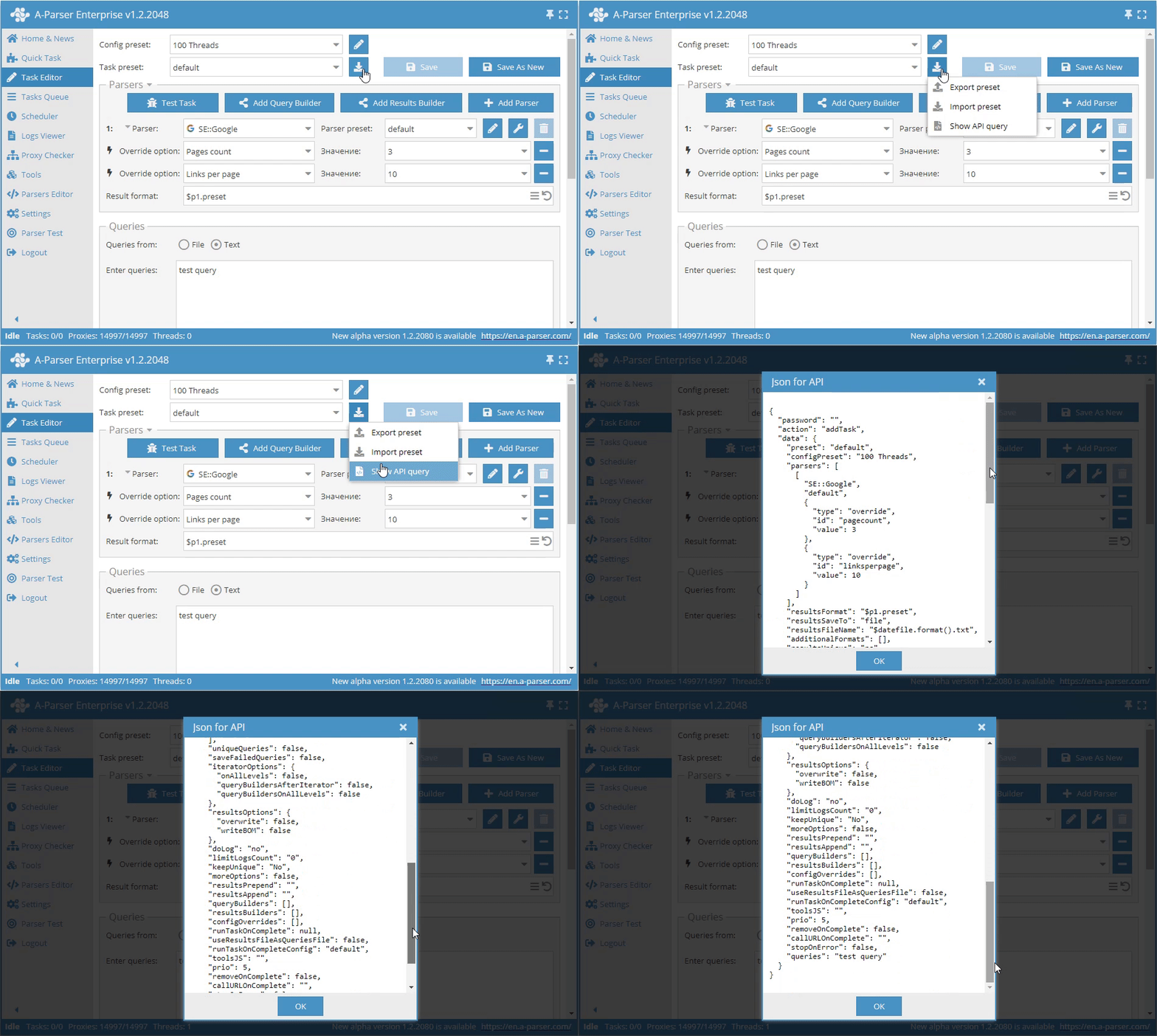
Getting API request in the interface
To get a full API request in the Task Editor, there is a Get API request function. With its help, you can get the full JSON for use in the addTask method.
Redis API
Redis API is an alternative way to integrate A-Parser via a Redis server, providing greater flexibility and performance in some scenarios.