SE::Yandex::WordStat::ByRegion -
Parser overview
Wordstat is a Yandex service designed to estimate user interest in various topics and select keywords for SEO optimization and contextual advertising. In addition, using Wordstat Yandex, you can evaluate the seasonality and geographical dependence of search queries.
The Yandex WordStat by region parser supports automatic query multiplication, so you can be sure that you will get the maximum number of results from the search results. Also, A-Parser can automatically follow related queries to a specified depth.
A-Parser functionality allows you to save parsing settings for future use (presets), set a parsing schedule, and much more. You can use automatic query multiplication, substitution of subqueries from files, iteration of alphanumeric combinations and lists to get the maximum possible number of results.
Saving results is possible in the form and structure you need, thanks to the built-in powerful template engine Template Toolkit which allows you to apply additional logic to the results and output data in various formats, including JSON, SQL, and CSV.
Accounts
To use the  SE::Yandex::WordStat::ByRegion parser, Yandex accounts are required. Accounts can be registered using the
  SE::Yandex::Register parser or simply by adding existing accounts to the
 files/SE-Yandex/accounts.txt file in the supported format.
Alternatively, you can enable "on-the-fly" account registration.
Collected data
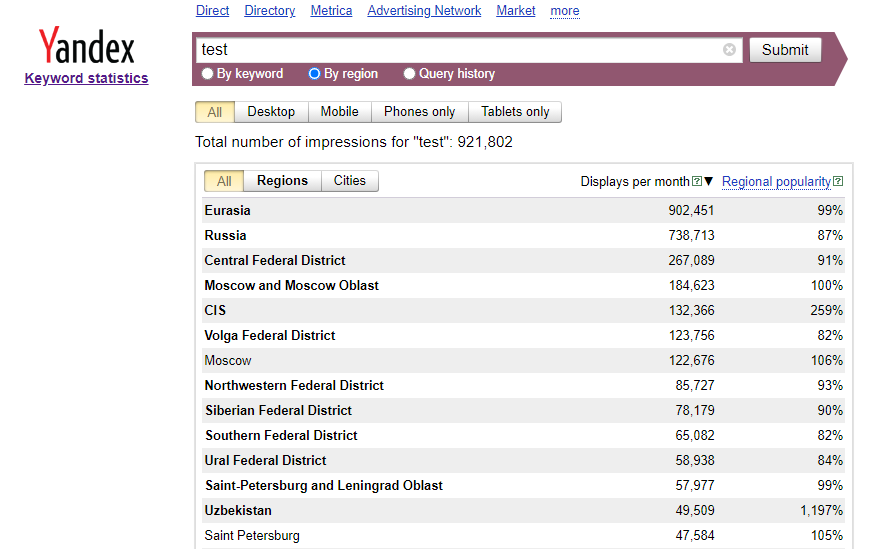
- Total number of impressions for the query
- Keyword statistics by regions and cities:
- Region/City
- Number of views per month
- Regional popularity in %
Capabilities
- Support for automatic Smart captcha bypass and the ability to bypass graphic captcha using the AntiCaptcha service or any other supporting their API
- Device type selection
- Ability to choose the authorization method
- Ability to register accounts "on the fly"
- Supports working with extended account format and can answer the secret question (if the answer is in
info). It also uses a saved proxy for authorization (if it is ininfo).
Use cases
- Estimating the amount of traffic per keyword by region
Queries
Keywords should be specified as queries, just as if they were entered directly into the Wordstat search form, for example:
test
Output results examples
A-Parser supports flexible result formatting thanks to the built-in template engine Template Toolkit, which allows it to output results in an arbitrary form, as well as in a structured one, such as CSV or JSON
Default output
Result format:
$query - Total views: $totalcount\nViews by regions:\n$regions.format('$region $count, $popularity%\n')\nViews by cities:\n$cities.format('$city $count, $popularity%\n')
The result displays the number of impressions for the query, keyword statistics by regions and cities, number of views per month, and regional popularity:
test - Total views: 872855
Views by regions:
Moscow and Moscow region 147107, 85%
Center 194716, 77%
North-West 55815, 70%
South 31759, 67%
Volga region 86006, 66%
...
Views by cities:
Chita 2937, 113%
Saint Petersburg 35713, 73%
Belgorod 2737, 58%
Ivanovo 1773, 55%
Kaluga 2196, 64%
Kostroma 1166, 49%
Output in CSV table
Result format:
[% FOREACH i IN regions;
    tools.CSVline(query, i.popularity, i.region, i.count);
END %]
Example result:
"test",88,"Moscow and Moscow region",1902795
"test",96,"Center",2992864
"test",95,"North-West",926138
"test",112,South,647140
"test",124,"Volga region",1927873
"test",64,"West",60975
"test",86,"East",427304
Saving in SQL format
Result format:
[% FOREACH i IN regions;
    "INSERT INTO regions VALUES('" _ query _ "', '";    i.popularity _ "', '"; i.count _ "', '";    i.region _ "')\n";
END %]
Example result:
INSERT INTO regions VALUES('test', '88', '1902795', 'Moscow and Moscow Region')
INSERT INTO regions VALUES('test', '96', '2992864', 'Center')
INSERT INTO regions VALUES('test', '95', '926138', 'Northwest')
INSERT INTO regions VALUES('test', '112', '647140', 'South')
INSERT INTO regions VALUES('test', '124', '1927873', 'Volga Region')
INSERT INTO regions VALUES('test', '64', '60975', 'West')
INSERT INTO regions VALUES('test', '86', '427304', 'East')
INSERT INTO regions VALUES('test', '80', '89569', 'South')
INSERT INTO regions VALUES('test', '75', '356560', 'Center')
INSERT INTO regions VALUES('test', '77', '34894', 'North')
Dump results to JSON
General output format:
[% IF notFirst;
  ",\n";
ELSE;
  notFirst = 1;
END;

obj = {};
obj.totalcount = p1.totalcount;
obj.regions = [];

FOREACH item IN p1.regions;
    obj.regions.push({
        popularity = item.popularity
        region = item.region
        count = item.count
    });
END;

obj.json %]
Initial text:
[
Final text:
]
Example result:
[
    {
        "regions": [
            {
                "count": "1902795",
                "popularity": 88,
                "region": "Moscow and Moscow region"
            },
            {
                "count": "2992864",
                "popularity": 96,
                "region": "Center"
            },
            {
                "count": "926138",
                "popularity": 95,
                "region": "North-West"
            },
            {
                "count": "647140",
                "popularity": 112,
                "region": "South"
            },
            {

                "count": "34894",
                "popularity": 77,
                "region": "North"
            },
        ],
        "totalcount": "10837937"
    }
]
See also: Results filters
Possible settings
| Parameter | Default value | Description |
|---|---|---|
| AntiGate preset | default | You must first configure the  Util::AntiGate parser - specify your access key and other parameters, then select the created preset here Util::AntiGate parser - specify your access key and other parameters, then select the created preset here |
| AntiGate preset for Login | default | AntiGate preset for login. You must first configure the Util::AntiGate parser with parameters, then select the created preset here |
| Type | All | Device type selection |
| Accounts | Only from "accounts.txt" | Choice of method for working with accounts: Always auto register - always automatically register accounts "on the fly", requires selecting a configured preset in the SE::Yandex::Register preset parameter. Auto register if no more in "accounts.txt" - existing accounts from accounts.txt are used first, and if they run out, automatic registration "on the fly" is used, for which you need to select a configured preset in the SE::Yandex::Register preset parameter. Only from "accounts.txt" - use only existing accounts from accounts.txt, and if they run out, wait for the specified time (Wait new accounts in "accounts.txt" parameter) for new ones to appear |
| Wait new accounts in "accounts.txt" | 0 | Waiting time for new accounts to appear in accounts.txt |
| Remove bad accounts | Always, except wrong login/password | Automatic removal of "bad" accounts: Always - always remove. Always, except wrong login/password - always remove, except when Yandex reported that an incorrect login/password was specified. The fact is that Yandex can give such a message when an IP is banned for a perfectly working account, so optionally you can leave such accounts for reuse. Never - never remove. Regardless of the selected option, accounts are not removed in case of proxy/browser errors |
| SE::Yandex::Register preset | default | Selection of a settings preset for SE::Yandex::Register |
| Authorization method | HTTP | Authorization method: HTTP - fast, not resource-intensive. Chrome - slow, resource-intensive, theoretically can extend account life |
| Chrome headless | ☑ | If the option is enabled, the browser will not be displayed |
| Use sessions | ☑ | Use sessions |
| Do not reset session if authorization passed | ☑ | Do not reset session on errors if the parser has already authorized |
| Use Wordstat 2 | ☐ | Use Wordstat 2 |
| Wordstat 2 parse all table data | ☑ | Allows you to immediately download all 2000 results for a query without going through pagination |