SE::Yandex - Yandex Search Results Scraper
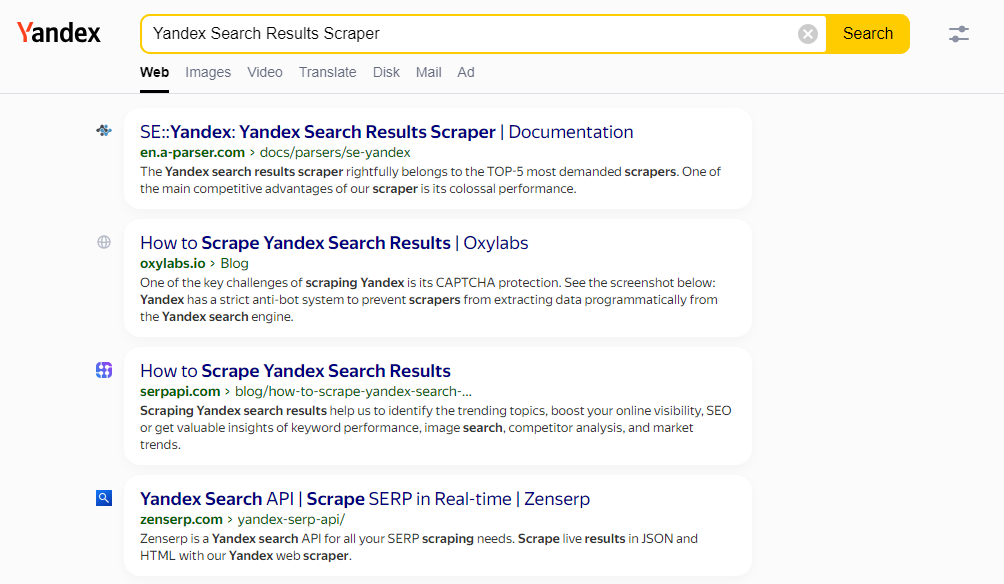
Overview of the scraper
The Yandex search results scraper is rightly included in the TOP-5 most popular scrapers. One of the main competitive advantages of our scraper is its enormous performance. Thanks to A-Parser's multi-threaded operation, query processing speed can reach 3000-7000 queries per minute, which on average allows for up to 5000000 links per minute, while resource consumption is minimal; any office or home computer, as well as any entry-level VDS, is suitable for operation. Our scraper supports all Yandex search operators, which significantly expands scraping capabilities. Stability and uninterrupted scraping of results are ensured by captcha recognition through AntiCaptcha or any other supporting their API (Anti-Captcha, RuCaptcha, CapMonster.cloud, 2captcha and others).
Flexibility in settings allows specifying the search result type (mobile/desktop), region, language, sorting results by date, and much more. A-Parser's functionality allows saving scraping settings for future use (presets), setting a scraping schedule, and much more. You can use automatic query multiplication, substitution of sub-queries from files, iteration of alphanumeric combinations and lists to obtain the maximum possible number of results.
Results can be saved in the form and structure you need, thanks to the powerful built-in templating engine Template Toolkit which allows applying additional logic to the results and outputting data in various formats, including JSON JSON, SQL and CSV.
Use Cases for the Scraper
🔗 Yandex results and position number
Get Yandex results and the result's position number. The result is saved to a csv file.
🔗 Scraping Yandex lite search results
This article provides an example of creating a scraper to collect information from the lite version of the Yandex search engine.
🔗 Scraping ads from Yandex
The preset parses the ad block in Yandex search results and saves the result in json format.
🔗 Assessing competition in Yandex
The preset determines competition in the Yandex search engine based on keywords.
🔗 Yandex cache scraper
The preset implements the ability to get links to the Yandex search engine cache.
🔗 Scraping only snippets from Yandex
This preset takes a word or phrase for searching in Yandex as a parameter.
Collected Data
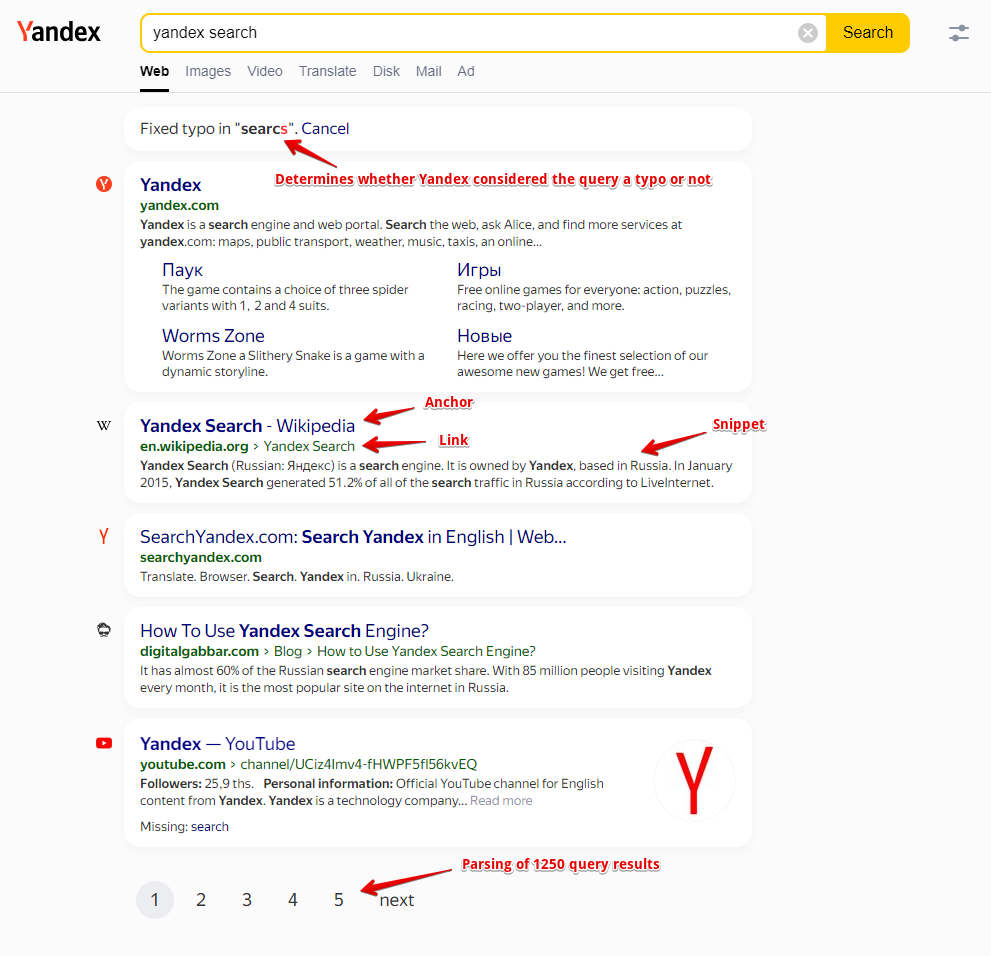
- Number of results per query
- Links, anchors, and snippets from the results
- Information is also collected on the flags of each result; currently, the following flags are supported: Date, Image Preview, Video, Rich snippet, Featured snippet
- Time of first and last caching (for desktop results only)
- List of Related keywords
- Determines whether Yandex considered the query a misspelling or not
- Scraping the link to the page cache (for desktop results only)
- List of website icon names, as well as their types, if any are present (including Turbo)
- Top, middle, and bottom ad blocks from all pages
- Link, visible link, anchor, snippet, and domain
- Additional links and anchors
- Metro station
- Omitted words (words that may appear under each result in the search results with the note "Not found")
- List of Quick answers: questions, answers, links to sources (enabled by the separate option Parse Quick answers)
- AI answer (Search with Alice), its type, and list of sources
Capabilities
- Selection of search results type: mobile/desktop
- Support for all search operators Yandex (site:, lang: etc.)
- Scrapes the maximum number of results returned by Yandex - 25 pages with 50 elements per result set
- Ability to search for related keywords
- Supports selection of search region, domain
- Ability to sort search results by date
- Scrapes the page indexation time, with the ability to filter results by this parameter
- Option for browser emulation (allows for high scraping speed and low captcha consumption)
- Ability to bypass captcha using AntiCaptcha service or any other supporting their API (it is recommended to enable the is_russian parameter in antigate settings)
- Ability to set the number of quick answers (Quick answers) that the scraper should collect by clicking deeper into each question

The following scrapers operate based on the Yandex scraper:
 SE::Yandex::Position - website position checker by keywords in Yandex
Use Cases
- Collecting link databases - for A-Poster, XRumer, AllSubmitter, etc.
- Assessing competition for keywords
- Searching for backlinks (mentions) of websites
- Checking website indexing
- Searching for vulnerable websites
- Any other scenarios involving Yandex scraping in one form or another
Queries
The queries should be search phrases, exactly as if they were entered directly into the Yandex search form, for example:
windows Moscow
lang:en windows Moscow
url:a-parser.com
site:a-parser.com
"a-parser.com"
Query Substitutions
You can use built-in macros to multiply queries. For example, if we want to get a very large database of forums, we can specify a few main queries in different languages:
forum
forum
foro
论坛
In the query format, we specify iterating through characters from a to zzzz, this method allows for maximum rotation of search results and obtaining many new unique results:
$query {az:a:zzzz}
This macro will create 475254 additional queries for each initial search query, which in total gives 4 x 475254 = 1901016 search queries, an impressive number, but this is not a problem for A-Parser. With a speed of 2000 queries per minute, such a task will be processed in only 16 hours.
Using Operators
You can use search operators in the query format, so it will be automatically added to each query from your list:
site:$query
Accounts
The  SE::Yandex scraper may require Yandex accounts. Accounts can be registered using the
  SE::Yandex::Register scraper or simply add existing accounts to the file
 files/SE-Yandex/accounts.txt in the supported format.
Alternatively, you can enable account registration "on the fly".
For session authorization to work, the data string must be in the following format:
[email protected];MAQT78Z31Rinx4H;{"answer":"qmfhsxdcrk","proxy":"185.104.120.45:3128","session_id":"3:1748440908.5.0.1748440867459:ZXBxpg:47e4.1.2:1|2191075974.41.2.2:41.3:1748440908|3:10308131.797655.5pfkoRZWgLJGntKTlcUhYdysNfk"}
Result output options
A-Parser supports flexible result formatting thanks to the built-in templating engine Template Toolkit, which allows it to output results in arbitrary form, as well as in structured formats, such as CSV or JSON
Exporting a list of links
Result Format:
$serp.format('$link\n')
Example result:
https://TestoMetrika.com/tests/
https://onlinetestpad.com/ru/tests
https://www.speedtest.net/
https://ustaliy.ru/testi/
https://yandex.ru/internet/
https://konstruktortestov.ru/popular
https://TestEdu.ru/test/
https://kto-chto-gde.ru/category/tests/
https://weekend.rambler.ru/tests/
https://GadalkinDom.ru/test
...
Links + anchors + snippets with position output
Result Format:
[% FOREACH item IN serp; loop.count _ ' - ' _ item.link _ ' - ' _ item.anchor _ ' - ' _ item.snippet _ "\n"; END %]
Example result:
1 - http://forum.r-rp.ru/ - <b>forum</b>.r-rp.ru -
2 - https://forum.arizona-rp.com/ - <div class=a11y-hidden>Web result with additional links</div><b>Forum</b> – Arizona Role Play - Menu. Home. <b>Forums</b>. New posts. What's new? New posts. Users. Current visitors. <b>Forums</b>. Login. ... Forum<b>statistics</b>. Threads. 1,247,176. Messages. 5,225,340. Users. 623,675.
3 - https://ru.wikipedia.org/wiki/%D0%A4%D0%BE%D1%80%D1%83%D0%BC - <b>Forum</b> — Wikipedia - <b>Fórum</b> (Lat. <b>forum</b> — arch. forecourt of the tomb; area in a wine press for grapes to be processed; market square, city market; fairground, central square):
4 - https://zen.yandex.ru/media/propromotion/chto-takoe-forum-i-vse-chto-s-nim-sviazano-5d65164c1d656a00ad52ba30 - What is a <b>forum</b> and everything related to it | Creative... - Today we will talk about what a <b>forum</b> is and everything related to it in accessible and simple terms. Each of us strives to find a person with whom we can build communication based on shared interests, share experiences, and give advice. In the modern world, all this has become possible without leaving home. A web-<b>forum</b> is precisely one form of such virtual contact.
5 - https://forum.vimeworld.ru/ - VimeWorld - <b>Forum</b> - <b>Forum</b> of the ideal Minecraft game servers project - VimeWorld...
...
Outputting links, anchors, and snippets to a CSV table
The built-in utility $tools.CSVLine allows you to create correct tabular documents ready for import into Excel or Google Sheets.
General Result Format:
[% FOREACH i IN p1.serp; tools.CSVline(i.link, i.anchor, i.snippet); END %]
File Name:
$datefile.format().csv
Initial Text:
Link,Anchor,Snippet
In the General Result Format the Template Toolkit templating engine is used to output the $serp array in a loopFOREACH.
In the result file name, you just need to change the file extension to csv.
For the "Initial Text" option to be available in the Task Editor, you need to activate "More options". In "Initial Text", write the column names separated by commas and leave the second line empty.
Outputting ad blocks
Result Format:
$ads.format('$link - $anchor - $snippet\n')
Example result:
http://yabs.yandex.ru/count/WcOejI_zO3C2vH80P1zY-_ryBtnaD0K0CmCnZYWCO000000u109mhiMfd8qUW07CkUOvY07Kyz3GCP01vCcQhIwO0PgqhFigk06qZQ3m6C01NDW1gkAR5E01kAZK4-W1y06W0kYCvAl-Wue5-0Bmwl7WeSQurUK1c0FRc3lkh0Ju1Bpr48W5lFKGa0MxjssW1Qxa1QW5hkG5i0Mkv0Mu1OYr9S05eTt90SW5aFn4YkWqZwuhO8VP1W00012H0000gGVlTvJIyeiV0R07W82O3BW7W0Nn1tjIyvgFUtz-X8A0WSIqXdB92j4AXC7wM-4_u3nZJEzt003CKjw5aRa50DaBw0kyzRAxthu1gGn-j62AsN3cl-WCemBW3OE0W4293eDHIPs09kwAqTFvwFMAi8VO3WAX3zaFW13WszlG4DcTXo9ZI0HkD3-n4YxXl0bOc-q2u1E8jIMW58Yr9QWKkxTjl9wVx0Ne58m2q1Mydf_i1TWLmOhsxAEFlFnZyA0Mq92TW0R95l0_q1Qokzw-0O4N0F0_c1UwdvGKg1S9m1Uq0jWNm8GzcHYW60wm68UTi806q1WX-1Yf-9keZlxncYM06R3qkEBGlP6v890P0Q0PmWEm6RWP____0T8P4dbXOdDVSsLoTcLoBt8qEJSjCkWPWC83y1c0mWE16l__WxZFMxv27W2GPM2khLr2HGBSgKCU4fSjR_apLy29ToVZBSaX0K10aLK2xDc6HsxyWlx3mqOzRTCnV7G7IDvEXnY4YqauFXdHmHcIWrcJNGT1NfMC_8eB8q1m1-WEYbKFtWBTZHwcD4A80G00~1?from=yandex.ru%3Bsearch%26%23x2F%3B%3Bweb%3B%3B0%3B&q=%D0%BA%D1%83%D0%BF%D0%B8%D1%82%D1%8C+%D0%B0%D0%B2%D0%B8%D0%B0%D0%B1%D0%B8%D0%BB%D0%B5%D1%82%D1%8B&etext=2202.wBaB7RlytlP_PRaU6jPhHD2nHBNT_4gSF6009OyJEfpWjUPoA5WrSJAqCfap0m9ReXhoaGRlaWhmYmllemF2ZA.f04b1271668949ea17ffcafcb11c72c2ab6454c5 - <b>Buy</b> <b>air ticket</b> to / aviasales.ru - We offer: <b>Buy</b> <b>air ticket</b> to here. Super offer! Hurry!
http://yabs.yandex.ru/count/WgGejI_zO5e2rHG092HY-_ryhkYFF0K0MWCnZYWCO000000u109mhDZpa8WGW07ZZm680U2f-wrQa07AywxRoe20W0AO0ShphjjAk06oWAxe8C01NDW1e8MobW7W0TJCXm_e0O01c0BImFq2e0BuQjW20l02g_w3YWNu0l3gyU2XnhZLvG600vF6eiSFY0FStR-O39W3cyKxYga3-0JJpWI81TFE1905Z-zGe0MPj06e1PMM0R05bPO1k0NInnJ01TF1ZG781PNz8uheD8-kAs27sGO0000GaG000Aa7xtUKqlAB7m6m1u20c0ou1u05yGTxKlEQZtj_VeI2l3M02W712l_aZtPQIU8_oGeJ5NRdMhxJFweB4E0yOqplTm00p5BUXP6v1G3P2-WBqyu4y0i6Y0ookzw-0QaCu_jL-Yu3zB_e3AC2u0s3W810YGwgO5HI9w3dYj7J-UZrYh27s0u2-0x7dPAe2Q4FFGhNet0zzZ_P3_0_W13GmC4Rm92GPpgqxC9xJZC_iHAuM7p6uhZj0k0JqiSKe1JInnIe58_lKB0KYw381hWKmAo0jQI04TWK-FpP_WNe58m2q1Nu_Dd-1TWLmOhsxAEFlFnZyA0Mq92TW0R95j0MihlUlW615vWNfwZz3wWN2S0Nj0BO5y24FPaOe1WAi1Z9fB201j0O8VWOgVYRg8x-yPebW1cmzBZYqBsHkI2G6G6W6S83i1cu6V___m7I6H9vOM9pNtDbSdPbSYzoD3atBJBe6O320_0PWC83WHh__oD2TTsApne0jsLWrgrT_2INXiZt8r8kcvWxe0SCE37tPBmjEYG0203ecjreFlD0AY-khXXjgcFZa190IXd9BOrkl3guMzzraExES_xHXH4WwWDq1xIoUlHJ6Y74~1?from=yandex.ru%3Bsearch%26%23x2F%3B%3Bweb%3B%3B0%3B&q=%D0%BA%D1%83%D0%BF%D0%B8%D1%82%D1%8C+%D0%B0%D0%B2%D0%B8%D0%B0%D0%B1%D0%B8%D0%BB%D0%B5%D1%82%D1%8B&etext=2202.wBaB7RlytlP_PRaU6jPhHD2nHBNT_4gSF6009OyJEfpWjUPoA5WrSJAqCfap0m9ReXhoaGRlaWhmYmllemF2ZA.f04b1271668949ea17ffcafcb11c72c2ab6454c5 - <b>Buy</b> <b>air ticket</b> online on Tutu.ru! Official website! - Plane tickets at a low price! Profitable flights worldwide! <b>Buy</b> ticket online!
http://yabs.yandex.ru/count/WcOejI_zO3C2vH80P1zY-_ryBtnaD0K0CmCnZYWCO000000u109mhiMfd8qUW07CkUOvY07Kyz3GCP01vCcQhIwO0PgqhFigk06qZQ3m6C01NDW1gkAR5E01kAZK4-W1y06W0kYCvAl-Wue5-0Bmwl7WeSQurUK1c0FRc3lkh0Ju1Bpr48W5lFKGa0MxjssW1Qxa1QW5hkG5i0Mkv0Mu1OYr9S05eTt90SW5aFn4YkWqZwuhO8VP1W00012H0000gGVlTvJIyeiV0R07W82O3BW7W0Nn1tjIyvgFUtz-X8A0WSIqXdB92j4AXC7wM-4_u3nZJEzt003CKjw5aRa50DaBw0kyzRAxthu1gGn-j62AsN3cl-WCemBW3OE0W4293eDHIPs09kwAqTFvwFMAi8VO3WAX3zaFW13WszlG4DcTXo9ZI0HkD3-n4YxXl0bOc-q2u1E8jIMW58Yr9QWKkxTjl9wVx0Ne58m2q1Mydf_i1TWLmOhsxAEFlFnZyA0Mq92TW0R95l0_q1Qokzw-0O4N0F0_c1UwdvGKg1S9m1Uq0jWNm8GzcHYW60wm68UTi806q1WX-1Yf-9keZlxncYM06R3qkEBGlP6v890P0Q0PmWEm6RWP____0T8P4dbXOdDVSsLoTcLoBt8qEJSjCkWPWC83y1c0mWE16l__WxZFMxv27W2GPM2khLr2HGBSgKCU4fSjR_apLy29ToVZBSaX0K10aLK2xDc6HsxyWlx3mqOzRTCnV7G7IDvEXnY4YqauFXdHmHcIWrcJNGT1NfMC_8eB8q1m1-WEYbKFtWBTZHwcD4A80G00~1?from=yandex.ru%3Bsearch%26%23x2F%3B%3Bweb%3B%3B0%3B&q=%D0%BA%D1%83%D0%BF%D0%B8%D1%82%D1%8C+%D0%B0%D0%B2%D0%B8%D0%B0%D0%B1%D0%B8%D0%BB%D0%B5%D1%82%D1%8B&etext=2202.wBaB7RlytlP_PRaU6jPhHD2nHBNT_4gSF6009OyJEfpWjUPoA5WrSJAqCfap0m9ReXhoaGRlaWhmYmllemF2ZA.f04b1271668949ea17ffcafcb11c72c2ab6454c5 - <b>Buy</b> <b>air ticket</b> to / aviasales.ru - We offer: <b>Buy</b> <b>air ticket</b> to here. Super offer! Hurry!
...
Saving related keywords
Result Format:
$related.format('$key\n')
Example result:
<b>test</b> tanki online
tanki online
all <b>tests</b> dot ru
i exam ru testing
<b>internet speed </b> test
<b>tests</b>24.ru
| Parameter Name | Default Value | Description |
online pc performance <b>test</b> pc performance
online testing
my <b>test</b> student how to find answers
| **Experimental img captcha max count** | ```5```       | Maximum number of repeated captcha images per attempt |
To automatically remove HTML tags in the result, you need to use the Results Builder, select the $related array and apply Remove HTML tags.
Keyword competition
Result Format:
| **Preffered captcha type** | ```Click``` | Selection of preferred captcha type: Click or Puzzle |
Example result:
all tests dot ru - 25000000
online testing - 13000000
| **Pages count**                        | ```5```       | Number of pages to scrape (from 1 to 25) |
i exam ru testing - 27000000
| **Serp time**                          |```All time``` | Search period |
online pc performance test - 16000000
| **Region of serp (lr=)**             | ```Moscow``` | Selection of search region (parameter lr=) |
internet speed test - 16000000
| **Search sites from (rstr=)**         | ```Not set``` | Selection of regional affiliation of websites (parameter rstr=) |
my test student how to find answers - 16000000
Identifying misspellings in keywords
Result Format:
| **Parse not found** | ```☑``` | Determines whether to scrape the results if zero results are found for the queried phrase and results for another query are suggested |
Example result:
online testing - 0
internet speed test - 0
onliin tastirovaniye - 1
test skarosti intrneta - 1
Checking link indexing
Query Format:
|**Accounts**|```Only from "accounts.txt"```|Selection of account usage method: ```Always auto register``` - always automatically register accounts 'on the fly', requires selecting a configured preset in the parameter SE::Yandex::Register preset. ```Auto register if no more in "accounts.txt"``` - first use existing accounts from _accounts.txt_, and if they run out, automatic 'on the fly' registration is used, for which a configured preset needs to be selected in the parameter SE::Yandex::Register preset. ```Only from "accounts.txt"``` - use only existing accounts from _accounts.txt_, and if they run out, wait for the specified time (parameter Wait new accounts in "accounts.txt") for new ones to appear. ```Only by session_id from "accounts.txt"``` - authorization by cookies.|
Result Format:
|**Remove bad accounts**|```Always, except wrong login/password```|Automatic deletion of "bad" accounts: ```Always``` - always delete. ```Always, except wrong login/password``` - always delete, except when Yandex reports incorrect login/password. The reason is that Yandex may give such a message when the IP is banned for a perfectly working account, so optionally, such accounts can be kept for reuse. ```Never``` - never delete. Regardless of the selected option, accounts are not deleted in case of proxy/browser errors|
Example result:
|**Use sessions**|```☑```|Use sessions|
|**Wait new accounts in "accounts.txt"**|```0```|Waiting time for new accounts to appear in _accounts.txt_|
| **Force neuro**                       | ```☐```      | Forced enablement of the neural response, similar to manually switching between "Search" and "Search with Alice" |
https://a-parser.com/resources - 1000
https://a-parser.com/forum - 499
To check link indexing, substitute the corresponding operator into the Query Format: site:.
The result format is displayed as "original URL - number of pages in the index".
As a result, we get the page address and its quantity in the search engine index.
If the page is missing, the result will be: 0.
Saving in SQL format
Result Format:
[% FOREACH serp; "INSERT INTO serp VALUES('" _ query _ "', '"; link _ "', '"; anchor _ "')\n"; END %]
Example result:
INSERT INTO serp VALUES('test', 'https://konstruktortestov.ru/popular', 'Popular online <b>tests</b>')
INSERT INTO serp VALUES('test', 'https://TestoMetrika.com/tests/', 'Online <b>tests</b> c with accurate results from psychological...')
INSERT INTO serp VALUES('test', 'https://ustaliy.ru/testi/', '<b>Tests</b> online: best, interesting, and popular')
INSERT INTO serp VALUES('test', 'https://www.SunHome.ru/tests/Interesting_tests', 'Interesting <b>tests</b>. Take interesting psychological...')
INSERT INTO serp VALUES('test', 'https://onlinetestpad.com/ru/tests', '<b>Tests</b> online | Online Test Pad')
...
Dump results in JSON
Общий формат результата:
[% IF notFirst;
  ",\n";
ELSE;
  notFirst = 1;
END;

obj = {};
obj.totalcount = p1.totalcount;
obj.links = [];

FOREACH item IN p1.serp;
    obj.links.push(item.link);
END;

obj.json %]
Начальный текст:
[
Конечный текст:
]
Example result:
[{"totalcount":113000000,"links":["https://TestoMetrika.com/tests/","https://konstruktortestov.ru/popular","https://ustaliy.ru/testi/","https://www.SunHome.ru/tests/Interesting_tests","https://GadalkinDom.ru/test","https://zen.yandex.ru/tes","https://onlinetestpad.com/ru/tests","https://kto-chto-gde.ru/category/tests/","https://psytests.org/top.html","https://MixTests.com/new/","https://TestEdu.ru/test/","https://testserver.pro/index","https://onedio.ru/tests","https://BankTestov.ru/","https://weekend.rambler.ru/tests/","https://edieta.org/testi","https://trikky.ru/?%21","https://BBF.ru/tests/","https://dropi.ru/c/tests/raznie","https://cadelta.ru/tests","https://www.Elle.ru/tests/","https://www.adme.ru/svoboda-psihologiya/polnyj-spisok-psihologicheskih-testov-dlya-poznaniya-sebya-kotorye-mozhno-projti-onlajn-2071715/","https://www.ellegirl.ru/tests/","https://test.tankionline.com/","https://vraki.net/onlajn-testy/","https://Lifehacker.ru/psixologicheskie-testy/","https://iq2u.ru/tests","https://www.b17.ru/tests/","https://ru.wikipedia.org/wiki/%D0%A2%D0%B5%D1%81%D1%82","https://gurutest.ru/test/","https://www.psychologies.ru/tests/","https://peopletalk.ru/category/tests/","https://obrazovaka.ru/testy","https://likeyou.io/category/test/","https://ProfTest.me/tests","https://TayniyMir.com/testy","https://psi-technology.net/psytest/","https://www.kp.ru/putevoditel/online-test/","https://tvoytest.ru/","https://twizz.ru/tests/","https://lunanews.net/testy/","https://www.ivi.ru/titr/tests","https://sntch.com/tests/","https://testy.online/","https://videouroki.net/tests/","https://www.speedtest.net/ru","https://rb.ru/tests/","https://aznaetelivy.ru/tests/","https://woman-psy.com/psihologicheskie-testy/testy_na_eruditsiyu_i_znaniya/interesnye_testy/","https://mamochka-club.com/psihologicheskie-testy/interesnye-testy/"]}]
For the "Initial Text" and "Final Text" options to be available in the Task Editor, you need to activate "More options".
Result processing
A-Parser allows processing results directly during scraping, in this section we have provided the most popular use cases for the Yandex scraper
Link deduplication
Add deduplication and select $serp.$i.link - Link.
Download Example
How to import the example into A-Parser
eJx9VE2P2jAQ/SurEYdWQqvQLpfcWFSqVnTZLuyhohy8ZIJcHNu1HQqK+O+dCUkc
ttVeoszze/NtVxCE3/tHhx6Dh3Rdga3/IYXlpzT9IXSGx5u51Ht/86zl7xJhCFY4
j47p6x6LDjLMRakCDCsIJ4vkxBzQOZmxSmZkW2eOJ4fBSfSEHYQqmTZKkgTOb8jE
Drem1CFqRm/QFedr0bEsKsZJT1K2xVC5nHK6BqrJEsBi2AwbxupC95Sx3kGLflbm
RShIgyvxvNm0XvzMuEJw8wZ2dNt0sjtcigOuDB3mUsXIfkbWgyg4yiATAfn0Nq8d
vXt/G47sQWSZDNJooS4RuPcxajOYFLQhLv1yd2fOFAQFrB0weGqzW8OgtmOV3y8a
SHOhPA7BU6ozQYlkr09kQCeCcQvL+RBegdETpeZ4QBVptf/7UqqMFmWSk+hLI/w/
ZfGPj3NXXj8UDfqPoxw6L7V1v/gWVZmZmx1Vnr3UwyxkINtP6+1JISFwj2i7nj1w
zwrjsAvTeG6i092wqHmr4sgmNkJXZVyN5RrcGp3L3aLZ1JZZ6hVdwIWemsIq5Lp0
qRSNxeNTXI+Jb8bARkzwtXhah+DS23sIwRjlvy4vqVonaf3GnGBBnexHbVxuhVLP
T/P+CcSVIuNnmdzdfeDvx3H9P7ogwNqAO0NbRZWdN90r0b0tVf+tSKszjeqXf7yQ
uC6mEEYN8jQHvuB/AYBymo0=
See also: Results Deduplication
Deduplicating links by domain
Add deduplication and select $serp.$i.link - Link. Select deduplication type: Domain.
Download Example
How to import the example into A-Parser
eJx9VE2P2jAQ/SvI4tBKCIV2ueTG0lK1ost2YQ8V5WDIBLk4tms7FBTx33fGCXHY
VnuxPG/mzbddMc/dwT1acOAdS9cVM+HOUrb8nKY/ucrg1JsLdXC9ZyX+lNDbnnuf
dMGFYgNmuHVgibju2KMig5yX0rNBxfzZALrTR7BWZIBKkaFsrD6dLXgrwCF25LIk
s1GSJOzyBo3vYadL5SNn9Ia5pMwNWKJFxjjpUMpQFiqxcEo5XTOsySBAZLYZNBar
2jy71l6jX6TecslSb0u4bDZXL26mbcGpjX0zGjY9bZVLfoSVRmUuZIzsZig98IKi
9DPugbTDPDh6937oT+SBZ5nwQisu6wjU+xi1HhHylUZbvFJ3Z1YXCHkIDgg8X7Nb
s36QY5U/ag5Lcy4dDJjDVGccE8lea4QHy722C0P5IF4xrSZSzuEIMpoF//elkBku
yiRH0teG+H+TxT8+Lm153VA46L8Wc2i9BOl+8T2yMj3XexrZNgyzEB5lNw3bk7IE
wQOAaXv2QD0rtIU2TOO5iY6vxICirYojm5gI3ZRxM5ZbcKdVLvaLZlOvlqVa4VNc
qKkujASqS5VS4lgcPMX1mLhmDCTEBF+TpyEElX59h8xrLd23ZZ2qsQLXb0wJFtjJ
btTG5Y5L+fw072pYXCkUfpXJ3d0HOj+Ow31UI4y4HvYatworu2zaX6L9ZaruX5FW
FxzVb/dYG1FdZIIYNsjhHOiBvwAa7J3h
See also: Results Deduplication
Extracting domains
Add Results Builder and select source from the drop-down list: $p1.serp.$i.link - Link. Select type: Extract Domain.
Download Example
How to import the example into A-Parser
eJx9VEtv2zAM/isFkcMGBIGzNRff0qwBNmRN17SHIetBi+lAiyxpkpwlMPzfR8qO
7XZDL4b5+Eh+fKiCIPzB3zv0GDyk2wps/IcUNrdp+l3oDE9Xt6fgxC5cfTKFkNrD
GKxwHh0jtgNHMmSYi1IFGFcQzhYpjjmiczJDMsqMZOvM6ewwOIkc6ShUyW7TJEmg
fgMm9rgzpQ49ZvqGu5L64C06hvWIWVI/P4+BKFKNfmlcIZjqyE4nLe/OuBFHfDRk
zKXCXr0k6U4UnHKUiYBsneQx0Lv3k3DiCCLLZJBGC9Vk4Db1WZ+0/B0Za0O+9MuN
WDpTkCpgDMDK86W6LYyiDBSijNhvDQbSXCiPY/BU6lJQIdlriwzoRDBubbke0ldg
9FypFR5R9W4x/k0pVUYznecE+twC/++y/idG3dEbpqKZ/HFUQxclSjfrrz0qMyuz
J+bZT+KtZCEDyX4RB51CQsoDou16dsc9K4zDLk0buc1Om2xR8wL0I5vbXvWCxoux
DJQVeFO6HeXbJuMt0KLbWJw+AG9Pu3HYHEVzEzx158SZ9K17MO0WQk2YndG53K/b
Jb1kLvUjnd9aL0xhFXKfdKkUjdnjQ79uc9+OlYWe8GvwIqbgVl5OkGowyn/ZNNSt
k1TSjAkXNJlh1jbkTij19LAaWqBfURJ+lMn19Qf+fpzF/2mjAcYG3BvaUmLGhNsH
ontZquEzkVY1jf6Xv2+cmBe7kI4a5GmufNt/AaiMmIc=
See also: Results Builder
Removing tags from anchors and snippets
Add Results Builder and select source from the drop-down list: $p1.serp.$i.anchor - Anchor. Select type: Remove HTML tags.
Add Results Builder again and select source from the drop-down list: $p1.serp.$i.snippet - Snippet. Select type: Remove HTML tags.
Download Example
How to import the example into A-Parser
eJyVVN9v2jAQ/lcii4dNQihs5SVvFA11Ey0dtA8T64NHLszDsT3bYaCI/313jknS
rqq0lyi+u++7X59dM8/d3t1bcOAdyzY1M+GfZWz9Kcu+cZXDMVlBqQ+Q3DzcLhLP
dy4prC6Tqdr+1NYlGJOslTCGKIbMcOvAEtmmx4GOHApeSc+GNfMnA5gCSa0VOaBT
5Hg2Vh9PFrwVQEwHLisKG6dpys5vwPgOtrpSvsOM3wiXQu2dAUuwDjFJz09PQ4bd
Y41urm3JaQoDMx7FkbTONT/Ag0ZnISR05jme7nhJKQc590DeURGI3r0f+SMx8DwX
XmjFZZOBxtRlfVTid+hYaYzFXxrEHGeNJg+BgIynS3UbNghnhhRVwH5tMCwruHQw
ZA5LnXMsJH/pER4s99ouDdWD9pppNZVyAQeQXVjgv66EzHGn0wJBnyPw9ZDlPxzn
tr1+KtzJH4s1tCzhdL287VC5Xugddp7/wL6lKIXHs5uFRWcsReMewLQzu6OZldpC
myYyx+wocgOKBNCtbGo607M2nq2lZ6yZ05XdYr5NOtwwFLqhrYabwEg/UXM23Jgb
X0pyW8tPaIzRnqQTISTT1xhdc5/+i/KCOSNmq1Uhdsuo/Es7lXrA675UM10aCTR8
VUmJ2nGw6jQ8dVErdOim+BI8CyloP5d7jWVo6b6sm3kaK7CqyTAW3s8aKbdcysfV
ou9hne7x8L1Kr64+0PfjJPyPGwsjrIedRuljZ9RwfHXal6zuvz1ZfUY9/XL3TRD1
RSFowwE5FAs9GH8BhLW+Jg==
You can add the Results Builder as many times as you need.
See also: Results Builder
Filtering links by inclusion
Add filter and select from the drop-down list: $serp.$i.link - Link. Select type: Contains string. Next, in String you need to specify the filtering criteria, for example, if you want only links that contain .com, to be saved in the result, then write that into "String".
Download Example
How to import the example into A-Parser
eJx9VE2P2jAQ/SvI4tBKCMFhL7mxqEit6LJd2EOFOHjxJHJxbNd2KCjKf++ME+Kw
rfaW+Xhv3nw4NQvcn/yzAw/Bs2xfMxu/Wca2X7LsJ9cCLqOVVAGc1MXo7TryIX5J
PVJSn9iEWe48OELvByAMCMh5pQKb1CxcLSCnOYNzUgAGpUDbOnO5OkBG8Og7c1VR
2nw2m7HmAxgv4GgqHRJm/kE66fQWHMES4mE2gOSxQwxi9yQ52zPsyaIjNnmYdBm7
Nv1odOBSDyRPj6ZE09ggjUbbg/asORxujH5lXMlprmM7n3ZD7oNbfoadaXVAcuPc
4YmXxD8WPABFp3kk+vR5Gi7EwIWQVJOrtgLtIVV91fJ31KcN5uInTXrlUGvGAkQC
cl5v6vZsHG3quIrYHy2GZTlXHibMo9QVRyHifUTifHgwbhNngP6aGb1Qag1nUCkt
8j9WUgk8mkWOoK8d8P8pm384mr69YSlc+h+HGnqWaD1uvieUMGtTYOfiLS62lAFt
v4yXlLEZOk8Atp/ZE82sNA76Mh1zVx2fjQVNF5ZWtrDJddfG3VrunXhNuSw23dXe
Miu9w7e50UtTWgXUl66UwrV4eEnnsfDdGshIAt+Dl7EEtX57kywYo/y3bSvVOonn
90ACS5zksGpHeeRKvb6shxGWTiqekyfaI95pYfCCsIvm0P8d+l9MPfxHZHWDa/nl
n9sk6oFS0IfD8PElzZu/Z6ed/A==
See also: Result Filters
Available Settings
| Parameter Name | Default Value | Description |
|---|---|---|
| AntiGate preset | default | Selection of preset  Util::AntiGate, more details on configuration here Util::AntiGate, more details on configuration here |
| AntiGate preset for old captcha | default | Similar to AntiGate preset, but used only for regular (older, single-image) captchas. If no preset is selected here, the preset selected in AntiGate preset will be used for such captchas. |
| Experimental img captcha max count | 5 | Maximum number of repeated captcha images per attempt |
| Preffered captcha type | Click | Selection of preferred captcha type: Click or Puzzle |
| Engine | HTTP (Fast, JavaScript Disabled) | Allows selecting the engine: HTTP (faster, but higher probability of captchas) or browser (slower, but lower probability of captchas) |
| Device | Modern desktop computer (Windows 10, Chrome 84) | Selection of search result type (Desktop computer / Mobile device) |
| Pages count | 5 | Number of pages to scrape (from 1 to 25) |
| Sort serp by date | ☐ | Sort results by date |
| Serp time | All time | Search period |
| Yandex domain | www.yandex.ru | Yandex domain for scraping; all domains are supported (.ru, .ua, .by, .kz, .com.tr, .com). Starting with version 1.1.345, this is automatically selected based on the chosen region. |
| Region of serp (lr=) | Moscow | Selection of search region (parameter lr=) |
| Custom region ID | Ability to specify a region ID not present in the selection field. This option takes precedence over the option Region of serp (lr=). The corresponding domain must be set in Yandex domain. | |
| Search sites from (rstr=) | Not set | Selection of regional affiliation of websites (parameter rstr=) |
| Language | Any | Search results language (Russian, English, Belorussian, French, German, Indonesian, Kazakh, Tatar, Turkish, Ukrainian) |
| Parse not found | ☑ | Determines whether to scrape the results if zero results are found for the queried phrase and results for another query are suggested |
| Not personalized | ☐ | Search personalization. Details here |
| Filter pages | Moderate filter | Filtering results from undesirable content (Family search / Moderate filter / Do not filter) |
| Use Accounts | ☐ | Working with existing accounts in the file files/SE-Yandex/accounts.txt. SE::Yandex::Register - Allows registering accounts in Yandex |
| Remove bad accounts | ☑ | Deleting invalid accounts |
| Quick answers count | 0 | Maximum number of quick answers (Questions and Answers) per query that the scraper should collect |
| Parse generative answer | ☐ | Whether to scrape the generative answer (this adds an additional sub-query and consequently slows down overall operation) |
| Accounts | Only from "accounts.txt" | Selection of account usage method: Always auto register - always automatically register accounts 'on the fly', requires selecting a configured preset in the parameter SE::Yandex::Register preset. Auto register if no more in "accounts.txt" - first use existing accounts from accounts.txt, and if they run out, automatic 'on the fly' registration is used, for which a configured preset needs to be selected in the parameter SE::Yandex::Register preset. Only from "accounts.txt" - use only existing accounts from accounts.txt, and if they run out, wait for the specified time (parameter Wait new accounts in "accounts.txt") for new ones to appear. Only by session_id from "accounts.txt" - authorization by cookies. |
| Remove bad accounts | Always, except wrong login/password | Automatic deletion of "bad" accounts: Always - always delete. Always, except wrong login/password - always delete, except when Yandex reports incorrect login/password. The reason is that Yandex may give such a message when the IP is banned for a perfectly working account, so optionally, such accounts can be kept for reuse. Never - never delete. Regardless of the selected option, accounts are not deleted in case of proxy/browser errors |
| Use sessions | ☑ | Use sessions |
| Wait new accounts in "accounts.txt" | 0 | Waiting time for new accounts to appear in accounts.txt |
| SE::Yandex::Register preset | default | Selection of settings preset for SE::Yandex::Register |
| Force neuro | ☐ | Forced enablement of the neural response, similar to manually switching between "Search" and "Search with Alice" |