SE::DuckDuckGo::Position - Website keyword position checker for DuckDuckGo
Overview
A parser for checking website positions by keywords in DuckDuckGo. Thanks to the SE::DuckDuckGo::Position parser, you can automatically check positions in DuckDuckGo search results using your own domain databases. Using the SE::DuckDuckGo::Position parser, you can easily, accurately, and quickly determine a website's position in DuckDuckGo.
A-Parser functionality allows you to save parsing settings for the SE::DuckDuckGo::Position parser for future use (presets), set parsing schedules, and much more. You can use automatic substitution of subqueries from files.
Saving results is possible in any form and structure you need, thanks to the built-in powerful Template Toolkit templating engine, which allows applying additional logic to results and outputting data in various formats, including JSON, SQL, and CSV.
Collected data
- Website position and the link to the website page
- A list of all website positions and page links
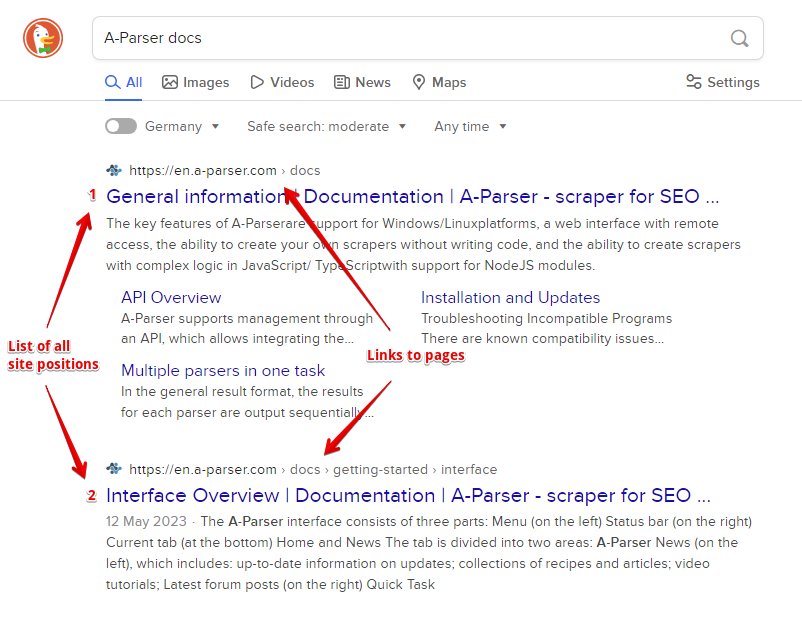
Capabilities
- All features of the
 SE::DuckDuckGo parser
 - Automatically stops parsing when the website is found
- Supports subdomain search
- Ability to compare the searched position by domain, by main domain, and by full link
- Collecting positions for multiple domains at once
Use cases
- Checking positions of your own websites and competitors' websites
- Searching for high-traffic website pages
Queries
As queries, you must specify the domain of the target website and the search query separated by a space, for example:
lenta.ru news
lenta.ru news online
ria.ru news
a-parser.com A-Parser
If you need to check one website against a list of queries, you can specify the domain in the Query format:
lenta.ru $query
Or just use a list of keywords. To use multiple domains in a query at once, specify the list of domains separated by commas and then the keyword after a space, for example:
lenta.ru,ria.ru,notfound.com news feed
Results will be recorded in the $bulkcheck array.
The Stop when found option is also supported; parsing will end if positions are found for all domains.
Query substitutions
You can use built-in macros for automatic substitution of subqueries from files; for example, if we want to check websites/a website against a keyword database, specify several main queries:
ria.ru
lenta.ru
rbc.ru
yandex.ru
In the query format, specify the macro for substituting additional words from the Keywords.txt file; this method allows checking a database of websites against a database of keys and obtaining positions as a result:
$query {subs:Keywords}
This macro will create as many additional queries as there are in the file for each original search query, which in total will give [number of original queries (domains)] x [number of queries in the Keywords file] = [total number of queries] as a result of the macro's operation.
Output results examples
A-Parser supports flexible result formatting thanks to the built-in Template Toolkit templating engine, which allows it to output results in any form, as well as structured formats like CSV or JSON
Exporting a list of positions
Obtaining the result in the form:
target domain - key: position number in search results
Result format:
$domain - $key: $position\n
Result example:
lenta.ru - news online: 13
lenta.ru - news: 26
ria.ru - news: 1
a-parser.com - A-Parser: 1
...
Simultaneous check of multiple domains (bulk check)
Information for all domains during simultaneous checking of multiple domains is contained in the $bulkcheck array.
Result format:
$bulkcheck.format('$domain - $position\n')
Query example:
lenta.ru,ria.ru,notfound.com news feed
Result example:
lenta.ru - 2
ria.ru - 6
notfound.com - 0
Links + anchors + snippets with position output
Outputting links, anchors, and snippets to a CSV table
Saving related keywords
Keyword competition
Checking link indexing
Saving in SQL format
Result dump to JSON
Results processing
A-Parser allows processing results directly during parsing; in this section, we have provided the most popular cases for the SE::DuckDuckGo::Position parser
Saving domains without zero positions
The example of simultaneous checking of multiple domains (see above in output results examples) was taken as a basis and a filter was added.
Add a filter and select the position output variable from the dropdown list. Select type: >. Next, enter 0 in Number. With such a filter, you can remove all results with a zero position.
Download example
How to import an example into A-Parser
eJx1VNtu2zAM/RVDCNAVyIJ2a4HBDwPSbhk2dE3Wy1OSB8WiWy2y6OmSXoL8+yhZ
ttNufYgi3g55SMpb5rhd25kBC86yfL5ldbyznF1/zfMvvliH3zfM8xla6STq7H12
zTeQCay41DZ7kO4evct49gwGszq5sSGrubFgAuz8TTRyE1Byrxwbbpl7qoFS4waM
kQLIKAXJ3kJt8PGJ5A1XnlxKrizs3o4o0VTcEZUI3EaxwcqrdXEPxXrUeLw7GDQ8
iNWgLX2x0AeHbA+9lMqBIZwEmM9ZBxR4tlyWw+R608R93kt9RHeso1vOLGjLdstl
i2gnsZpQYX08SiPojKHdN9jUAb16QtIlryIvwR0Ea0vrcOQeAwIXIpbGVZMhDKPP
eqvln1icRvKlq5FgJwYrUjmIAEH51FY3Z4MoB6I+xv5qYtJAhsxSqRNOhYjXFklt
4Q7NNPaA9FuGeqzUBWxA9W4R/8xLJWhzxiUFfU+B/3eZ/oOx6+jtp6L9eDBUQ4cS
pbPpzz5K4AXeEXOxIt5KVtKRbM/Ra5fmtwaou55dhp5VaKBLk5BTdnpUNeiwjP3I
xnWvekHjxVheKgvUpbybpgVvPb2+oZc71edY1QoCL+2VGoanctWvx9imMQShL/B1
8HlMEai3T5E5RGV/XDel1kbS+p2GAivq5H7WBFlwpW6vLvYtrF8pEhRox0fGD42M
fxpdSZ0VowKrbOGPTj6KeEI8P/T3k+N4NppPjesqnqd9WDKHGRX0Eu6QdpT6tFt2
H6HuE7d9+1OUb3e0Br/trAkJPQsBpKPm2+hxvPsLSinNVw==
See also: Result filters
Link deduplication
Link deduplication by domain
Extracting domains
Removing tags from anchors and snippets
Filtering links by inclusion
Possible settings
Supports all settings of the SE::DuckDuckGo parser, as well as additionally:
| Parameter name | Default value | Description |
|---|---|---|
| Result format | $domain - $key: $position\n | Default result output format |
| Stop when found | ☑ | Stop parsing if the domain is found; will not proceed to subsequent pages |
| Match type | Exact domain | Ability to compare the searched position by domain, by main domain, and by full link (Exact domain / Top level domain / Exact url) |