OpenAI::ChatGPT - ChatGPT parser
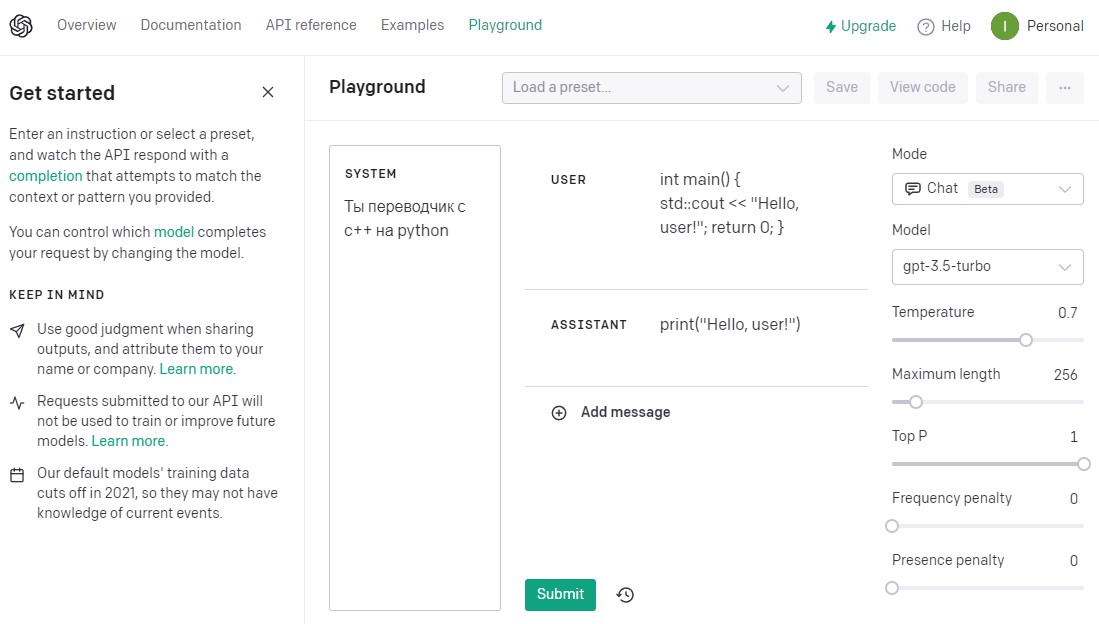
Parser overview
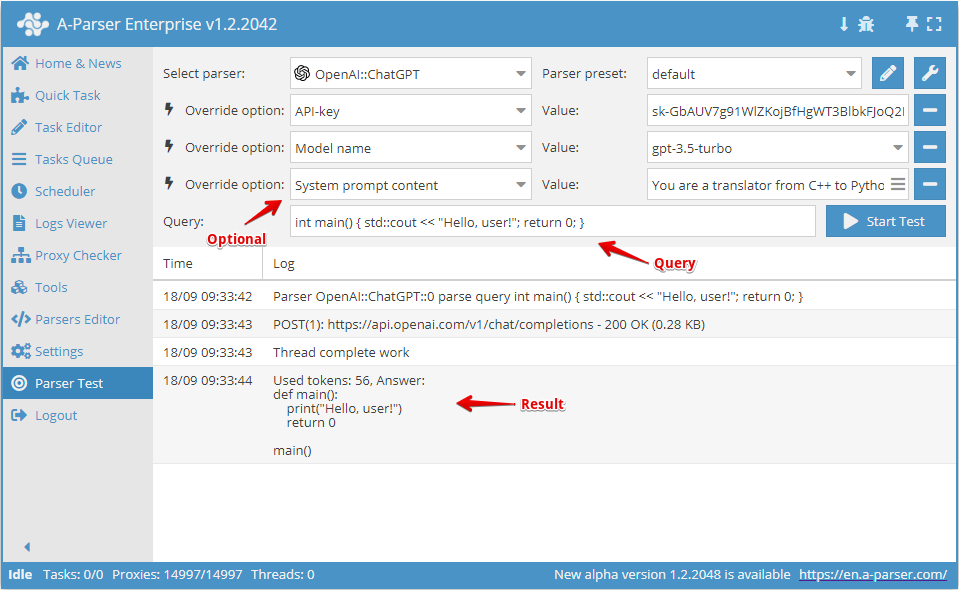
ChatGPT parser. Built based on the official API and uses an API key.
A-Parser functionality allows you to save Google parser settings for future use (presets), set parsing schedules, and much more. You can use automatic query multiplication, substitution of subqueries from files, brute-forcing of alphanumeric combinations and lists to obtain the maximum possible number of results.
Saving results is possible in the form and structure you need, thanks to the built-in powerful Template Toolkit which allows applying additional logic to results and outputting data in various formats, including JSON, SQL, and CSV.
Collected data
- Response from ChatGPT
- Number of tokens used
Capabilities
- Parse responses from ChatGPT
- Ability to set System prompt content
Use cases
- Generating responses from ChatGPT to any questions
Queries
Queries should be specified as single-line text, for example:
int main() { std::cout << "Hello, user!"; return 0; }
What are 5 key points I should know when studying Ancient Rome?
Query substitutions
You can use built-in macros for query multiplication.
In the query format, we will specify a character brute-force from a to zzzz; this method allows for maximum rotation of search results and obtaining many new unique results:
$query {az:a:zzzz}
This macro will create 475254 additional queries for each original search query, which in total will give 4 x 475254 = 1901016 search queries—an impressive figure, but no problem at all for A-Parser. At a speed of 2000 queries per minute, such a task will be processed in just 16 hours.
Output results examples
A-Parser supports flexible result formatting thanks to the built-in Template Toolkit, which allows it to output results in arbitrary forms, as well as structured ones like CSV or JSON.
Default output
Result format:
Used tokens: $total_tokens, Answer:\n$answer\n
Result example:
Used tokens: 54, Answer:
print("Hello, user!")
exit(0)
Used tokens: 290, Answer:
1. Founding and Early History: Ancient Rome was founded in 753 BCE by twin brothers Romulus and Remus. The city grew to become one of the most powerful and influential empires in world history.
2. Roman Republic: The Roman Republic was established in 509 BCE and lasted until 27 BCE. During this time, Rome developed a complex system of government, with two consuls elected annually, a senate, and assemblies of citizens.
3. Roman Empire: The Roman Empire began in 27 BCE when Augustus became the first Roman emperor. The empire grew to include much of Europe, the Middle East, and North Africa and lasted until the fall of the Western Roman Empire in 476 CE.
4. Achievements and Contributions: Ancient Rome made significant contributions to architecture, engineering, law, philosophy, art, literature, and language. Roman innovations include the arch, concrete, aqueducts, roads, and the Latin alphabet.
5. Decline and Fall: The Roman Empire faced numerous challenges, including economic instability, political corruption, military defeats, and invasions by barbarian tribes. The Western Roman Empire fell in 476 CE, while the Eastern Roman Empire (Byzantine Empire) survived until 1453 CE.
Possible settings
| Parameter | Default value | Description |
|---|---|---|
| API domain | api.openai.com | Ability to change the domain for API requests |
| API key | API key. You can specify several (one per line); for each attempt, a key will be randomly selected from those available and not used within the current query. | |
| Model name | gpt-3.5-turbo | Model type (gpt-4-0613, gpt-4, gpt-3.5-turbo, gpt-5-search-api-2025-10-14, gpt-realtime-mini, and others you can see in the Model list) |
| Another model name | Allows specifying a different model name. OpenAI API Models. | |
| System prompt content | System prompt content | |
| Temperature | 0.7 | Temperature |
| Top P | 1 | Top P |
| Maximum length | 256 | Maximum number of tokens used |
| Presence penalty | 0 | Presence penalty |
| Frequency penalty | 0 | Frequency penalty |
| Additional options | Ability to specify additional options from the official API that are not provided in A-Parser. Example of using Additional options |
Model list
gpt-4-0613
gpt-4
gpt-3.5-turbo
gpt-5-search-api-2025-10-14
gpt-realtime-mini
gpt-realtime-mini-2025-10-06
sora-2
sora-2-pro
davinci-002
babbage-002
gpt-3.5-turbo-instruct
gpt-3.5-turbo-instruct-0914
dall-e-3
dall-e-2
gpt-4-1106-preview
gpt-3.5-turbo-1106
tts-1-hd
tts-1-1106
tts-1-hd-1106
text-embedding-3-small
text-embedding-3-large
gpt-4-0125-preview
gpt-4-turbo-preview
gpt-3.5-turbo-0125
gpt-4-turbo
gpt-4-turbo-2024-04-09
gpt-4o
gpt-4o-2024-05-13
gpt-4o-mini-2024-07-18
gpt-4o-mini
gpt-4o-2024-08-06
chatgpt-4o-latest
o1-mini-2024-09-12
o1-mini
gpt-4o-realtime-preview-2024-10-01
gpt-4o-audio-preview-2024-10-01
gpt-4o-audio-preview
gpt-4o-realtime-preview
omni-moderation-latest
omni-moderation-2024-09-26
gpt-4o-realtime-preview-2024-12-17
gpt-4o-audio-preview-2024-12-17
gpt-4o-mini-realtime-preview-2024-12-17
gpt-4o-mini-audio-preview-2024-12-17
o1-2024-12-17
o1
gpt-4o-mini-realtime-preview
gpt-4o-mini-audio-preview
computer-use-preview
o3-mini
o3-mini-2025-01-31
gpt-4o-2024-11-20
computer-use-preview-2025-03-11
gpt-4o-search-preview-2025-03-11
gpt-4o-search-preview
gpt-4o-mini-search-preview-2025-03-11
gpt-4o-mini-search-preview
gpt-4o-transcribe
gpt-4o-mini-transcribe
o1-pro-2025-03-19
o1-pro
gpt-4o-mini-tts
o3-2025-04-16
o4-mini-2025-04-16
o3
o4-mini
gpt-4.1-2025-04-14
gpt-4.1
gpt-4.1-mini-2025-04-14
gpt-4.1-mini
gpt-4.1-nano-2025-04-14
gpt-4.1-nano
gpt-image-1
codex-mini-latest
gpt-4o-realtime-preview-2025-06-03
gpt-4o-audio-preview-2025-06-03
o4-mini-deep-research
gpt-4o-transcribe-diarize
o4-mini-deep-research-2025-06-26
gpt-5-chat-latest
gpt-5-2025-08-07
gpt-5
gpt-5-mini-2025-08-07
gpt-5-mini
gpt-5-nano-2025-08-07
gpt-5-nano
gpt-audio-2025-08-28
gpt-realtime
gpt-realtime-2025-08-28
gpt-audio
gpt-5-codex
gpt-image-1-mini
gpt-5-pro-2025-10-06
gpt-5-pro
gpt-audio-mini
gpt-audio-mini-2025-10-06
gpt-5-search-api
gpt-3.5-turbo-16k
tts-1
whisper-1
text-embedding-ada-002