SE::Bing::Position - Checking Site Positions in Bing
Overview of the scraper
A scraper for checking website positions by keywords in Bing. Thanks to the SE::Bing::Position scraper, you can automatically verify positions in Bing search results using your own domain databases. Using the SE::Bing::Position scraper makes it easy, accurate, and fast to determine a website's position in Bing.
A-Parser functionality allows you to save the parsing settings for the SE::Bing::Position scraper for future use (presets), ), set a parsing schedule, and much more. You can use automatic substitution of sub-queries from files.
Results can be saved in the format and structure you need, thanks to the powerful built-in templating engine Template Toolkit that allows you to apply additional logic to the results and output data in various formats, including JSON, SQL and CSV.
Collected Data
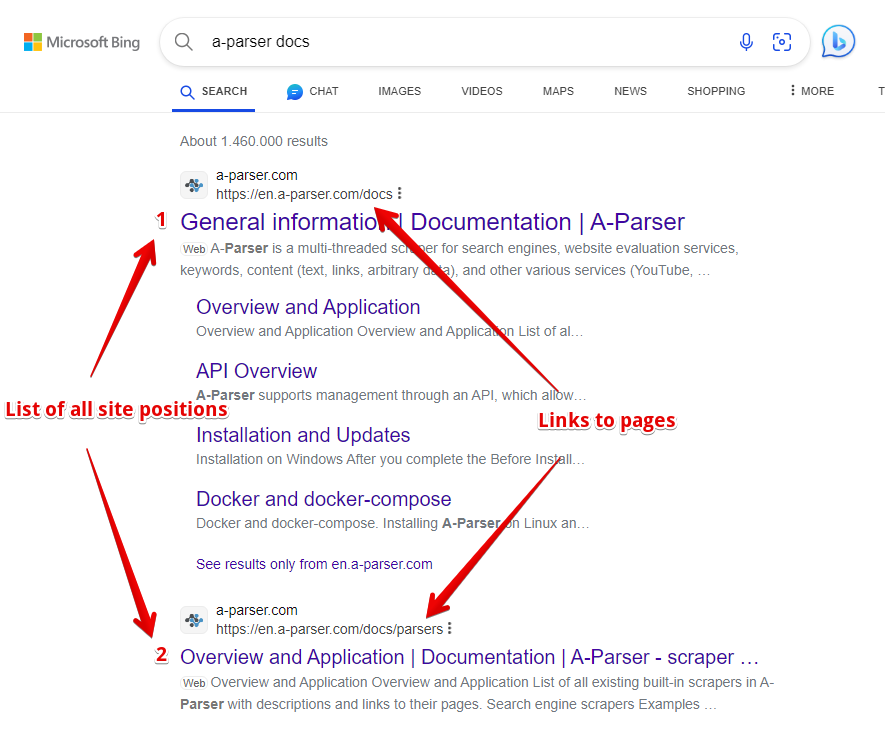
- Site position and link to the site page
- List of all site positions and links to pages
Capabilities
- All capabilities of
 SE::Bing
 - Automatically stops scraping when the site is found
- Supports subdomain search
- Ability to compare the desired position by domain, top-level domain, and full link
- Collection of positions for multiple domains simultaneously
Use Cases
- Checking the positions of your own sites and competitor sites
- Finding traffic pages of a site
Queries
Queries should include the domain of the desired site and the search query separated by a space, for example:
lenta.ru news
lenta.ru online news
If you need to check one site against a list of queries, you can specify the domain in the query format (Query format):
lenta.ru $query
Or just use a list of keywords. To use multiple domains in a query, list the domains separated by commas and the keyword separated by a space, for example:
lenta.ru,ria.ru,notfound.com news feed
The results will be written to the array $bulkcheck.
The option Stop when found is also supported; parsing will stop if positions are found for all domains.
Query substitutions
You can use built-in macros for automatic substitution of sub-queries from files. For example, if we want to check sites/a site against a keyword database, we specify a few main queries:
ria.ru
lenta.ru
rbc.ru
yandex.ru
In the query format, we specify the macro to substitute additional words from the file Keywords.txt, , this method allows checking a database of sites against a database of keys and obtaining positions as a result:
$query {subs:Keywords}
This macro will create as many additional queries as there are in the file for each original search query, which in total will give [number of original queries (domains)] x [number of queries in the Keywords file] = [ total number of queries] as a result of the macro's operation.
Examples of result output
A-Parser supports flexible results formatting thanks to the built-in templating engine Template Toolkit, which allows it to output results in any form, as well as in a structured format, such as CSV or JSON
Exporting the list of positions
Analogous to SE::Google::Position.
Simultaneous check of multiple domains (bulk check)
Analogous to SE::Google::Position.
Links + anchors + snippets with position output
Outputting links, anchors, and snippets to a CSV table
Saving related keywords
Keyword competition
Checking link indexation
Saving in SQL format
Dumping results in JSON
Results processing
A-Parser allows processing results directly during scraping, and in this section we have provided the most popular use cases for the SE::Bing::Position scraper
Saving domains without zero positions
Analogous to SE::Google::Position.
Link deduplication
Link deduplication by domain
Extracting domains
Removing tags from anchors and snippets
Filtering links by inclusion
Possible settings
Supports all settings of the scraper SE::Bing, as well as additional ones:
| Parameter Name | Default Value | Description |
|---|---|---|
| Pages count | 1 | Number of SERP pages to scrape (from 1 to 50) |
| Links per page | Auto | Number of links per SERP page (Auto / 10 / 15 / 30 / 50) |
| Result format | $domain - $key: $position\n | Result output format |
| Stop when found | ☑ | Stop scraping if the domain is found, will not proceed to the next pages |
| Match type | Exact domain | Option to compare the desired position by domain, top-level domain, and full link (Exact domain / Top level domain / Exact url) |