SE::Yandex::Video - Yandex Video parser
Parser overview
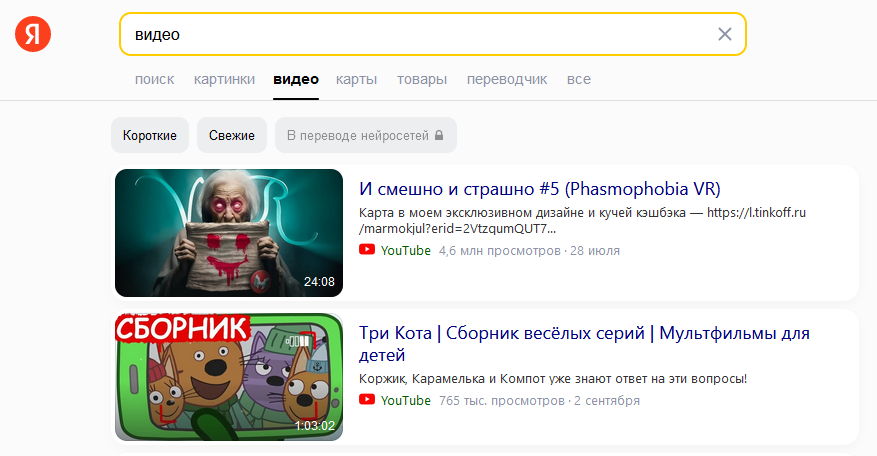
Yandex Video search parser. Thanks to the SE::Yandex::Video parser, you will be able to obtain databases of video links. You can use queries in the same form as you enter them in the Yandex search bar.
A-Parser functionality allows you to save Yandex parser settings for future use (presets), set a parsing schedule, and much more. You can use automatic query multiplication, substitution of subqueries from files, brute-forcing of alphanumeric combinations and lists to obtain the maximum possible number of results.
Saving results is possible in the form and structure you need, thanks to the built-in powerful Template Toolkit templating engine, which allows you to apply additional logic to the results and output data in various formats, including JSON, SQL, and CSV.
Collected data
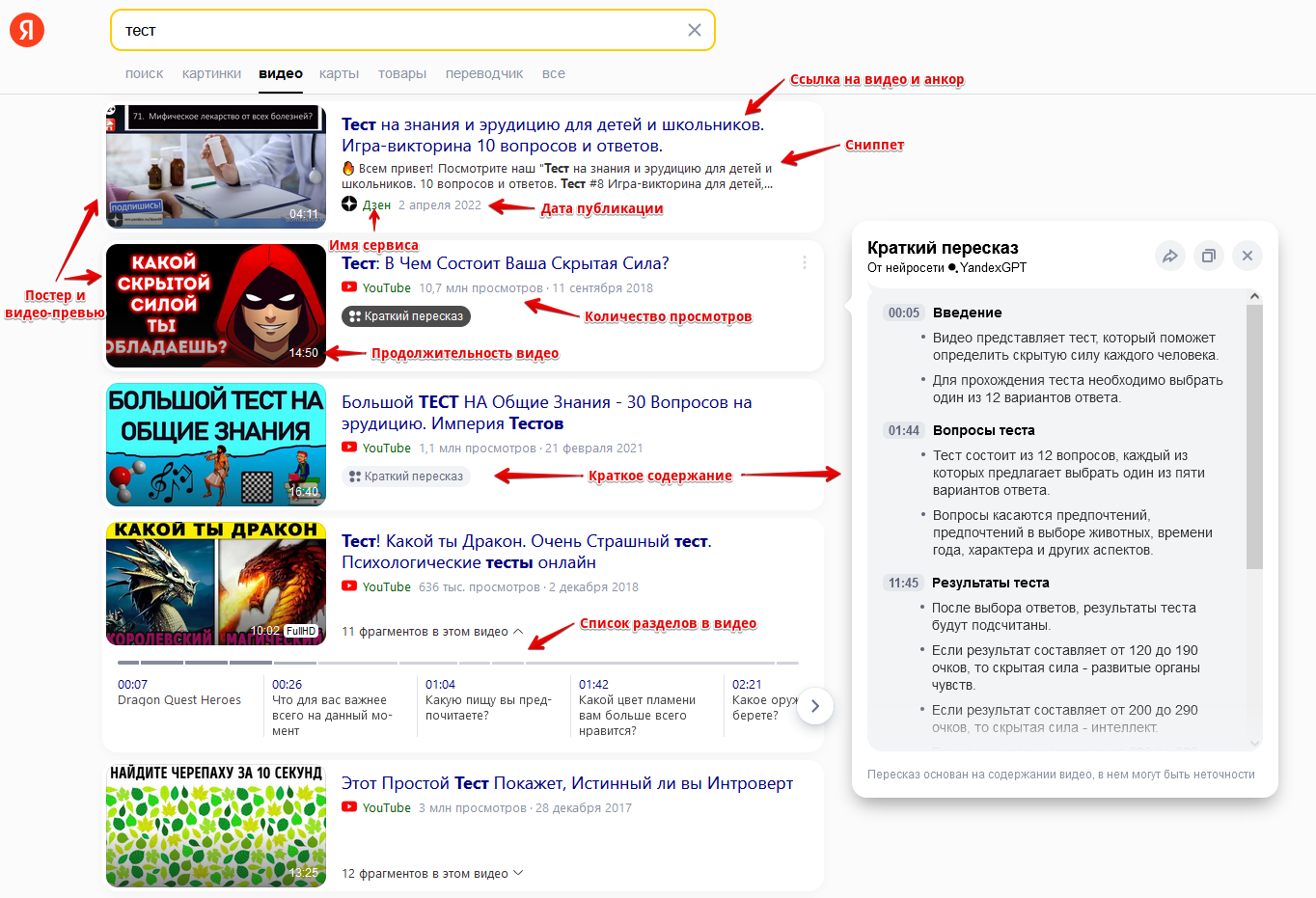
- Video links
- Anchors
- Snippets
- Name of the service where the video is hosted
- Duration, view count, and publication date
- Links to poster and video preview
- Brief video summary
- List of chapters in the video
- Embed code for websites
Capabilities
- Support for filters (short, fresh)
- Selection of the number of search result pages
- Session support
Use cases
- Collecting videos to populate your blogs, tubes, doorways...
- Collecting text data
Queries
You should specify search phrases as queries, for example:
Cats
Football
Waterfall
Speak in english
cars
Query substitutions
You can use built-in macros for query multiplication; for example, if we want to get a very large database of forums, let's specify several main queries in different languages:
forum
forum
foro
论坛
In the query format, we will specify a character brute-force from a to zzzz; this method allows for maximum rotation of search results and obtaining many new unique results:
$query {az:a:zzzz}
This macro will create 475254 additional queries for each original search query, which in total will give 4 x 475254 = 1901016 search queries—an impressive figure, but not a problem at all for A-Parser. At a speed of 2000 queries per minute, such a task will be processed in just 16 hours.
Output results examples
A-Parser supports flexible result formatting thanks to the built-in Template Toolkit templating engine, which allows it to output results in arbitrary forms, as well as structured ones like CSV or JSON.
Default output
Result format:
$serp.format('$link\n')
Result example:
http://www.youtube.com/v/lcYzh7IjJj0
http://www.youtube.com/watch?v=VD2h2YUY_WQ
http://www.youtube.com/watch?v=UPOUE8ObCy8
http://www.youtube.com/watch?v=Ha9Q1kHqCHA
http://www.youtube.com/watch?v=P5rlifhgewY
https://zen.yandex.ru/video/watch/61099fa859eaef364db8b3cd?f=video
http://www.youtube.com/v/-cvEA8897Fc?fs=0
https://zen.yandex.ru/video/watch/625ed4e3099b9b7b81b17e3b?f=video
http://rutube.ru/video/016773a106036e9d3cd619ace97011e0/
http://rutube.ru/video/e54b2392b7dd3fe57fed6002aba5f833/
http://rutube.ru/video/8fe868740089c3557d6d54e86ceca6a1/
http://www.youtube.com/v/OuOK2fEPdMU
http://www.youtube.com/watch?v=UcbmVFYp4Lg
http://www.youtube.com/watch?v=JgJE4oQf-Gs
http://www.youtube.com/watch?v=ektN1-ptnDE
Output in CSV table
Result format:
[% FOREACH item IN serp;
    tools.CSVline(query, item.link, item.anchor, item.prevPoster, item.duration, item.views);
END %]
Result example:
test,http://www.youtube.com/v/lcYzh7IjJj0,"<b>IQ test</b> using 10 photos",https://avatars.mds.yandex.net/get-vthumb/4322300/5f649751351f727400bfd1be494fd6b4/564x318_1,07:09,"2.5M views"
test,http://www.youtube.com/watch?v=VD2h2YUY_WQ,"Online <b>Test</b> Pad -how to create a <b>test</b>",https://avatars.mds.yandex.net/get-vthumb/1023253/fffa43fb9402c436d6881537bb9aee9a/564x318_1,05:38,"16,6 K views"
test,http://www.youtube.com/watch?v=UPOUE8ObCy8,"Simple educational <b>test</b>.  Online <b>Test</b> Pad",https://avatars.mds.yandex.net/get-vthumb/3435353/fa94c2b60d9bb0fa8cda2d469b6dcf0a/564x318_1,04:16,"76,5 K views"
test,http://www.youtube.com/watch?v=Ha9Q1kHqCHA,"Creating <b>tests</b> with Online <b>Test</b> Pad #2",https://avatars.mds.yandex.net/get-vthumb/2032788/4ffd2b149fbfc3de17b67ef92290028e/564x318_1,07:00,"1704 views"
test,http://www.youtube.com/watch?v=P5rlifhgewY,"This IQ-<b>test</b> of 5 Questions Will Show Your Intelligence Level",https://avatars.mds.yandex.net/get-vthumb/4507451/f3475d744f7841b40912dd933dce65c1/564x318_1,08:01,"606K views"
test,https://zen.yandex.ru/video/watch/61099fa859eaef364db8b3cd?f=video,"Spotlight 4 Grade 4. Final <b>test</b>.  Exit <b>test</b>",https://avatars.mds.yandex.net/get-vthumb/3304426/beaeeaba5bfc6c00bcae50c4fa7cf236/564x318_1,09:39,
test,http://www.youtube.com/v/-cvEA8897Fc?fs=0,"English grammar <b>test</b>",https://avatars.mds.yandex.net/get-vthumb/2428342/b5b8a32f0260ce4ac785b6a4f1a8b006/564x318_1,12:35,"597 K views"
test,https://zen.yandex.ru/video/watch/625ed4e3099b9b7b81b17e3b?f=video,"Only a few know THESE answers ""Brain <b>Test</b>"" #1",https://avatars.mds.yandex.net/get-vh/5811343/2a00000180429688a113593b8944b066f53d/564x318_1,17:07,
test,http://rutube.ru/video/016773a106036e9d3cd619ace97011e0/,"How to complete Brain <b>Test</b> 2?  Answers for all levels",https://avatars.mds.yandex.net/get-vthumb/4407993/aa07260f286afde40d15abad02f816af/564x318_1,1:29:03,
test,http://rutube.ru/video/e54b2392b7dd3fe57fed6002aba5f833/,"Brain <b>Test</b> Full walkthrough № 4 Diving into the world of puzzles",https://avatars.mds.yandex.net/get-vthumb/467972/c078458de66e698c5680527352261b9d/564x318_1,26:23,
test,http://rutube.ru/video/8fe868740089c3557d6d54e86ceca6a1/,"SpeedTest - Internet connection speed testing",https://avatars.mds.yandex.net/get-vthumb/3446066/7cca0b8914479dcfe294b06246ea6df8/564x318_1,05:16,"223K total views"
Saving in SQL format
Result format:
[%  FOREACH serp;
    "INSERT INTO serp VALUES('" _ query _ "', '";
    link _ "', '";
    snippet.replace("\n", '\n') _ "', '";
    summary.replace("\n", '\n') _ "')\n";
END %]
Result example:
INSERT INTO serp VALUES('test', 'http://www.youtube.com/v/lcYzh7IjJj0', '', '00:25 Board puzzle\nQuestion: how many boards are here?\nAnswer: none, as extra lines are drawn to the boards and one board smoothly transitions into another\n01:10 Elephant legs puzzle\nQuestion: how many legs does the elephant have?\nAnswer: the elephant has one leg located at the back, and all other legs are not real\n02:00 Woman by the window puzzle\nQuestion: what is the difference between these two images?\nAnswer: there is a mouse hole in the bottom right corner')
INSERT INTO serp VALUES('test', 'http://www.youtube.com/watch?v=VD2h2YUY_WQ', '', '00:01 Introduction\nThe video talks about the Online Test Pad website, where you can create tests, surveys, crosswords, and logic games.\nTo start, you need to register using email.\n00:35 Creating a test\nAfter registration, you can create your own tests, surveys, crosswords, and logic games.\nThe video demonstrates creating a test from scratch.\n01:06 Question options\nThe video shows how to create different question options: single choice, text input, fill in the blanks, and others.\nExamples of questions and answers for each option are demonstrated.')
INSERT INTO serp VALUES('test', 'http://www.youtube.com/watch?v=P5rlifhgewY', '', '00:00 Introduction\nThe video is an IQ test consisting of five questions that will help determine the level of intelligence.\n04:00 Test results\nIf the first answer options are chosen, then the happiness level is high, and intelligence is average.\nIf the second answer options are chosen, then the intelligence level is high, and the happiness level is average.\nIf different answer options are chosen, then the intelligence and happiness levels are at the golden mean.\n07:08 Conclusion\nThe video encourages sharing the test results with friends and subscribing to the channel.\nIf they get 50 thousand likes, they will prepare another test.')
INSERT INTO serp VALUES('test', 'https://zen.yandex.ru/video/watch/625ed4e3099b9b7b81b17e3b?f=video', '"Brain <b>Test</b>" ► Walkthrough Enjoy Watching Everyone :) Links: Music in Video: https://www.youtube.com/watch?v=5qap5aO4i9A Discord Server ► https://discord.gg/4JWEu9URwB YouTube ►...', '')
INSERT INTO serp VALUES('test', 'http://rutube.ru/video/016773a106036e9d3cd619ace97011e0/', 'Completed Brain <b>Test</b> 2. Sharing answers for all levels. Walkthrough of Brain <b>Test</b> 2 all parts: Losing weight with Nastya Prison Break Agent Bames Jond The Smith Family Monster Hunter Vanya...', '')
INSERT INTO serp VALUES('test', 'http://rutube.ru/video/e54b2392b7dd3fe57fed6002aba5f833/', 'https://www.youtube.com/channel/UCgpWRYOfFZ0whXZ8F26KbUg YouTube channel https://t.me/DimaDaimont telegram channel https://www.donationalerts.com/r/dimadaimont2 help with development...', '')
Dump results to JSON
General output format:
[% IF notFirst;
  ",\n";
ELSE;
  notFirst = 1;
END;

obj = {};
obj.query = query;
obj.videos = [];

FOREACH item IN p1.serp;
    obj.videos.push({
        link = item.link
        anchor = item.anchor
        snippet = item.snippet
        service = item.service
        embed = item.embed
    });
END;

obj.json %]
Initial text:
[
Final text:
]
Result example:
[{
"videos": [
{
"embed": "<iframe src=\"//www.youtube.com/embed/lcYzh7IjJj0?enablejsapi=1&wmode=opaque\" frameborder=\"0\" scrolling=\"no\" allowfullscreen=\"1\" allow=\"autoplay; fullscreen; accelerometer; gyroscope; picture-in-picture\" aria-label=\"Video\"></iframe>",
"link": "http://www.youtube.com/v/lcYzh7IjJj0",
"snippet": "",
"anchor": "<b>IQ test</b> using 10 photos",
"service": "YouTube"
},
{
"embed": "<iframe src=\"//www.youtube.com/embed/VD2h2YUY_WQ?enablejsapi=1&wmode=opaque\" frameborder=\"0\" scrolling=\"no\" allowfullscreen=\"1\" allow=\"autoplay; fullscreen; accelerometer; gyroscope; picture-in-picture\" aria-label=\"Video\"></iframe>",
"link": "http://www.youtube.com/watch?v=VD2h2YUY_WQ",
"snippet": "",
"anchor": "Online <b>Test</b> Pad -how to create a <b>test</b>",
"service": "YouTube"
},
{
"embed": "<iframe src=\"//www.youtube.com/embed/UPOUE8ObCy8?enablejsapi=1&wmode=opaque\" frameborder=\"0\" scrolling=\"no\" allowfullscreen=\"1\" allow=\"autoplay; fullscreen; accelerometer; gyroscope; picture-in-picture\" aria-label=\"Video\"></iframe>",
"link": "http://www.youtube.com/watch?v=UPOUE8ObCy8",
"snippet": "",
"anchor": "Simple educational <b>test</b>. Online <b>Test</b> Pad",
"service": "YouTube"
},
{
"embed": "<iframe src=\"//www.youtube.com/embed/Ha9Q1kHqCHA?enablejsapi=1&wmode=opaque\" frameborder=\"0\" scrolling=\"no\" allowfullscreen=\"1\" allow=\"autoplay; fullscreen; accelerometer; gyroscope; picture-in-picture\" aria-label=\"Video\"></iframe>",
"link": "http://www.youtube.com/watch?v=Ha9Q1kHqCHA",
"snippet": "",
"anchor": "Creating <b>tests</b> with Online <b>Test</b> Pad #2",
"service": "YouTube"
}
],
"query": "test"
}]
To make the "Initial text" and "End text" options available in the Task Editor, you need to activate "More options".
Possible settings
| Parameter | Default value | Description |
|---|---|---|
| Pages count | 5 | Number of pages to parse |
| New videos | ☐ | Fresh videos |
| Short videos | ☐ | Short videos |