SE::Google::Position - Check website rankings by keywords in Google
Parser Overview
A parser for checking website positions by keywords in Google. Thanks to the SE::Google::Position parser, you can automatically check positions in Google search results using your own domain databases. Using the SE::Google::Position parser, you can easily, accurately, and quickly determine a website's position in Google.
A-Parser functionality allows you to save parsing settings for the SE::Google::Position parser for future use (presets), set parsing schedules, and much more. You can use automatic query substitution from files.
Saving results is possible in any form and structure you need, thanks to the built-in powerful Template Toolkit templating engine, which allows applying additional logic to results and outputting data in various formats, including JSON, SQL, and CSV.
Parser Use Cases
🔗 Working with API, Part 1
Example of working with the A-Parser API using the SE::Google::Position rank tracker
🔗 Another example of working with SE::Google::Position
Determining site position by keyword, just like in a user's browser
🔗 Overview of presentation options
The article examines 4 different result presentation options: text, CSV, JSON, HTML
🔗 How to find positions by keywords?
Getting to know the SE::Google::Position parser and checking the rank of a keyword in search results
Collected Data
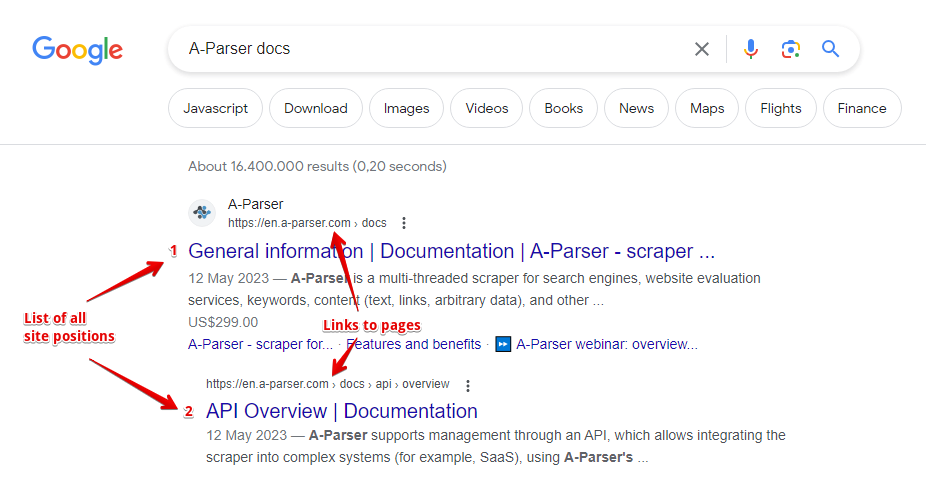
- Website position and the link to the website page
- List of all website positions and page links
Capabilities
- All features of the
 SE::Google parser
 - Automatically stops parsing when the website is found
- Supports subdomain search
- Ability to compare the target position by domain, by main domain, and by full link
- Collecting positions for multiple domains at once
Use Cases
- Checking positions of your own websites and competitors' websites
- Finding high-traffic website pages
Queries
As queries, you must specify the domain of the target website and the search query separated by a space, for example:
lenta.ru news
lenta.ru news online
If you need to check one website against a list of queries, you can specify the domain in the Query format:
lenta.ru $query
Or simply use a list of keywords. To use multiple domains in a query at once, specify the list of domains separated by commas and the keyword after a space, for example:
lenta.ru,ria.ru,notfound.com news feed
Results will be recorded in the $bulkcheck array.
The Stop when found option is also supported; parsing will end if positions are found for all domains.
Query Substitutions
You can use built-in macros for automatic substitution of subqueries from files; for example, if we want to check websites/a website against a keyword database, we specify several main queries:
ria.ru
lenta.ru
rbc.ru
yandex.ru
In the query format, specify the macro for substituting additional words from the Keywords.txt file; this method allows checking a database of websites against a database of keys and obtaining positions as a result:
$query {subs:Keywords}
This macro will create as many additional queries as there are in the file for each original search query, which in total will give [number of original queries (domains)] x [number of queries in the Keywords file] = [total number of queries] as a result of the macro's operation.
Output Results Examples
A-Parser supports flexible result formatting thanks to the built-in Template Toolkit templating engine, which allows it to output results in arbitrary forms, as well as structured ones like CSV or JSON.
Exporting a List of Positions
Obtaining the result in the form:
target domain - key: position number in search results
Result format:
$domain - $key: $position\n
Example result:
lenta.ru - news: 6
lenta.ru - news online: 7
...
Simultaneous Check of Multiple Domains (Batch Check)
Information for all domains during a simultaneous check of multiple domains is contained in the $bulkcheck array.
Result format:
$bulkcheck.format('$domain - $position\n')
Example query:
lenta.ru,ria.ru,notfound.com news feed
Example result:
lenta.ru - 1
ria.ru - 3
notfound.com - 0
Links + Anchors + Snippets with Position Output
Outputting Links, Anchors, and Snippets to a CSV Table
Saving Related Keywords
Keyword Competition
Checking Link Indexing
Saving in SQL Format
Dumping Results to JSON
Results Processing
A-Parser allows processing results directly during parsing; in this section, we have provided the most popular cases for the SE::Google::Position parser.
Saving Domains Without Zero Positions
The example of simultaneous checking of several domains (see above in output results variants) was taken as a basis and a filter was added.
Add a filter and select the position output variable from the dropdown list. Select type: >. Next, enter 0 in Number. With such a filter, you can remove all results with a zero position.
Download example
How to import an example into A-Parser
eJx1VNtu2zAM/RVDCNAVyIJ2a4HBDwPSYhk2ZE3Wy1OaB9WiUy2y6Ely2szwv4+S
ZTvtuhdZJA/Jw4tcM8ft1i4NWHCWpaualeHOUnbzJU2/Im4UpOkSrXQSdfI+ueE7
SAQWXGqbPEn3iJVLePIHDCZlhLExK7mxYHzI1ZuRCCIg55VybFwzty+BUuIOjJEC
yCgFyTmagjsiFGBsx1XlYaOHSm2zR8i2kxbx7mjUMiJ+o47E/b0+OmbN/6NXFkqD
z/shcs6VhQOPXCoHhuyRQrpifWpfY1fLehyht63f5wOyJ3THMsBSZkFb1qzXXUQ7
C/x9TeXpJLa+N/pW32LLAwb1jKQrXoROCO7AW7tGHE/cs4/AhQjUuGoz+EEMWe+0
/B3IaSQsXY0EOzNYkMpBCOCV+47dio2C7Autgu/P1ie2bMwsUZ1xIiJeWyS1hTs0
i9AD0tcM9VSpOexADbAQ/6KSStDWTHNy+hYd34Ys/onR9OUdpqKZPxni0EcJ0sXi
x+AlcI4bqlw8UN1KFtKRbC+x0i7ObwtQ9j278j0r0ECfJkaO2ekxlaD9gg0jm5aD
6kUZL8byUpmhzuVmEZe2Q1b6ll7sQl9iUSrwdelKqbFf5uthPaY2jsELA8HXzpch
hS+9e4rMISr7/aalWhpJ63fuCRbUycOsMWTGlbq7nh9a2LBSJCjQjk9MNTYyfDS6
nDorJhkWyX11cvZRhBPC+WG4n52Gs9V8aqEP4Twf3KLZzyijl7BB2lHqU7Puf0D9
r61++zeU1g2twC+7bOG+Xx5MOmq8DYjT5i+HCcki
See also: Result Filters
Link Deduplication
Link Deduplication by Domain
Extracting Domains
Removing Tags from Anchors and Snippets
Filtering Links by Inclusion
Possible Settings
Supports all settings of the SE::Google parser, as well as additionally:
| Parameter name | Default value | Description |
|---|---|---|
| Pages count | 1 | Number of search result pages to parse (from 1 to 10) |
| Result format | $domain - $key: $position\n | Default result output format |
| Stop when found | ☑ | Stop parsing if the domain is found; will not proceed to subsequent pages |
| Match type | Exact domain | Ability to compare the target position by domain, by main domain, and by full link (Exact domain / Top level domain / Exact url) |