SE::Yandex::WordStat - WordStat Parser. Keyword and search volume collection
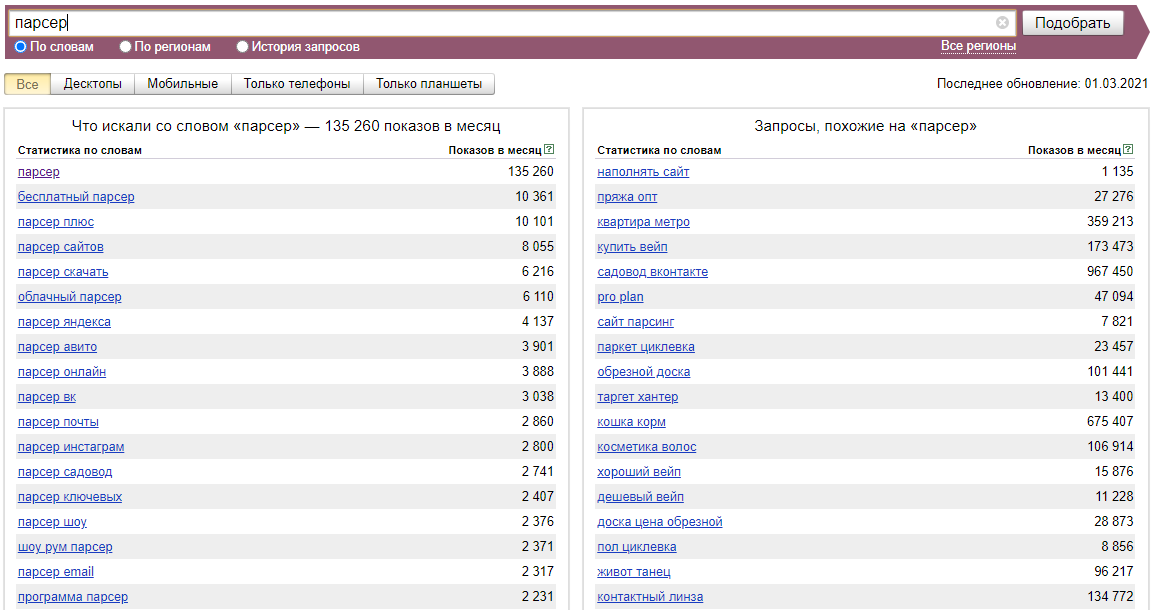
Parser overview
Wordstat is a Yandex service designed to evaluate user interest in various topics and select keywords for SEO optimization and contextual advertising. In addition, with the help of Wordstat Yandex, you can estimate the seasonality and geographical dependence of search queries.
The Yandex WordStat keyword parser supports automatic query multiplication, so you can be sure that you will get the maximum number of results from the search results. Also, A-Parser can automatically follow related queries to a specified depth.
A-Parser functionality allows you to save parsing settings for future use (presets), set a parsing schedule, and much more. You can use automatic query multiplication, substitution of subqueries from files, enumeration of alphanumeric combinations and lists to get the maximum possible number of results when parsing Yandex Wordstat.
Saving results is possible in the form and structure you need, thanks to the built-in powerful Template Toolkit which allows you to apply additional logic to the results and output data in various formats, including JSON, SQL, and CSV.
Use cases for the parser
🔗 Deep Wordstat parsing
Using the Yandex WordStat parser for deep parsing.
🔗 WordStat frequency estimation
WordStat frequency estimation
Accounts
To use the  SE::Yandex::WordStat parser, Yandex accounts are required. Accounts can be registered using the
  SE::Yandex::Register parser or simply by adding existing accounts to the file
 files/SE-Yandex/accounts.txt in the supported format.
Alternatively, you can enable "on-the-fly" account registration.
To work using session authorization, it is necessary that the data string be in this format:
[email protected];MAQT78Z31Rinx4H;{"answer":"qmfhsxdcrk","proxy":"185.104.120.45:3128","session_id":"3:1748440908.5.0.1748440867459:ZXBxpg:47e4.1.2:1|2191075974.41.2.2:41.3:1748440908|3:10308131.797655.5pfkoRZWgLJGntKTlcUhYdysNfk"}
Collected data
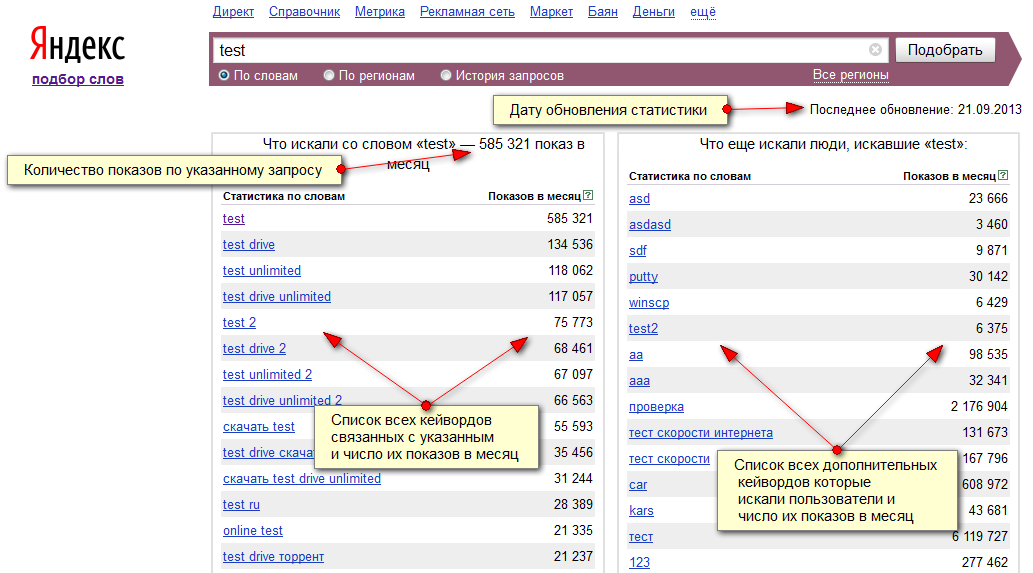
- Number of impressions for the specified query
- Statistics update date
- List of all keywords related to the specified one and their number of impressions per month
- List of all additional keywords that users searched for and their number of impressions per month
Capabilities
- Parses the maximum number of results provided by Wordstat - 40 pages of 50 search results each
- Supports selection of search region (with subgroups)
- Can automatically substitute found keywords back into queries (option Parse to level)
- Ability to select multiple regions for evaluation at once
- Support for automatic bypass of Smart captcha and the ability to bypass graphic captcha using the AntiCaptcha service or any other supporting their API
- Device type selection
- Ability to choose the authorization method
- Ability to register accounts "on the fly"
- Supports working with extended account format and can answer the secret question (if the answer is in
info). It also uses the saved proxy for authorization (if it is ininfo).
Use cases
- Estimating traffic volume by keyword (frequency)
- Searching for new keywords of similar topics
- Collecting large databases of keywords on different topics
- Any other options involving Yandex.WordStat parsing in one form or another
Queries
Keywords should be specified as queries, just as if they were entered directly into the Wordstat search form, for example:
windows moscow
"windows moscow"
!windows !moscow
Result output options
A-Parser supports flexible result formatting thanks to the built-in template engine Template Toolkit, which allows it to output results in an arbitrary form, as well as in a structured one, such as CSV or JSON
Default output
Result format:
$query - $totalcount, updated: $updatedate\nkeywords:\n$keys.format('$key: $count\n')\nadditional keywords:\n$search.format('$key: $count\n')
The result displays the original query, its number of impressions, the statistics update date, a list of related keywords and their monthly impressions, a list of additional keywords and their monthly impressions:
!windows !moscow - 10368, updated: 16/05/2013
keywords:
windows moscow: 32367
plastic windows moscow: 8994
pvc windows moscow: 4813
buy windows moscow: 2561
windows prices moscow: 1706
moscow work windows: 1547
windows vacancies moscow: 1187
wooden windows moscow: 1087
one-stop shop service moscow: 1021
...
additional keywords:
pvc windows production: 8512
rehau windows: 15686
salamander windows: 1576
kbe windows: 3798
kbe windows: 6089
kbe windows: 3227
balcony glazing: 83216
gazebos: 471213
loggia glazing: 26366
office partitions: 18740
windows installation: 26223
Output to CSV table
Result format:
[% FOREACH i IN keys;
  tools.CSVline(query, i. key, i.count);
END %]
Result example:
website parser, website parser, 8055
website parser, free website parser,    1122
website parser, parser official website,    666
website parser, cloud parser websites,  507
website parser, email parser +from website, 477
website parser, download website parser,    434
website parser, website address parser, 390
website parser, online website parser,  366
website parser, turbo website parser,   342
website parser, turbo parser official website,  309
website parser, cloud parser official website,  308
website parser, excel website parser,   276
website parser, sliza parser website,   259
Saving in SQL format
Result format:
[% FOREACH i IN keys;
  "INSERT INTO keys VALUES('" _ query _ "', '";     i.key _ "', '";     i.count _ "')\n";
END %]
Result example:
INSERT INTO serp VALUES('test', 'test', '10837937')
INSERT INTO serp VALUES('test', 'test drive', '1164338')
INSERT INTO serp VALUES('test', 'dough +for test', '879980')
INSERT INTO serp VALUES('test', 'online tests', '792560')
INSERT INTO serp VALUES('test', 'test drive video', '550164')
INSERT INTO serp VALUES('test', 'dough recipe', '484489')
INSERT INTO serp VALUES('test', 'tests +with answers', '449401')
INSERT INTO serp VALUES('test', 'test 2014', '427602')
INSERT INTO serp VALUES('test', 'free tests', '315144')
INSERT INTO serp VALUES('test', 'free tests', '315096')
INSERT INTO serp VALUES('test', 'tests +for girls', '309355')
INSERT INTO serp VALUES('test', 'tests +by topics', '293917')
INSERT INTO serp VALUES('test', 'test games', '288989')
Results dump in JSON
General output format:
[% IF notFirst;
  ",\n";
ELSE;
  notFirst = 1;
END;

obj = {};
obj.updatedate = p1.updatedate;
obj.totalcount = p1.totalcount;
obj.keys = [];

FOREACH item IN p1.keys;
    obj.keys.push({
        key = item.key
        count = item.count
    });
END;

obj.json %]
Initial text:
[
Final text:
]
Result example:
[{
    "updatedate": "12.03.2014",
    "totalcount": "10837937",
    "keys": [
        {
            "count": "10837937",
            "key": "test"
        },
        {
            "count": "1164338",
            "key": "test drive"
        },
        {
            "count": "879980",
            "key": "dough +for test"
        },
        {
            "count": "792560",
            "key": "online tests"
        },
    ]
}]
See also: Results filters
Possible settings
| Parameter | Default value | Description |
|---|---|---|
| Pages count | 10 | Number of pages to parse |
| Region | All | Search region |
| Remove + from keywords | ☐ | Remove the plus symbol (+) from found queries |
| AntiGate preset | default | It is necessary to pre-configure the  Util::AntiGate parser - specify your access key and other parameters, then select the created preset here Util::AntiGate parser - specify your access key and other parameters, then select the created preset here |
| AntiGate preset for Login | default | AntiGate preset for login. It is necessary to pre-configure the Util::AntiGate parser with parameters, then select the created preset here |
| Type | All | Device type selection |
| Accounts | Only from "accounts.txt" | Selection of the method for working with accounts: Always auto register - always automatically register accounts "on the fly", you need to select a configured preset in the SE::Yandex::Register preset parameter. Auto register if no more in "accounts.txt" - first, existing accounts from accounts.txt are used, and if they run out - automatic registration "on the fly" is used, for which you accordingly need to select a configured preset in the SE::Yandex::Register preset parameter. Only from "accounts.txt" - use only existing accounts from accounts.txt, and if they run out - wait for the specified time (Wait new accounts in "accounts.txt" parameter) for new ones to appear. Only by session_id from "accounts.txt" - authorization by cookies. |
| Wait new accounts in "accounts.txt" | 0 | Waiting time for new accounts to appear in accounts.txt |
| Remove bad accounts | Always, except wrong login/password | Automatic removal of "bad" accounts: Always - always remove. Always, except wrong login/password - always remove, except for cases when Yandex reported that an incorrect login/password was specified. The fact is that Yandex can give such a message when an IP is banned for an absolutely working account, so you can optionally leave such accounts for reuse. Never - never remove. Regardless of the selected option, accounts are not removed in case of proxy/browser errors |
| SE::Yandex::Register preset | default | Selection of settings preset for SE::Yandex::Register |
| Authorization method | HTTP | Authorization method: HTTP - fast, not resource-intensive. Chrome - slow, resource-intensive, theoretically can extend account life |
| Chrome headless | ☑ | If the option is enabled, the browser will not be displayed |
| Use sessions | ☑ | Use of sessions |
| Do not reset session if authorization passed | ☑ | Do not reset session on errors if the parser is already authorized |
| Use Wordstat 2 | ☐ | Use of Wordstat 2 |
| Wordstat 2 parse all table data | ☑ | Allows you to immediately upload all 2000 results for a query without going through pagination |
