SE::Yandex::Register - Allows registering accounts in Yandex
Parser overview
Automatic Yandex mail registrar. Mass registers accounts using  Util::SMS for automatic SMS confirmation.
A-Parser functionality allows you to save parsing settings for the SE::Yandex::Register parser for future use (presets), set a parsing schedule, and much more.
To receive a phone number and confirmation code, you must use a Util::SMS parser preset (Util::SMS preset option).
Parser use cases
🔗 Wordstat parsing automation
Used to store up-to-date information in the database, and generates a csv with fresh data upon each run.
🔗 Retrieving Yandex regions list
Account registration and region data collection via ID enumeration.
Basic setup
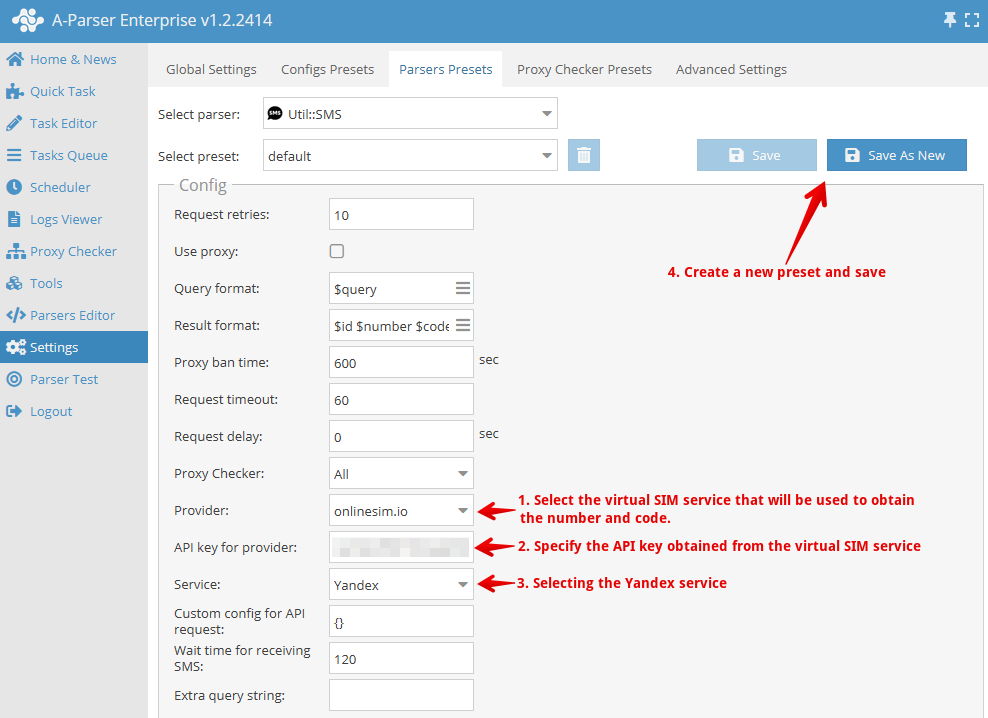
Since obtaining a virtual phone number and confirmation code is the main factor for registration, let's look at configuring the Util::SMS preset for this.
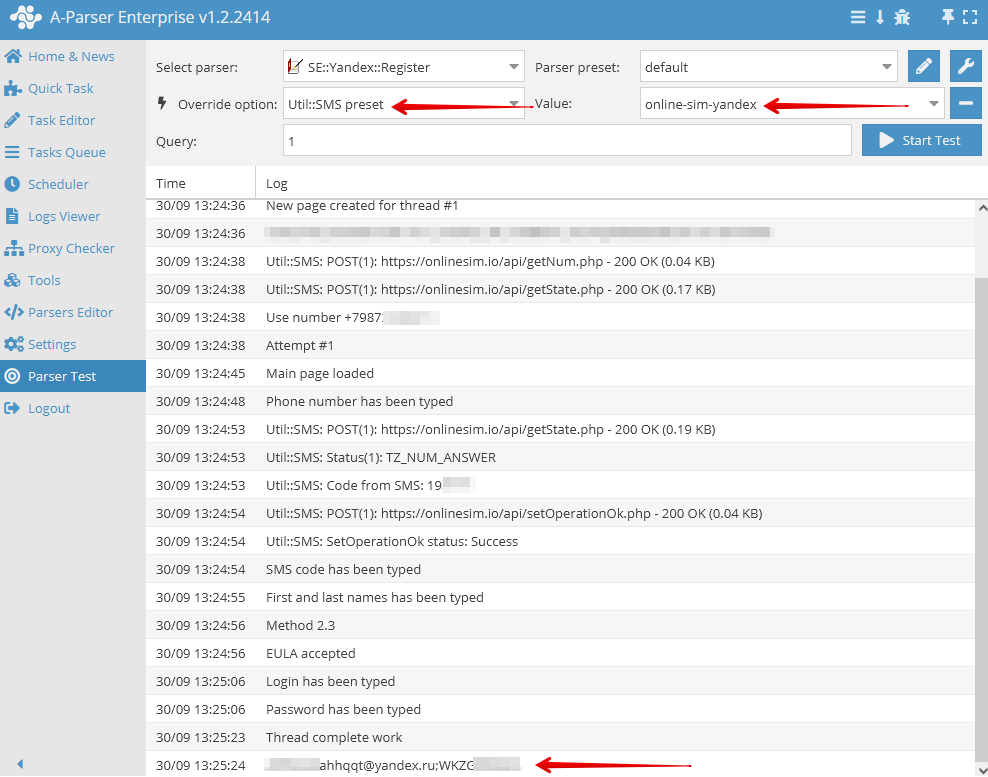
After creating the preset for the Util::SMS parser, select it in the task for  SE::Yandex::Register
Collected data
- Automatically registers accounts based on the number of queries using Util::SMS
Capabilities
- Automatic registration of Yandex accounts
- Obtaining the answer to the secret question (variable
$answer), additionally, the question and answer themselves are identical - Registration of multiple accounts per phone number
- Adding your own accounts to the file
files/SE-Yandex/accounts.txt
Account format
Two account formats are supported:
[email protected];password- simple (old) format[email protected];password;info- extended (new) format, whereinfois JSON with additional data
Example of accounts in the extended format:
[email protected];j85qWzWCez;{"answer":"lhutmofwlp","proxy":"http://88.198.56.226:23663"}
[email protected];jqrZ80kNbG;{"answer":"mzpcdxklbw"}
[email protected];wPXAEGoKPf;{"proxy":"http://88.198.56.226:23663"}
[email protected];pJ4563aOSl;{"answer":"qoysggfmya","proxy":"socks5://fsghfdgf:[email protected]:36532"}
By default, the SE::Yandex::Register parser saves the answer to the secret question and the proxy used during registration in info. Saving the used proxy is controlled by the Write with used proxy option and can be disabled, for example, in cases where the exit IP changes with each proxy connection.
Use cases
- Creating accounts for use in
 SE::Yandex::WordStat and similar parsers
Queries
You must specify the required number of queries. They can be set using a macro in the "Enter queries" field, for example:
{num:1:20}
In this example, the parser will register 20 accounts.
The built-in macro {num:START:END} is used here for automatic substitution.
Results output examples
A-Parser supports flexible result formatting thanks to the built-in Template Toolkit, which allows it to output results in any form, as well as in structured formats like CSV or JSON.
Exporting registered accounts
Result format:
$login;$password\n
Example result:
[email protected];xobgbygi
[email protected];cropssyo
[email protected];foqxvpjy
[email protected];zsiofjew
[email protected];adppfssz
...
Outputting account number, login, and password
Result format:
$query;$login;$password\n
Example result:
1;[email protected];papkrbsp
2;[email protected];voadzgna
...
Output to CSV table
The built-in utility $tools.CSVLine allows creating correct tabular documents ready for import into Excel or Google Sheets.
Result format:
[% tools.CSVline(login, password) %]
File name:
$datefile.format().csv
Initial text:
Login,Password
To make the "Initial text" option available in the Task Editor, you need to activate "More options". In "Initial text", write the column names separated by commas and make the second line empty.
Saving in SQL format
Result format:
[% "INSERT INTO serp VALUES('" _ login _ "', '" _ password _ "')\n"; %]
Example result:
INSERT INTO serp VALUES('[email protected]', 'zobafsdu')
INSERT INTO serp VALUES('[email protected]', 'zsiofjew')
INSERT INTO serp VALUES('[email protected]', 'adppfssz')
...
Dump results to JSON
General output format:
[% IF notFirst;
  ",\n";
ELSE;
  notFirst = 1;
END;

obj = {};
obj.login = p1.login;
obj.password = p1.password;

obj.json %]
Initial text:
[
Final text:
]
Example result:
[{"password":"bsjgfhsm","login":"[email protected]"},{"password":"adppfssz","login":"[email protected]"}]
To make the "Initial text" and "End text" options available in the Task Editor, you need to activate "More options".
Possible settings
| Parameter name | Default value | Description |
|---|---|---|
| Util::SMS preset | default | Parser preset Util::SMS. You must first configure the Util::SMS parser - specify your access key and other parameters, then select the created preset here |
| Wait time for receiving SMS | 120 | SMS wait time |
| Click "Resend sms" when it possible | ☑ | The parser automatically clicks the resend SMS button on the registration page as soon as it becomes available. This helps in cases where the SMS did not arrive the first time. Disabling is recommended only if problems occur. |
| Chrome headless | ☑ | If the option is enabled, the browser will not be displayed |
| Write registered account to "SE-Yandex/accounts.txt" | ☑ | Whether to record accounts in files/SE-Yandex/accounts.txt. Necessary for their subsequent use in A-Parser |
| Write with used proxy | ☑ | Recording the proxy used during registration along with the account in files/SE-Yandex/accounts.txt |