Rank::Archive - Parser for the first and last caching dates of a site in the web archive
Overview of the parser
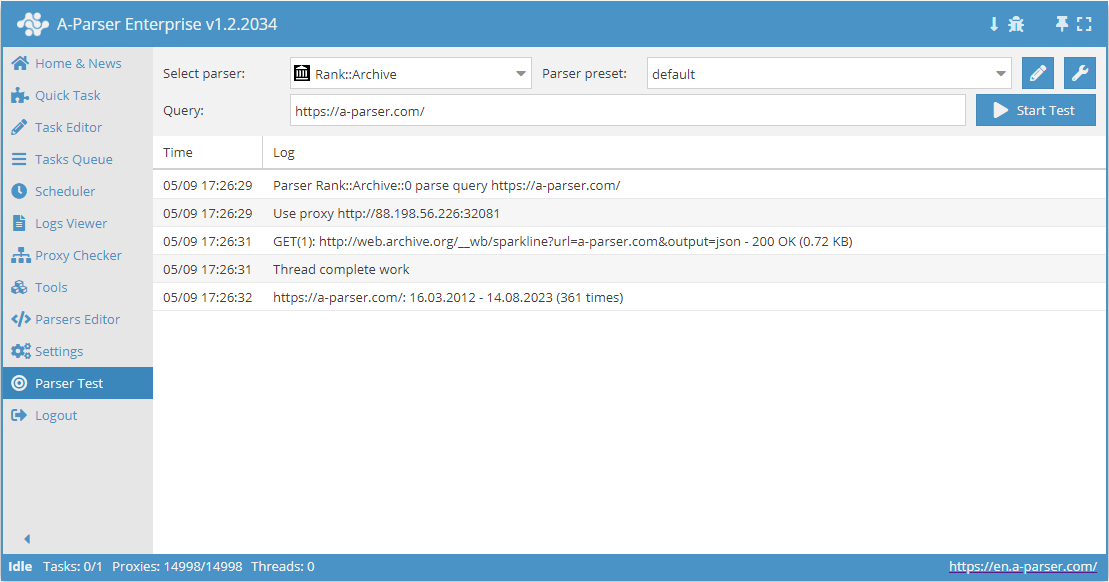
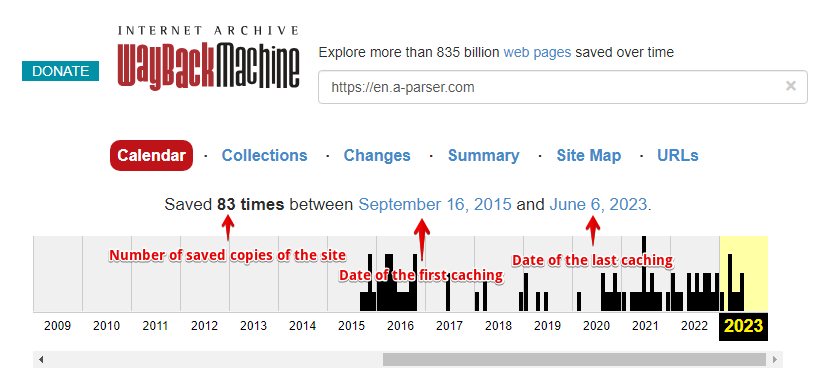
 Rank::Archive – Web Archive parser, determines the date of the first and last caching, as well as the number of saved copies of the site.
A-Parser functionality allows you to save Rank::Archive parser settings for future use (presets), set a parsing schedule, and much more.
Saving results is possible in the form and structure you need, thanks to the built-in powerful Template Toolkit template engine, which allows you to apply additional logic to the results and output data in various formats, including JSON, SQL, and CSV.
Collected data
- First caching date
- Last caching date
- Number of saved site copies
Use cases
- Checking for the existence of a site copy in the web archive, as well as the indexing dates of the first and last copies
- Domain evaluation: a large number of site copies in the web archive may indicate high site traffic
Queries
You should specify the domain of the target site as queries, for example:
a-parser.com
www.yahoo.com
google.com
vk.com
youtube.com
Output results examples
A-Parser supports flexible result formatting thanks to the built-in Template Toolkit template engine, which allows it to output results in arbitrary form, as well as structured, such as CSV or JSON
Default output
Result format:
$query: $first - $last ($times times)\n
The result displays the site, the indexing dates of the first and last copies, and the number of saved site copies:
vk.com: 11.05.2000 - 21.05.2014(8965 times)
youtube.com: 28.04.2005 - 21.05.2014(28150 times)
a-parser.com: 16.03.2012 - 17.05.2014(56 times)
google.com: 11.11.1998 - 21.05.2014(34575 times)
www.yahoo.com: 17.10.1996 - 20.05.2014(28537 times)
Saving in SQL format
Result format:
[% "INSERT INTO archive VALUES('" _ query _ "', '" _ first _ "', '" _ last _ "', '" _ times _ "')\n" %]
Result example:
INSERT INTO archive VALUES('http://a-parser.com/', '16.03.2012', '16.01.2021', '290')
INSERT INTO archive VALUES('http://yandex.ru/', '06.12.1998', '25.03.2021', '141421')
INSERT INTO archive VALUES('http://facebook.com/', '12.12.1998', '25.03.2021', '4877156')
INSERT INTO archive VALUES('http://vk.com/', '11.05.2000', '25.03.2021', '172132')
INSERT INTO archive VALUES('http://google.com/', '11.11.1998', '25.03.2021', '5969502')
INSERT INTO archive VALUES('http://youtube.com/', '28.04.2005', '25.03.2021', '2309673')
Dump results to JSON
General output format:
[% IF notFirst;
  ",\n";
ELSE;
  notFirst = 1;
END;

obj = {};
obj.query = query;
obj.first = p1.first;
obj.last = p1.last;
obj.times = p1.times;

obj.json %]
Initial text:
[
Final text:
]
Result example:
[
    {"first":"12.12.1998","query":"http://facebook.com/","last":"25.03.2021","times":4877156},
    {"first":"06.12.1998","query":"http://yandex.ru/","last":"25.03.2021","times":141421},
    {"first":"16.03.2012","query":"http://a-parser.com/","last":"16.01.2021","times":290},
    {"first":"28.04.2005","query":"http://youtube.com/","last":"25.03.2021","times":2309673},
    {"first":"11.11.1998","query":"http://google.com/","last":"25.03.2021","times":5969502},
    {"first":"11.05.2000","query":"http://vk.com/","last":"25.03.2021","times":172132}
]
To make the "Head text" and "End text" options available in the Task Editor, you need to activate "More options".