FreeAI::Perplexity - Perplexity AI service parser
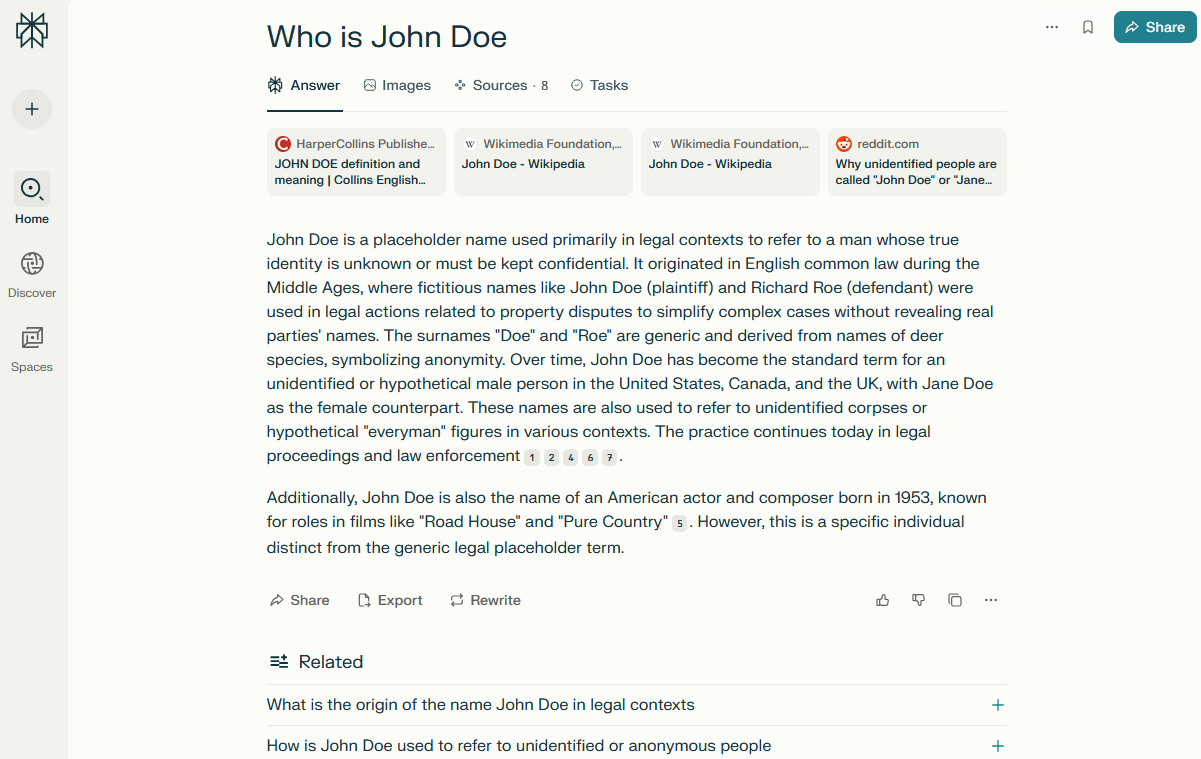
Perplexity Parser Overview
The Perplexity parser is a modern tool for collecting structured information from one of the fastest-growing AI search engines. Through integration with Perplexity, you receive not just lists of links, but up-to-date, concise, and relevant answers based on a large number of sources, including scientific articles, blogs, forums, and news portals.
The Perplexity parser supports natural language queries, including clarifications, contextual questions, and nested constructions. The parser provides the ability to parse relevant questions, automatically adding them to the query queue, thereby significantly expanding the amount of information collected.
Processing speed reaches 500–800 queries per minute thanks to multi-threaded operation. Depending on the configuration and presets used, you can receive thousands of unique text fragments and links within minutes.
Output results can be saved in any required format thanks to the powerful Template Toolkit template engine, which allows you to structure data in JSON, CSV, SQL, and other formats, as well as apply filtering, sorting, and data aggregation on the fly.
The Perplexity parser is ideal for competitive intelligence tasks, fact and quote gathering, knowledge base creation, news monitoring, and topic analysis, due to the high quality and contextuality of the results provided.
Collected Data
- Answer text (in Markdown formatting)
- Links, anchors, and snippets of data sources
- List of related questions
Capabilities
- Choice of information source type (multiple selection supported)
- Substitution of similar questions into the query queue up to a specified depth
- Protection bypass and session support for more stable and faster operation
Use Cases
- Collecting structured answers for thematic queries to create knowledge bases, content plans, reference systems, and FAQ generation
- Extracting source links with anchors and snippets - ideal for building lists of authoritative resources, citations, and backlink collection
- Collecting related/clarifying questions from Perplexity results - useful for analyzing user interest, forming a semantic core, and generating article ideas
- Monitoring mentions of brands, products, or persons - linked to context and sources
- Searching and analyzing expert opinions, trends, and insights from authoritative sources
- Quickly checking the relevance and completeness of information on key topics
- Automating competitor analysis: which resources are cited, which topics are covered, and how often
- Supporting research and analytical projects requiring aggregation of accurate information from different sources
- Any other tasks where quick, brief, accurate answers with confirmation from real sources and logical context are required
Queries
As queries, you should specify search terms exactly as if they were entered directly into the Perplexity search form, for example:
How to learn how to learn fast?
How to improve memory and concentration?
What is a parser?
TOP 10 websites of the Russian Internet
Results
Here and below, result examples are shortened for better clarity
By default, the query and its answer are output, for example:
What is a parser?
A parser is a program or script that automatically collects, analyzes, and systematizes information from various sources, most often from websites[1][2][5][7]. The main task of a parser is to extract the necessary data (for example, texts, prices, contacts, images) from structured or semi-structured arrays of information, such as HTML pages, databases, text files, and other formats[1][5][6].

**How a parser works:**
- Scans specified data sources (for example, web pages).
...

TOP 10 websites of the Russian Internet
## TOP 10 websites of the Russian Internet for June 2025

Based on recent data from Similarweb and other analytical resources, the list of the most visited websites in the Russian segment of the Internet (Runet) includes the following resources:

1. **Yandex.ru** — the largest Russian search engine and internet portal[2][6].
2. **Google.com** — a global search engine actively used in Russia as well[2][6].
...

### Table for clarity

| Rank | Website        | Main function                |
|-------|----------------|------------------------------|
| 1     | yandex.ru      | Search, services, portal     |
| 2     | google.com     | Search                       |
...
Output Results Options
A-Parser supports flexible result formatting thanks to the built-in Template Toolkit template engine, which allows it to output results in arbitrary form, as well as in structured formats like CSV or JSON.
Exporting a List of Links
Result format:
$sources.format('$link\n')
Example result:
https://ru.wikipedia.org/wiki/%D0%91%D0%B8%D1%82%D0%BA%D0%BE%D0%B9%D0%BD
https://www.kaspersky.ru/resource-center/definitions/what-is-bitcoin
https://dzengi.com/ru/chto-takoe-bitcoin-prostim-yazikom
https://www.sberbank.ru/ru/person/kibrary/vocabulary/bitkoin
https://help.cryptopay.me/ru/articles/3414939-%D1%87%D1%82%D0%BE-%D1%82%D0%B0%D0%BA%D0%BE%D0%B5-%D0%B1%D0%B8%D1%82%D0%BA%D0%BE%D0%B8%D0%BD
...
Outputting Links, Anchors, and Snippets with Positions to CSV
Result format:
[% FOREACH item IN sources;
    tools.CSVline(loop.count, item.link, item.anchor, item.snippet);
END %]
Example result:
...
6,https://www.kraken.com/ru/learn/what-is-bitcoin-btc,"What is Bitcoin (BTC)? Complete Guide - Kraken","Learn about Bitcoin's decentralized nature, limited supply, and its role as a digital currency. Find out what powers BTC, its core principles and use cases."
7,https://www.vedomosti.ru/finance/articles/2024/09/23/1064026-bitkoin,"What is bitcoin and why is it needed - Vedomosti","It is a digital currency used as a means of payment and a financial asset"
8,https://forklog.com/cryptorium/chto-takoe-bitkoin,"What is bitcoin and how does it work in simple words? - ForkLog","Bitcoin — is a decentralized system based on the principle of direct exchange between users. The cryptocurrency BTC of the same name is used for transactions."
In the General Result Format, the Template Toolkit engine is used to output the $sources array in a FOREACH loop.
In the result filename, you simply need to change the file extension to csv.
Outputting Question, Answer, and Related Questions List to JSON
General output format:
[% IF notFirst;
  ",\n";
ELSE;
  notFirst = 1;
END;

obj = {};
obj.query = query;
obj.answer = p1.answer;
obj.related = [];

FOREACH item IN p1.related;
    obj.related.push(item.text);
END;

obj.json %]
Initial text:
[
Final text:
]
Example result:
[{"related":["Why is bitcoin considered the first cryptocurrency and how does it differ from traditional money","How does the blockchain technology underlying bitcoin work","What cryptographic methods protect transactions in the bitcoin system","How does the 21 million coin limit make bitcoin a unique asset","What advantages do decentralization and the absence of intermediaries provide when using bitcoin"],"answer":"**Bitcoin** (Bitcoin, BTC) — is the first and most famous cryptocurrency, representing a decentralized digital payment system based on blockchain technology. In this system, all transactions are recorded in a public ledger (blockchain), which is protected by cryptographic methods and available for verification by any network participant[1][3][4].\n...","query":"What is bitcoin?"},{"related":["What are the basic rules and tips that help to google correctly","Why is it important to avoid questions and complex sentences when searching","How to use English for more effective searching in Google","What operators and symbols help expand or refine a search","What is the difference between using quotes and a tilde when searching for information"],"answer":"## How to Google correctly: basic tips\n\n**Formulate queries briefly and to the point**\n- Use 2–6 keywords, avoid long questions and complex sentences. For example, instead of \"what to do if the internet is not working on my windows computer?\" use \"internet not working windows how to fix\"[1].\n\n**Search for exact phrases**\n...","query":"How to google correctly?"}]
Possible Settings
| Parameter name | Default value | Description |
|---|---|---|
| Sources | Web | Information source type (multiple selection supported) |
| Use sessions | ☑ | Saves good sessions, which allows parsing even faster with fewer errors |
| Bypass CloudFlare | ☑ | Automatic CloudFlare protection bypass |
| Bypass CloudFlare Browser Max Pages | 10 | Max number of pages during CF bypass |
| Bypass CloudFlare Browser Headless | ☑ | If the option is enabled, the browser will not be displayed during CF bypass |