SE::Yandex::WordCraft - WordCraft Parser. Keyword research and market analysis
Parser Overview
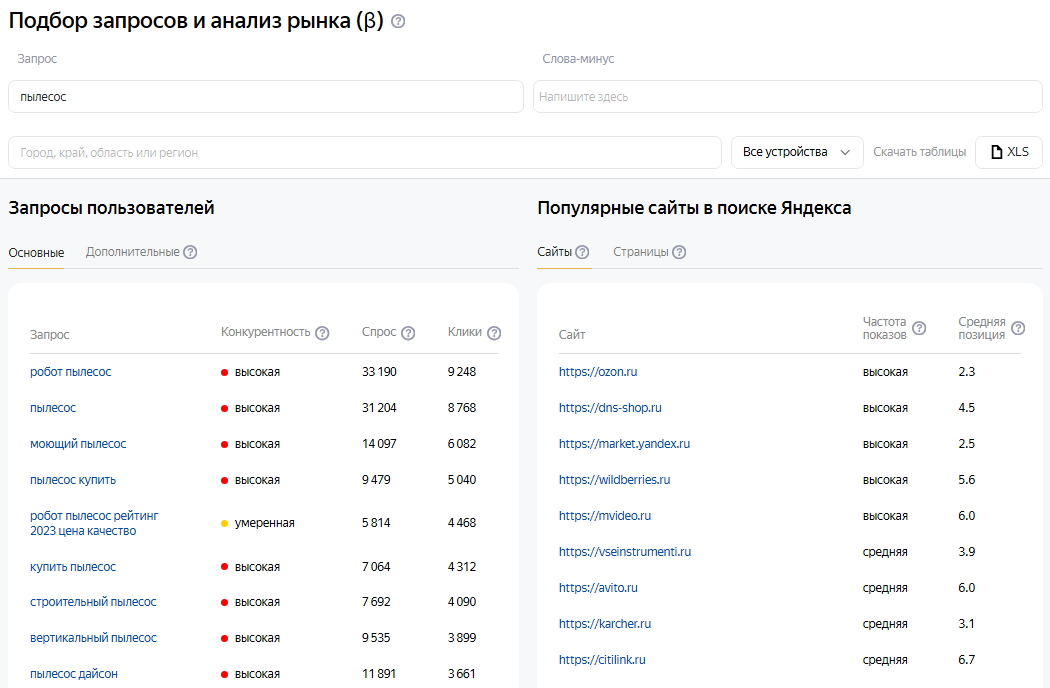
Yandex WordCraft is a part of the Yandex Webmaster service, with which you can select target queries for promotion and advertising, taking into account popularity and the competitive environment. Hundreds of millions of unique queries are available for analysis. Demand, impressions, clicks, and positions are provided as monthly averages for the past year.
The Yandex WordCraft query parser supports automatic query multiplication, so you can be sure that you will receive the maximum number of results from the search results.
A-Parser functionality allows you to save parsing settings for future use (presets), set a parsing schedule, and much more. You can use automatic query multiplication, substitution of subqueries from files, enumeration of alphanumeric combinations and lists to obtain the maximum possible number of results when parsing Yandex Wordstat.
Saving results is possible in the form and structure you need, thanks to the built-in powerful Template Toolkit which allows you to apply additional logic to the results and output data in various formats, including TXT, JSON, SQL, and CSV.
Accounts
To use the  SE::Yandex::WordCraft parser, Yandex accounts are required. Accounts can be registered using the
  SE::Yandex::Register parser or simply by adding existing accounts to the
 files/SE-Yandex/accounts.txt file in the supported format.
Alternatively, you can enable account registration "on the fly".
To work using session authorization, the data string must be in this format:
[email protected];MAQT78Z31Rinx4H;{"answer":"qmfhsxdcrk","proxy":"185.104.120.45:3128","session_id":"3:1748440908.5.0.1748440867459:ZXBxpg:47e4.1.2:1|2191075974.41.2.2:41.3:1748440908|3:10308131.797655.5pfkoRZWgLJGntKTlcUhYdysNfk"}
Collected data
- User queries (main):
- Query, competitiveness, demand, clicks
- User queries (additional):
- Query, competitiveness, demand, clicks
- Popular sites in Yandex search (sites):
- Site, impression frequency, average position
- Popular sites in Yandex search (pages):
- URL, impression frequency, average position, number of queries, title
Use cases
- Assessing competitiveness by keyword (demand, clicks)
- Searching for new keywords of similar topics
- Collecting large databases of keywords of different topics
- Any other options involving parsing Yandex Webmaster WordCraft in one form or another
Queries
Keywords should be specified as queries, exactly as if they were entered directly into the WordCraft search field, for example:
vacuum cleaner
seo
Output results examples
A-Parser supports flexible result formatting thanks to the built-in template engine Template Toolkit, which allows it to output results in an arbitrary form, as well as in a structured one, such as CSV or JSON
Default output
Example of outputting a list of user queries (main). Result format:
User queries general: $uqg.format('$query,$compet,$demand,$clicks\n')
Resulting list:
vacuum cleaner,HIGH,33190,9248
vacuum cleaner,HIGH,31204,8768
vacuum cleaner,HIGH,14097,6082
...
vacuum cleaner,HIGH,791,656
To output results using the General result format you need to specify the parser number in the task - $p1. (parser 1) or p1. if the Template Toolkit template engine. is used. For example:
User queries general: $p1.uqg.format('$query,$compet,$demand,$clicks\n')
See Editing result format for what the General result format is
Output in CSV table
Example of outputting a list of user queries (main) to a CSV table. Result format:
[%
    FOREACH uqg;
        tools.CSVline(query,compet,demand,clicks);
    END;
%]
Example of outputting a list of user queries (additional) to a CSV table. Result format:
[%
    FOREACH uqa;
        tools.CSVline(query,compet,demand,clicks);
    END;
%]
Example of outputting a list of popular sites in Yandex search (sites) to a CSV table. Result format:
[%
    FOREACH rs;
        tools.CSVline(site,popul,position);
    END;
%]
Example of outputting a list of popular sites in Yandex search (pages) to a CSV table. Result format:
[%
    FOREACH rp;
        tools.CSVline(url,popul,position,queries,title);
    END
%]
See also: Results filters
Options
- Parse queries for Rivals pages - when this option is enabled, popular queries are collected for each of the links in Rivals pages. The collected data is recorded as a JSON object in the variable
$rp.$i.queries_json. Enabling this option significantly increases parsing time, as the parser makes many additional subqueries.
Possible settings
| Parameter | Default value | Description |
|---|---|---|
| AntiGate preset | default | The  Util::AntiGate parser must be pre-configured - specify your access key and other parameters, then select the created preset here Util::AntiGate parser must be pre-configured - specify your access key and other parameters, then select the created preset here |
| AntiGate preset for Login | default | AntiGate preset for login. The Util::AntiGate parser must be pre-configured with parameters, then select the created preset here |
| Accounts | Only from "accounts.txt" | Choosing the method of working with accounts: Always auto register - always automatically register accounts "on the fly", you need to select a configured preset in the SE::Yandex::Register preset parameter. Auto register if no more in "accounts.txt" - first, existing accounts from accounts.txt are used, and if they run out, automatic registration "on the fly" is used, for which you accordingly need to select a configured preset in the SE::Yandex::Register preset parameter. Only from "accounts.txt" - use only existing accounts from accounts.txt, and if they run out - wait for a specified time (Wait new accounts in "accounts.txt" parameter) for new ones to appear. Only by session_id from "accounts.txt" - authorization by cookies. |
| Wait new accounts in "accounts.txt" | 0 | Waiting time for new accounts to appear in accounts.txt |
| Remove bad accounts | Always, except wrong login/password | Automatic removal of "bad" accounts: Always - always remove. Always, except wrong login/password - always remove, except when Yandex reported that an incorrect login/password was specified. The fact is that Yandex can give such a message when an IP is banned for a perfectly working account, so optionally you can leave such accounts for reuse. Never - never remove. Regardless of the selected option, accounts are not removed in case of proxy/browser errors |
| SE::Yandex::Register preset | default | Selection of settings preset for SE::Yandex::Register |
| Use sessions | ☑ | Use of sessions |
| Do not reset session if authorization passed | ☑ | Do not reset session on errors if the parser is already authorized |
| SE::Yandex::Register preset | default | Selection of settings preset for SE::Yandex::Register |