Shop::Wildberries::ProductsList - Wildberries product list scraper
Overview
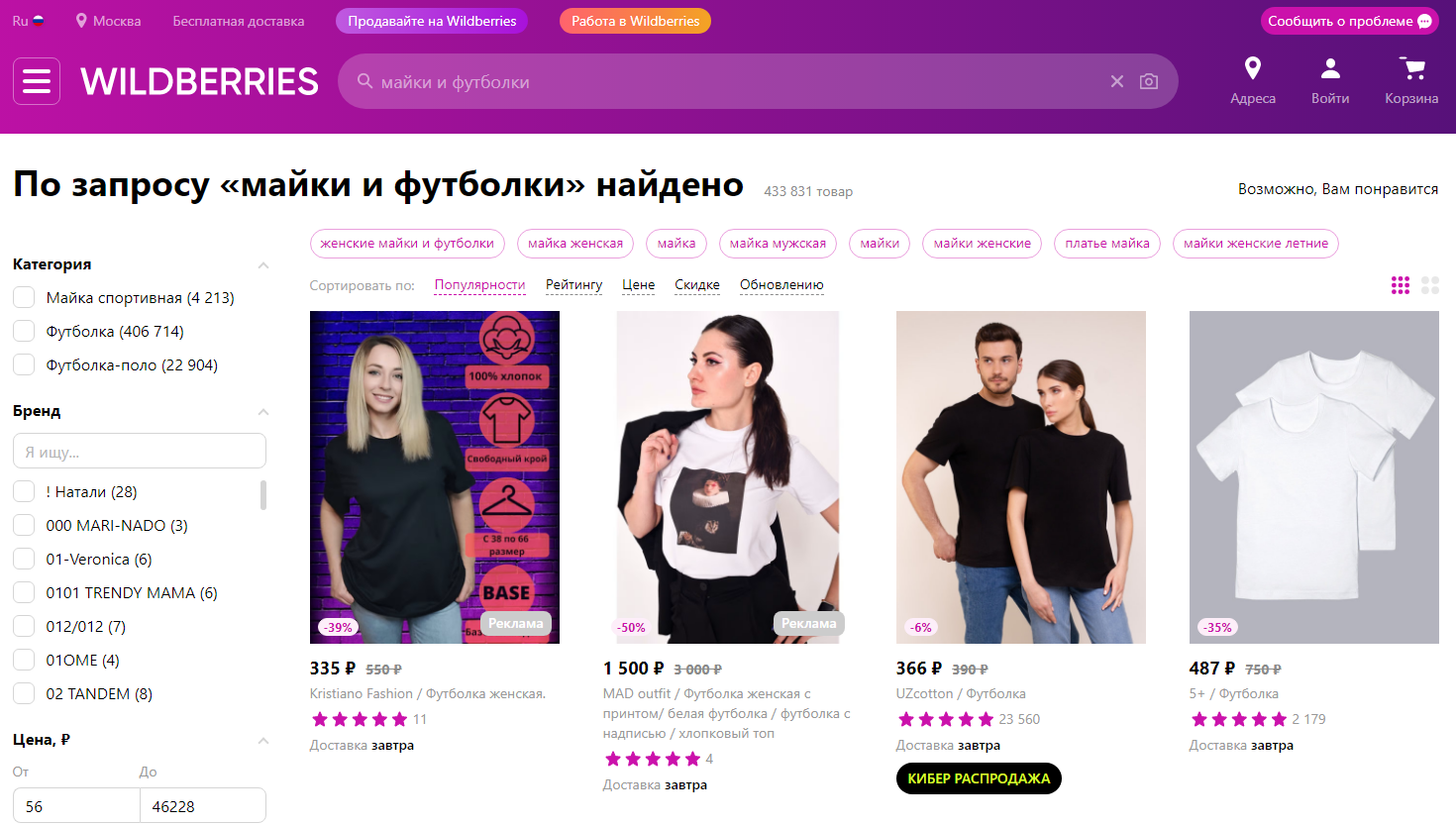
Using the Wildberries product parser, you can retrieve product data from search results by keyword or from a list of products in a specific category or brand. It can be used to collect a database of product links, track price dynamics, changes in the number of reviews or ratings, and collect product images or information about available colors and sizes. Additionally, a separate list of advertisements is collected, indicating the position of each in the organic search results. The parser provides the ability to set result sorting and specify a pickup point.
A-Parser functionality allows you to save parsing settings for future use (presets), set parsing schedules, and much more. You can use automatic query multiplication, substitution of subqueries from files, and iteration of alphanumeric combinations and lists to obtain the maximum possible number of results.
Collected data
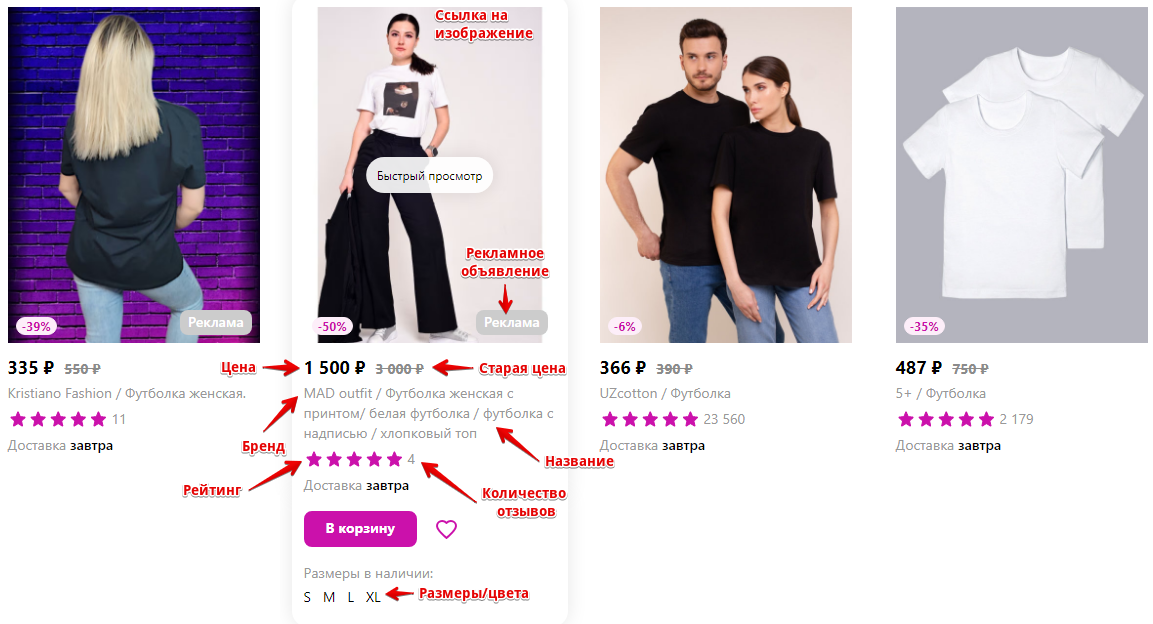
- Number of products
- Product name
- Product link
- Product image
- Brand
- Price and old price
- Rating and number of reviews
- Sizes and/or colors
- For advertisements - position in the product list
- List of keys from "People also search for" and "You might also like"
Use cases
- Collecting product links
- Assessing product popularity
- Tracking price dynamics and product popularity
- Collecting an array of product images
- Determining the positions of advertisements
Queries
As queries, you can use:
Links to a brand's product list, for example:
https://www.wildberries.ru/brands/kristiano-fashion
https://www.wildberries.ru/brands/s-a-s
Links to a product list in a category, for example:
https://www.wildberries.ru/catalog/elektronika/razvlecheniya-i-gadzhety/igrovye-konsoli/playstation
https://www.wildberries.ru/catalog/avtotovary/shiny-i-diski/shiny
Keywords, exactly as if you were entering them directly into the Wildberries search form, for example:
xiaomi mi10
t-shirts and tank tops
car radio
Query substitutions
When using keywords as queries, you can use built-in macros for query multiplication, for example, if you need to get more results than the standard search results provide.
For example, for the keywords listed above, in the query format, we will specify an iteration of characters from a to zzzz; this method allows for maximum rotation of search results and obtaining many new unique results:
$query {az:a:zzzz}
This macro will create 475254 additional queries for each initial search query, which will total 4 x 475254 = 1901016 search queries—an impressive figure, but not a problem at all for A-Parser. At a speed of 2000 queries per minute, such a task will be processed in just 16 hours.
Output results examples
A-Parser supports flexible result formatting thanks to the built-in Template Toolkit, which allows it to output results in an arbitrary form, as well as in structured formats like CSV or JSON.
Outputting brand, name, and price
Result format:
$items.format('$brand, $name, $price\n')
Example result:
Xiaomi, Smartphone Poco X3 Pro / 6.67'' / 2400x1080 / IPS / 8 GB / 256 GB / 5160 mAh, 23751
Realme, Smartphone realme 8 / 6.4'' / 2400x1080 / Super AMOLED / 6 GB / 128 GB / 5000 mAh, 19911
Apple, Smartphone iPhone 11 128GB / 6.1'' / 1792x828 / Liquid Retina HD / 128 GB, 54990
Apple, Smartphone iPhone 12 128GB / 6.1'' / 2532x1170 / OLED / 128 GB, 69990
Samsung, Smartphone Galaxy A32 / 6.4'' / 2400x1080 / Super AMOLED / 4 GB / 128 GB / 5000 mAh, 19791
Outputting with variable names
Result format:
$items.format('Brand: $brand, Name: $name, Price: $price\n')
Example result:
Brand: Samsung, Name: Smartphone Galaxy A32 / 6.4'' / 2400x1080 / Super AMOLED / 4 GB / 128 GB / 5000 mAh, Price: 19791
Brand: Realme, Name: Smartphone realme 8 / 6.4'' / 2400x1080 / Super AMOLED / 6 GB / 128 GB / 5000 mAh, Price: 19911
Brand: Honor, Name: Smartphone Honor 50 / 6.57'' / 2340x1080 / OLED / 6 GB / 128 GB / 4300 mAh, Price: 31490
Brand: Apple, Name: Smartphone iPhone 13 256GB / 6.1'' / 2532x1170 / OLED / 256 GB, Price: 89990
Brand: Xiaomi, Name: Smartphone 6.53'' / 1600x720 / 2 GB / 32 GB / 5000 mAh, Price: 8990
Outputting results with parsing date to a CSV table
Result format:
[% USE d = date(format = '%Y %m %d %H:%M', locale = 'C');
FOREACH item IN items;
    tools.CSVline(d.format(), item.name, item.price, item.link);
END %]
Example result:
"2022 01 26 10:15","Smartphone 6.53'' / 1600x720 / 2 GB / 32 GB / 5000 mAh*",8990,https://www.wildberries.ru/catalog/13615126/detail.aspx
"2022 01 26 10:15","Smartphone iPhone 13 128GB / 6.1'' / 2532x1170 / OLED / 128 GB",74390,https://www.wildberries.ru/catalog/40640907/detail.aspx
"2022 01 26 10:15","Smartphone Galaxy S21 256GB / 6.2'' / Dynamic AMOLED / 8 GB / 256 GB / 4000 mAh*",64791,https://www.wildberries.ru/catalog/18592983/detail.aspx
"2022 01 26 10:15","Smartphone Galaxy M22 / 6.4'' / 720x1600 / Super AMOLED / 4 GB / 128 GB / 5000 mAh*",17280,https://www.wildberries.ru/catalog/41501725/detail.aspx
Outputting name, price, and discount percentage to a CSV table
Result format:
[% USE Math;
FOREACH item IN items;
    discount = item.oldPrice ? (item.oldPrice - item.price) / item.oldPrice * 100 : 0;
    tools.CSVline(item.name, item.price, Math.int(discount + 0.5) _ '%');
END %]
Example result:
"Smartphone Poco X3 Pro / 6.67'' / 2400x1080 / IPS / 8 GB / 256 GB / 5160 mAh*",23751,12%
"Smartphone realme 8 / 6.4'' / 2400x1080 / Super AMOLED / 6 GB / 128 GB / 5000 mAh",19911,17%
"Smartphone iPhone 12 128GB / 6.1'' / 2532x1170 / OLED / 128 GB",69990,0%
"Smartphone Galaxy A32 / 6.4'' / 2400x1080 / Super AMOLED / 4 GB / 128 GB / 5000 mAh",19791,10%
"Smartphone galaxy a52 / 6.5'' / 1080x2400 / Super AMOLED / 8 GB / 256 GB / 4500 mAh*",28691,18%
Outputting to a CSV table
Result format:
[% FOREACH item IN items;
    tools.CSVline(item.link, item.name, item.price, item.oldPrice, item.rating, item.reviews);
END %]
Initial text:
Product link, Product name, Price, Old price, Rating, Number of reviews
Example result:
Product link, Product name, Price, Old price, Rating, Number of reviews
https://www.wildberries.ru/catalog/54067214/detail.aspx,"Women's beanie hat",703,1900,5,6
https://www.wildberries.ru/catalog/41415461/detail.aspx,"Women's beanie hat / cuffed beanie / Beanie",1487,1750,5,346
https://www.wildberries.ru/catalog/16782596/detail.aspx,"Women's beanie hat / cuffed beanie / Beanie",1487,1750,5,346
https://www.wildberries.ru/catalog/9468600/detail.aspx,"Hat with scarf / with gloves / women's beanie",2700,4500,5,137
https://www.wildberries.ru/catalog/4750212/detail.aspx,"Beret",765,1075,5,349
https://www.wildberries.ru/catalog/9793364/detail.aspx,"Beret with scarf",3297,4710,5,307
Saving in SQL format
Result format:
[% FOREACH item IN items;
    "INSERT INTO products VALUES('" _ item.name _ "', '"; item.link _ "', '"; item.price _ "', '"; item.brand _ "')\n";
END %]
Example result:
INSERT INTO products VALUES('Smartphone 6.53'' / 1600x720 / 2 GB / 32 GB / 5000 mAh*h', 'https://www.wildberries.ru/catalog/13615125/detail.aspx', '8990', 'Xiaomi')
INSERT INTO products VALUES('Smartphone galaxy a52 / 6.5'' / 1080x2400 / Super AMOLED / 4 GB / 128 GB / 4500 mAh*h', 'https://www.wildberries.ru/catalog/23155682/detail.aspx', '24291', 'Samsung')
INSERT INTO products VALUES('Smartphone 6.53'' / 1600x720 / 2 GB / 32 GB / 5000 mAh*h', 'https://www.wildberries.ru/catalog/13615126/detail.aspx', '8990', 'Xiaomi')
Dumping results to JSON
General output format:
[% IF notFirst;
  ",\n";
ELSE;
  notFirst = 1;
END;

obj = {};
obj.query = query;
obj.items = [];

FOREACH item IN p1.items;
    obj.items.push({
        link = item.link
        name = item.name
        price = item.price
    });
END;

obj.json %]
Initial text:
[
Final text:
]
Example result:
[
    {
        "query": "smartphone",
        "items": [
            {
                "link": "https://www.wildberries.ru/catalog/27379808/detail.aspx",
                "name": "Smartphone realme 8 / 6.4'' / 2400x1080 / Super AMOLED / 6 GB / 128 GB / 5000 mAh",
                "price": 19911
            },
            {
                "link": "https://www.wildberries.ru/catalog/16023994/detail.aspx",
                "name": "Smartphone iPhone 11 128GB / 6.1'' / 1792x828 / Liquid Retina HD / 128 GB",
                "price": 54990
            },
            {
                "link": "https://www.wildberries.ru/catalog/15875669/detail.aspx",
                "name": "Smartphone iPhone 12 128GB / 6.1'' / 2532x1170 / OLED / 128 GB",
                "price": 69990
            },
            ...
        ]
    },
    ...
]
To make the "Initial text" and "End text" options available in the Task Editor, you need to activate "More options".
Possible settings
| Parameter | Default value | Description |
|---|---|---|
| Pages count | 5 | Number of pages to parse |
| Sort by | Popularity | Result sorting |
| Address | Pickup point address | |
| Longitude | Pickup point longitude | |
| Latitude | Pickup point latitude |
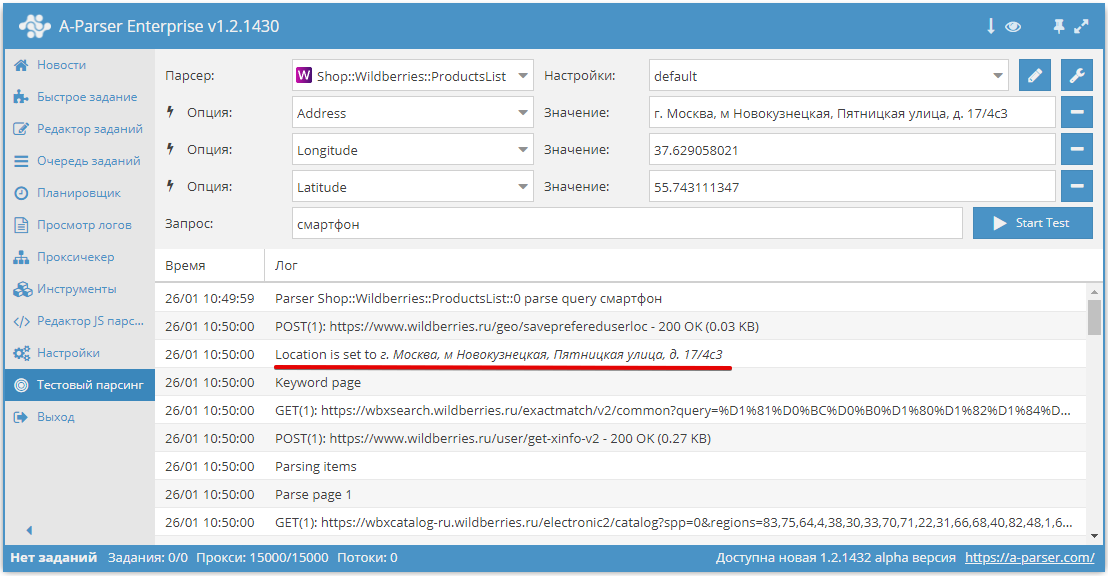
By default, Wildberries displays results for Moscow. The parser allows you to specify a pickup point, and the results list will be tied to a specific location. To do this, you need to override 3 parameters: Address, Longitude, and Latitude. You can obtain the necessary values for these parameters in your browser:
1. Select the desired pickup point, having previously opened Developer Tools (F12 in Chrome)
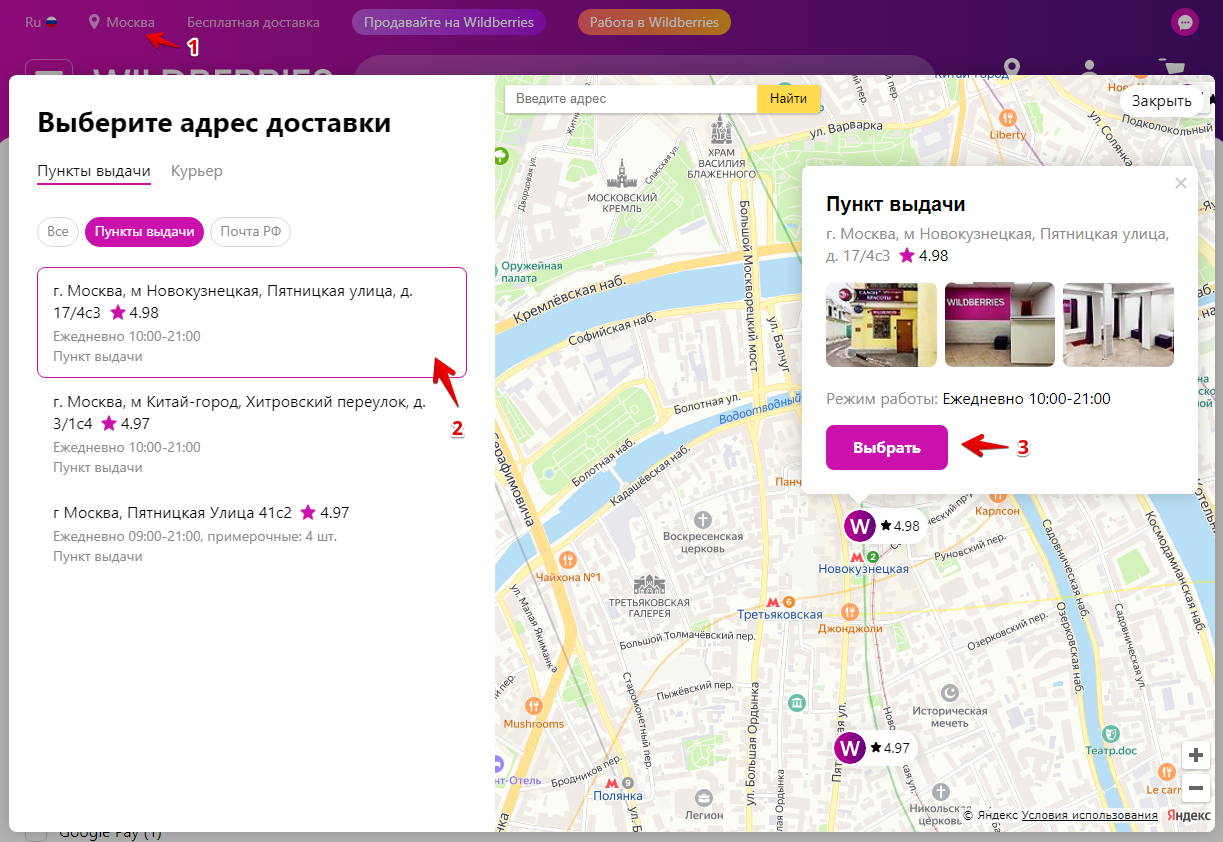
2. In Developer Tools on the Network tab, search for the request saveprefereduserloc and in the request body you will see the necessary data
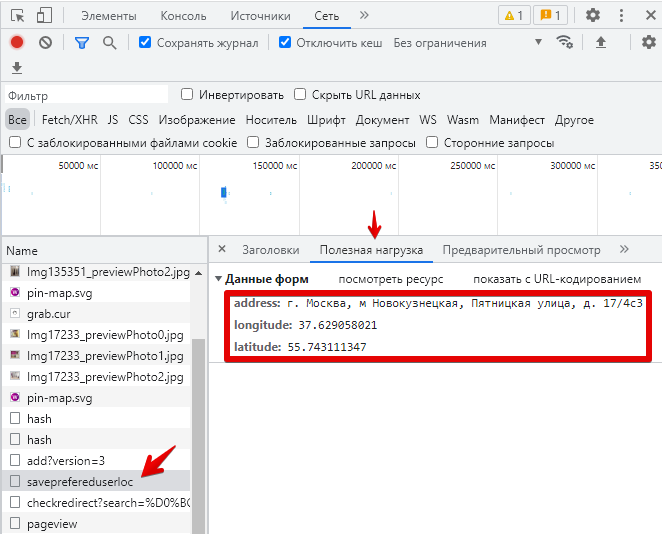
3. Copy them exactly into the parser settings