GooglePlay::Apps - Google Play App Scraper
Overview of the parser
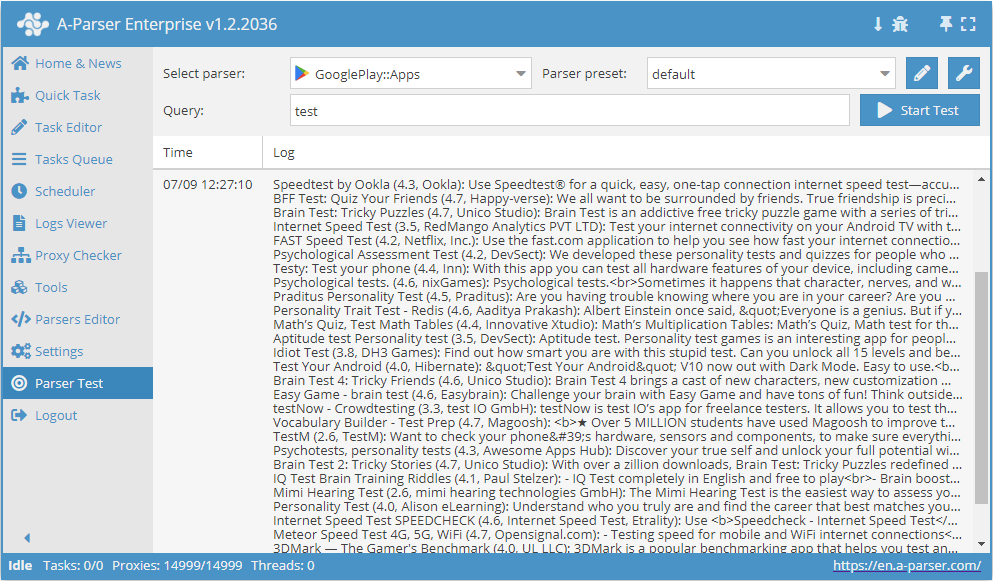
 GooglePlay::Apps – parses app data from Google Play. Automated collection of all data: title, rating, author, description, app link, and price.
You can use automatic query multiplication, substitution of subqueries from files, iteration of alphanumeric combinations and lists to obtain the maximum possible number of results. Using results filtering you can immediately clean the result by removing all unnecessary junk (using negative keywords).
A-Parser functionality allows you to save parsing settings for the GooglePlay::Apps parser for future use (presets), set a parsing schedule, and much more.
Saving results is possible in the form and structure you need, thanks to the built-in powerful Template Toolkit which allows you to apply additional logic to the results and output data in various formats, including JSON, SQL, and CSV.
Use cases for the parser
🔗 Parsing apps with discounts
Searching for apps with discounts on Google Play and saving the collected data to a database
🔗 Google Play Suggestions
Google Play store suggestion parser
Collected data
Data is collected from the service play.google.com
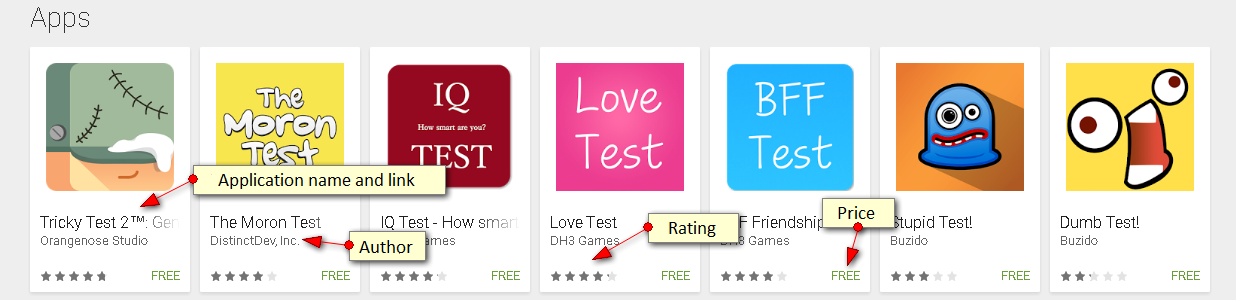
- Name
- Rating
- Description
- Link to the application
- Price
- Number of downloads
- Application genre
Capabilities
- Selection of the country from which the search is performed
- Selection of the result page language
- Search by price (Free or Paid)
- Search by rating (All or above 4+)
Use cases
- Parsing application data from Google Play
Queries
As queries, you must specify phrases by which the search in GooglePlay will be performed, for example:
heart rate monitor
Query substitutions
You can use built-in macros for automatic substitution of subqueries from files, for example, we want to add a list of other words to each query, let's specify several main queries:
fantasy
tower defense
rpg
In the query format, we will specify a macro for substituting additional words from the file keywords.txt, this method allows you to increase the variability of queries many times over:
{subs:keywords} $query
This macro will create as many additional queries as there are in the file for each original search query, which in total will give [number of original queries] x [number of queries in the Keywords file] = [total number of queries] as a result of the macro.
For example, if the file keywords.txt contains:
free
online
As a result, the substitution macro will turn 3 main queries into 6:
free fantasy
online fantasy
free tower defense
online tower defense
free rpg
online rpg
Output results examples
A-Parser supports flexible result formatting thanks to the built-in Template Toolkit, which allows it to output results in arbitrary form, as well as in structured form, such as CSV or JSON
Default output
Result format:
$serp.format('$name ($rating, $author): $desc ($link, $price)\n')
Result example:
Heart Rate Monitor (4.5, Meet Your Need Production): Most Precise Heart Rate Monitor Ever + Unlimited Measurements and Records. (https://play.google.com/store/apps/details?id=com.supersimpleapps.heart_rate_monitor_newui, free)
Instant Heart Rate : Heart Rate & Pulse Monitor (4.3, Azumio Inc.): Best way to track heart rate, health, fitness, workout, cardio, stress, training (https://play.google.com/store/apps/details?id=si.modula.android.instantheartrate, free)
Pulse - Heart Rate Monitor (4.3, Ahmerov Vadim): Get your heart rate in seconds! The Best way to measure your heart rate. (https://play.google.com/store/apps/details?id=com.icebit.pulse, free)
Heart Rate Monitor (4.5, REPS): The simplest yet the most accurate app to monitor your heart rate! (https://play.google.com/store/apps/details?id=com.repsi.heartrate, free)
Cardiograph - Heart Rate Meter (3.8, MacroPinch): How fast is your heart beating? Measure your pulse. (https://play.google.com/store/apps/details?id=com.macropinch.hydra.android, free)
iCare Health Monitor (BP & HR) (4.6, iCare Fit Studio): Measure blood pressure,heart rate,vision,hearing,SpO2,breath rate by the phone (https://play.google.com/store/apps/details?id=comm.cchong.BloodAssistant, free)
Output in CSV table
Result format:
[% FOREACH i IN serp;
    tools.CSVline(i.name, i.rating, i.author, i.price);
END %]
File name:
$datefile.format().csv
Initial text:
Name,Rating,Author,Price
The Template Toolkit is used in the Result Format to output elements of the $serp array in a FOREACH loop.
In the result file name, you just need to change the file extension to csv.
To make the "Initial text" option available in the Task Editor, you need to activate "More options". In "Initial text", we write the column names separated by commas and make the second line empty.
Saving in SQL format
Result format:
[% FOREACH serp;
    "INSERT INTO serp VALUES('" _ name _ "', '" _ rating _ "', '" _ author _ "')\n";
END %]
Result example:
INSERT INTO serp VALUES('Internet Speed Test-FiberTest for Android Smart TV', '3.9', 'RedMango Analytics PVT LTD')
INSERT INTO serp VALUES('Phone Check and Test', '4.6', 'inPocket Software')
INSERT INTO serp VALUES('Speedtest by Ookla', '4.3', 'Ookla')
INSERT INTO serp VALUES('Expert Speed Test WiFi Analyzer - analiti', '4.6', 'analiti Experts Group')
INSERT INTO serp VALUES('Brain Test: Tricky Puzzles', '4.6', 'Unico Studio')
INSERT INTO serp VALUES('Love Test Calculator - Compatibility Tester Prank', '3.8', 'DH3 Games')
INSERT INTO serp VALUES('FAST Speed Test', '4.3', 'Netflix, Inc.')
INSERT INTO serp VALUES('DMV WRITTEN TEST: Free DMV Tests for All 50 States', '4.7', 'DMV Written Test')
INSERT INTO serp VALUES('Brain Test 2: Tricky Stories', '4.6', 'Unico Studio')
INSERT INTO serp VALUES('Internet speed test Meter- SpeedTest Master', '4.9', 'Test speed internet & Net meter')
INSERT INTO serp VALUES('Test Your Android - Hardware Testing & Utilities', '4.2', 'Hibernate')
INSERT INTO serp VALUES('Stupid Test - How Smart Are You?', '3.6', 'DH3 Games')
INSERT INTO serp VALUES('love test', '4.1', 'MobilPlug')
INSERT INTO serp VALUES('Personality Trait Test', '4.2', 'Aaditya Prakash')
INSERT INTO serp VALUES('Aptitude test. Personality test games', '4.2', 'iq test')
INSERT INTO serp VALUES('What animal are you? Test', '3.5', 'Hemisoft')
INSERT INTO serp VALUES('Lie Detector Face Test Simulator Prank', '3.9', 'Droidheads')
INSERT INTO serp VALUES('BFF Friendship Test', '4.1', 'DH3 Games')
INSERT INTO serp VALUES('IQ and Aptitude Test Practice', '4.0', 'LangiS')
INSERT INTO serp VALUES('FCC Speed Test', '3.3', 'FCCAPPs')
INSERT INTO serp VALUES('40+ Psychological Tests', '4.4', 'MuraDev')
INSERT INTO serp VALUES('G1 Test Genie: Drivers Test Practice Ontario 2021', '4.5', 'Elegant E-Learning')
INSERT INTO serp VALUES('Brain test - psychological and iq test', '4.4', 'iq test')
Dump results to JSON
General output format:
[% IF notFirst;
  ",\n";
ELSE;
  notFirst = 1;
END;

obj = {};
obj.serp = [];

FOREACH item IN p1.serp;
    obj.serp.push({
        name = item.name
        author = item.author
        rating = item.rating
        price = item.price
    });
END;

obj.json %]
Initial text:
[
Final text:
]
Result example:
[{"serp": [{"name":"Internet Speed Test-FiberTest for Android Smart TV","price":"free","author":"RedMango Analytics PVT LTD","rating":"3.9"},{"name":"Phone Check and Test","price":"free","author":"inPocket Software","rating":"4.6"},{"name":"Speedtest by Ookla","price":"free","author":"Ookla","rating":"4.3"},{"name":"Expert Speed Test WiFi Analyzer - analiti","price":"free","author":"analiti Experts Group","rating":"4.6"},{"name":"Brain Test: Tricky Puzzles","price":"free","author":"Unico Studio","rating":"4.6"},{"name":"Love Test Calculator - Compatibility Tester Prank","price":"free","author":"DH3 Games","rating":"3.8"},{"name":"FAST Speed Test","price":"free","author":"Netflix, Inc.","rating":"4.3"},{"name":"DMV WRITTEN TEST: Free DMV Tests for All 50 States","price":"free","author":"DMV Written Test","rating":"4.7"},{"name":"Internet speed test Meter- SpeedTest Master","price":"free","author":"Test speed internet & Net meter","rating":"4.9"},{"name":"Brain Test 2: Tricky Stories","price":"free","author":"Unico Studio","rating":"4.6"},{"name":"Stupid Test - How Smart Are You?","price":"free","author":"DH3 Games","rating":"3.6"}]}]
To make the "Initial text" and "End text" options available in the Task Editor, you need to activate "More options".
Possible settings
| Parameter | Default value | Description |
|---|---|---|
| Country | United States | Selection of the country from which the search is performed. |
| Language | English | Selection of the result page language. |
| Prices | All | Selection of results by price (Free or Paid). |
| Ratings | All | Selection of results by rating. |