SE::Google::SafeBrowsing - Check domain in Google blacklist
Overview of the parser
The Google Safe Browsing parser allows you to check a domain against the Google blacklist. Using the Google Safe Browsing parser, you can check your own domain databases for presence in the Google blacklist. More details about this label can be found in Google Search Help.
A-Parser functionality allows you to save parsing settings for future use (presets), set parsing schedules, and much more.
Thanks to the multi-threaded operation of A-Parser, the request processing speed can reach 3800-4000 requests per minute.
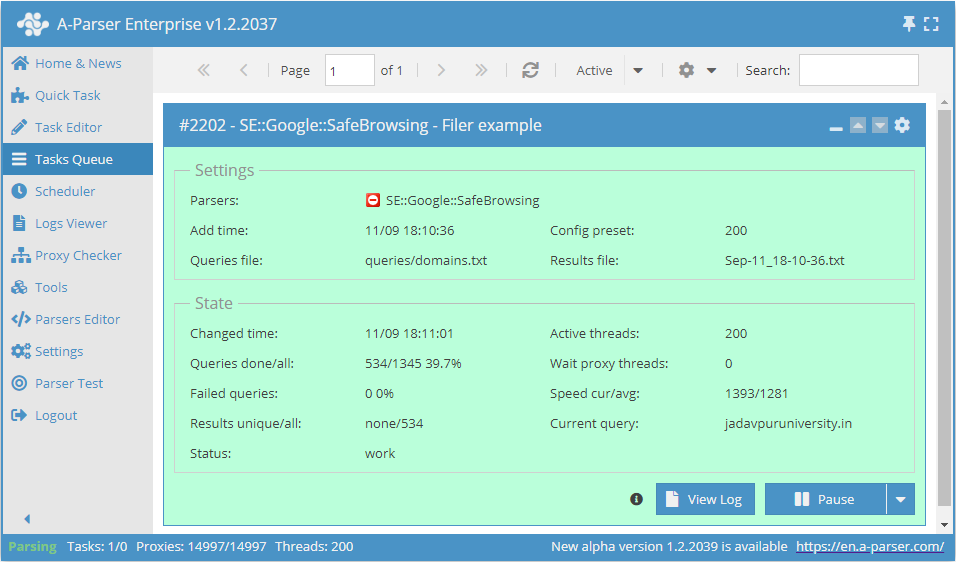
Saving results is possible in any form and structure you need, thanks to the built-in powerful Template Toolkit templating engine, which allows applying additional logic to the results and outputting data in various formats, including JSON, SQL, and CSV.
Collected data
- Presence in the list of suspicious sites

Use cases
- Checking a list of domains for inclusion in the Google blacklist
- Monitoring your own domains for inclusion in the Google blacklist
Queries
You must specify the URL of the target site as queries, for example:
http://a-parser.com/
http://www.yandex.ru/
http://facebook.com/
http://youtube.com/
http://perfect-soft.net/
Output results examples
A-Parser supports flexible result formatting thanks to the built-in Template Toolkit templating engine, which allows it to output results in an arbitrary form, as well as in a structured format, such as CSV or JSON
Exporting the blacklist check list
Result format:
$query: $exists\n
Example result showing the URL and whether it is in the Google blacklist:
http://youtube.com/: 0
http://www.yandex.ru/: 0
http://a-parser.com/: 0
http://perfect-soft.net: 1
http://facebook.com/: 0
Outputting results to a CSV table
The built-in utility $tools.CSVLine allows creating correct tabular documents ready for import into Excel or Google Sheets.
General result format:
[% tools.CSVline(query.orig,p1.exists) %]
File name:
$datefile.format().csv
Initial text:
Site,Check result
Example result:
Site,Check result
http://youtube.com/,0
http://www.yandex.ru/,0
http://a-parser.com/,0
http://perfect-soft.net,1
http://facebook.com/,0
The General result format uses the Template Toolkit engine to output the query and check against the blacklist.
In the result file name, simply change the file extension to csv.
To make the "Initial text" option available in the Task Editor, you need to activate "More options". In "Initial text", write the column names separated by commas and make the second line empty.
Saving in SQL format
Result format:
[% "INSERT INTO volumes VALUES('" _ query.query _ "', '" _ exists _ "')\n" %]
Result example:
INSERT INTO serp VALUES('http://www.yandex.ru/', '0')
INSERT INTO serp VALUES('http://a-parser.com/', '0')
INSERT INTO serp VALUES('http://perfect-soft.net', '1')
INSERT INTO serp VALUES('http://facebook.com/', '0')
INSERT INTO serp VALUES('http://youtube.com/', '0')
Dump results to JSON
General output format:
[% IF notFirst;
  ",\n";
ELSE;
  notFirst = 1;
END;

obj = {};
obj.query = p1.query.orig;
obj.exists = p1.exists;

obj.json %]
Initial text:
[
Final text:
]
Result example:
[{"query":"http://www.yandex.ru/","exists":"0"},
{"query":"http://youtube.com/","exists":"0"},
{"query":"http://facebook.com/","exists":"0"},
{"query":"http://a-parser.com/","exists":"0"},
{"query":"http://perfect-soft.net","exists":"1"}]
To make the "Initial text" and "End text" options available in the Task Editor, you need to activate "More options".
Results processing
A-Parser allows processing results directly during parsing; in this section, we have provided the most popular cases for the SE::Google::SafeBrowsing parser
Saving domains with validation value "1"
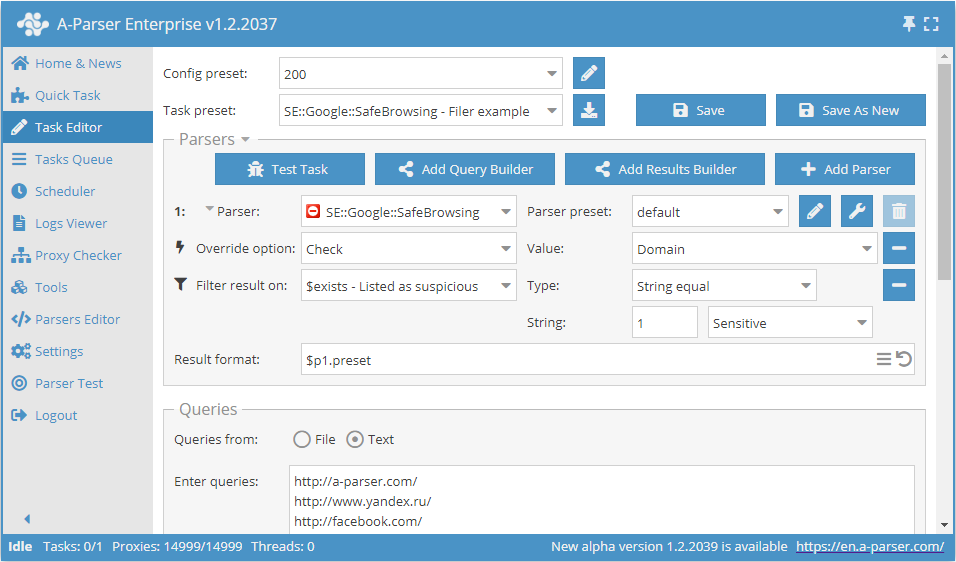
Add a filter and select the validation value variable $exists - Listed as suspicious from the drop-down list. Select type: String equals. Next, in String, enter the value we need: 1. With such a filter, you can remove all results with unwanted values.
Download example
How to import an example into A-Parser
eJx1VEuP2jAQ/ivI4tBKEMqhl9wAlaoVXbYLe2I5mGTCujger+3wUJT/3rETEth2
b57H983bJXPcHuyjAQvOsnhTMh3eLGarb3H8HXEvIY5XPIOpwZMVat8b9uZCgunB
medaAhswzY0F4/GbD2HklkLGC+nYoGTuooFi4BGMEannECnJySskBxKOXBbenmLO
hWJVh8iEdGDIhdL0XDGDs7CU+6AxrWs/eCu4vGEa0xu1E6hIsKAsq7bbK4udo8m5
J+vrcdR0oDWu+BHWWMeGTu2b8MBzT95PuQNvjbJA9Olz5M6egaep8DG5rCP4FnVR
n5V4C8kpJF96GgF2bjAnlYNA4JWXa3Yb1g8yI4oiYH/XGBZnXFoYMEupzjklkr63
CGoNd2iWoQekLxmqiZQLOILs3AL/tBAypXlOMgL9aID/d1n+w1G15d2GojmfDOXQ
sgRpuvzVoVJc4N7PfEd1S5ELR7KdYaH8YL6Q8gCg2549+J7laKAN0zA30WmnNSi/
VN3IJrpT3ZVxN5Z7ZYIqE/tls6hXz0Kt6XCWaob+BHxdqpCSxmLhqVuPiW3G4IUu
wffgWQjhS78eCHOI0v5c1alqI2j9vvoEc+rkbdSGMuFSPj8tbi2sWykSXp3T8WjE
h/WpRgnmoxfVaE+nU3ThKoVzZIpOnfEEdoiHe+cLFq7Ywb1Sg8kgcUOLmYtUOJ6E
TmKPtKzUsGrb/hHtV1N+/FPEZUX78Mc+1hDfPA8gHU3BhhMeV38BeN+pvw==
See also: Results filters
Possible settings
| Parameter name | Default value | Description |
|---|---|---|
| Check | Domain | Selection of check type (Domain / Full link) |