SE::Google::Suggest - Google search suggestions parser
Overview of the parser
Google keyword suggestion parser. Thanks to the SE::Google::Suggest parser, you can automatically collect keyword databases from Google search suggestions by query. Using the SE::Google::Suggest parser, you can easily and quickly parse Google suggestions for a query based on the selected country, language, or domain.
The Google Suggest parser solves one of the main SEO tasks, namely the fast automated acquisition of an expanded semantic core. Google search suggestions allow you to cover the maximum number of phrases, and in combination with the Google Keyword parser -  SE::Google::KeywordPlanner - you will get the most complete semantics, which will help attract more organic traffic.
Thanks to A-Parser multi-threaded operation, query processing speed can reach 6000 queries per minute, which on average allows receiving up to 45000-46000 results per minute.
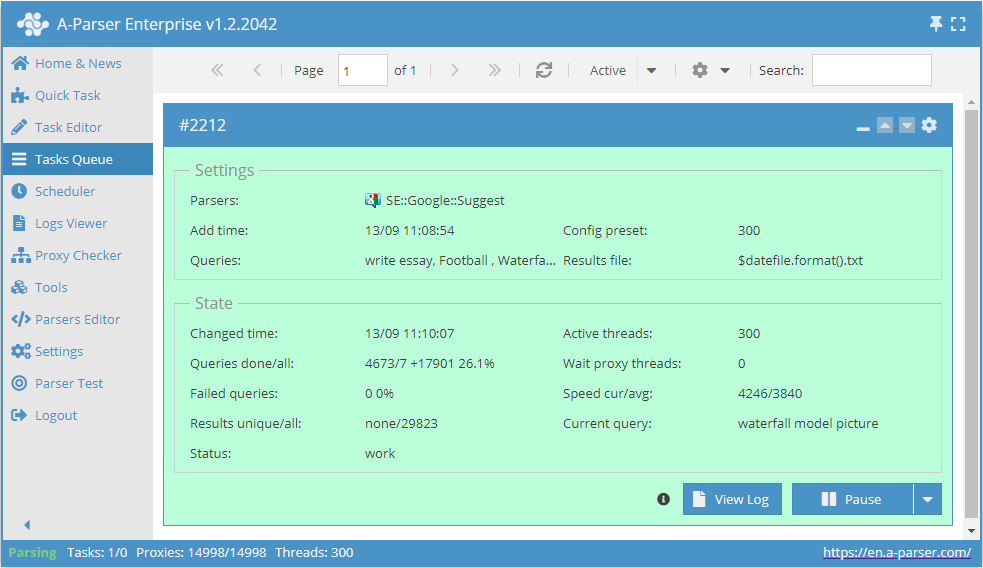
You can use automatic query multiplication, substitution of subqueries from files, iteration of alphanumeric combinations and lists to obtain the maximum possible number of results. Using results filtering you can immediately clean the result by removing all unnecessary garbage (using negative keywords).
A-Parser functionality allows you to save SE::Google::Suggest parsing settings for future use (presets), set a parsing schedule, and much more.
Saving results is possible in the form and structure you need, thanks to the built-in powerful Template Toolkit templating engine which allows applying additional logic to results and outputting data in various formats, including JSON, SQL, and CSV.
Use cases for the parser
🔗 JS::Google::FromSnippets
Example of working in JS parsers with built-in parsers
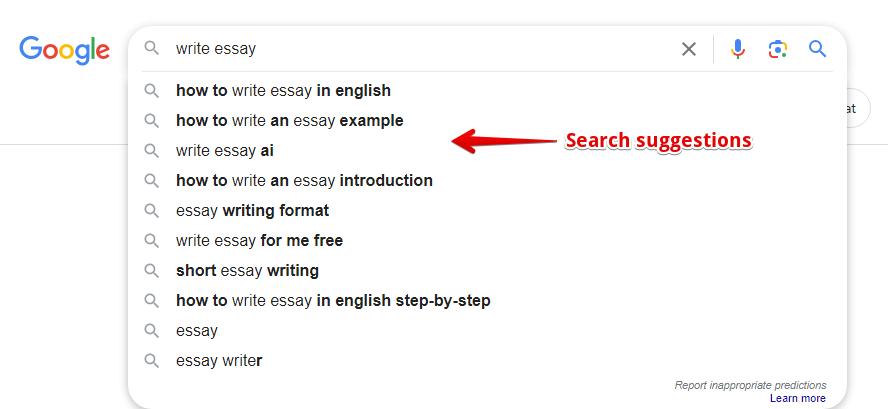
Collected data
- Number of results per query
- Query suggestions
- Suggestion type (0 - human, 1 - artificial)
Capabilities
- Supports selection of search country, domain, and language of results
- Ability to select the source to be used for collecting suggestions (Client option)
- Ability to remove HTML tags from parsing results (Remove HTML tags option)
Use cases
- Collecting keyword databases
Queries
Search phrases should be specified as queries, for example:
write essay
Football
Waterfall
Speak in english
Cats and dogs
forex
cheap essay
Query substitutions
You can use built-in macros for automatic substitution of subqueries from files; for example, if we want to add a list of other words to each query, we specify several main queries:
essay
article
thesis
In the query format, we specify a substitution macro for additional words from the file Keywords.txt; this method allows increasing query variability manifold:
{subs:Keywords} $query
This macro will create as many additional queries as there are in the file for each original search query, which in total will give [number of original queries (domains)] x [number of queries in the Keywords file] = [total number of queries] as a result of the macro's operation.
For example, if the Keywords.txt file contains:
buy
cheap
As a result, the substitution macro will turn 3 main queries into 6:
buy essay
cheap essay
buy article
cheap article
buy thesis
cheap thesis
Output results examples
A-Parser supports flexible result formatting thanks to the built-in Template Toolkit templating engine, which allows it to output results in arbitrary form, as well as in structured form, such as CSV or JSON
Exporting a list of suggestions
Result format:
$results.format('$suggest\n')
Result example:
buy essays online
buy essay cheap
buy essay uk
buy essays online no plagiarism
buy essay papers
buy essay online reviews
buy essays reddit
buy essay friend
Outputting query, query suggestions + suggestion type
Result format:
$query:\n$results.format('$suggest - $type\n')
Result example:
cheap essay:
cheap essay writing service - 1
cheap essay writing service uk - 1
cheap essay writing service canada - 1
cheap essay writing 24 - 1
cheap essays online - 1
cheap essay writing service reddit - 1
cheap essay writing service australia - 1
cheap essay writing service review - 1
buy essay:
buy essay online - 1
buy essay cheap - 1
buy essay uk - 1
buy essay papers - 1
buy essay online reviews - 1
buy essays reddit - 1
buy essay friend - 1
buy essay online uk - 1
Output to CSV table
The built-in utility $tools.CSVLine allows creating correct tabular documents ready for import into Excel or Google Sheets.
General result format:
[% FOREACH i IN p1.results;
    tools.CSVline(i.suggest);
END %]
File name:
$datefile.format().csv
Head text:
Suggestions
In the General result format, the Template Toolkit engine is used to output elements of the $results array in a FOREACH loop.
In the result file name, you simply need to change the file extension to csv.
To make the "Head text" option available in the Task Editor, you need to activate "More options". In "Head text", write the column names separated by commas and make the second line empty.
Keyword competition
Saving in SQL format
Result format:
[% FOREACH results; "INSERT INTO serp VALUES('" _ query _ "', '"; suggest _ "', '"; type _ "')\n"; END %]
Result example:
INSERT INTO serp VALUES('cheap essay', 'cheap essay writing service', '1')
INSERT INTO serp VALUES('cheap essay', 'cheap essay writing service uk', '1')
INSERT INTO serp VALUES('cheap essay', 'cheap essay writing service canada', '1')
INSERT INTO serp VALUES('cheap essay', 'cheap essay writing 24', '1')
INSERT INTO serp VALUES('buy essay', 'buy essay online', '1')
INSERT INTO serp VALUES('buy essay', 'buy essay cheap', '1')
INSERT INTO serp VALUES('buy essay', 'buy essay uk', '1')
INSERT INTO serp VALUES('buy essay', 'buy essay papers', '1')
...
Result dump to JSON
General output format:
[% IF notFirst;
  ",\n";
ELSE;
  notFirst = 1;
END;

obj = {};
obj.totalcount = p1.totalcount;
obj.suggests = [];

FOREACH item IN p1.results;
    obj.suggests.push(item.suggest);
END;

obj.json %]
Initial text:
[
Final text:
]
Result example:
[{"suggests":["buy essay online","buy essay cheap","buy essay uk","buy essays online no plagiarism","buy essay papers","buy essay online reviews","buy essays reddit","buy essay friend"],"totalcount":8}]
To make the "Head text" and "End text" options available in the Task Editor, you need to activate "More options".
Results processing
A-Parser allows processing results directly during parsing; in this section, we have provided the most popular cases for the SE::Google::Suggest parser
Parse to level option
The option instructs the parser to substitute the obtained results into the query queue in depth up to the specified level, for example:
- If the 1st level is specified, the parser will add all results obtained from the initial query to the queries
- If the 2nd level is specified, the parser will add all results obtained from the initial query + all results obtained from queries of the 1st level to the queries
- and so on.
In simple terms, this is the substitution of received results into the query queue, which in turn allows parsing more results. Since there will likely be duplicates in the results, it is recommended to enable Query deduplication so that the parser does not do unnecessary work (does not parse the same thing).
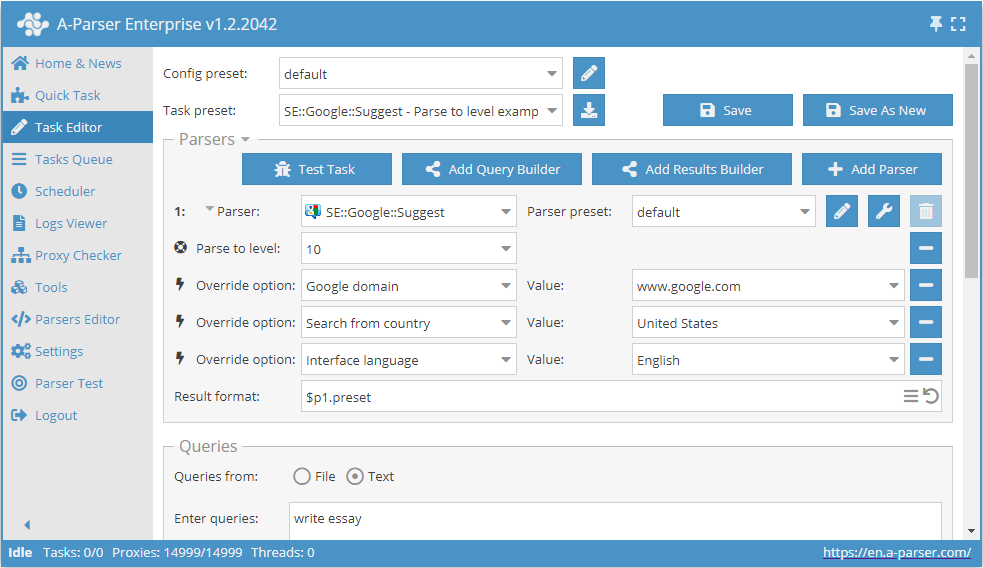
Download example
How to import an example into A-Parser
eJx9VE1v2zAM/SsGkcMGZEF72MW3NFiGDlmd1c0pyEGIaVerLHmSnDQw/N9HKo7t
bEFvpvj4+PFIN+CFe3Nriw69g3jbQBW+IYb0Wxx/N6ZQGMdpXRTofPQlWgvrMPIm
UnhAFeG7KCuFMIWKHZY5trdCCZFhLmpFXw34U4WUwlReGu3IJzMyA8WKeenlIFRN
mPu7doQ/oLUyw0tAZkoh9QCG4/E4K0Li2d6U8EFoMcoBm/Qj6OsYihra3W4KNCXq
xS2NLQVPa1Ldz7rR9c5UHPDFkDOXYUSXGLKeRMlsk0x4ZO8sD0SfPs/8OzOILJM8
G6HOGXiuQ9aNln9CNc5bqQvCk2kluqWlrmPwGEj48XSpcAuTYAPR1CH+1zkGYm9r
nIKjapeCasl6Ry6UI4/0aIU3Nunkihsweq5UkGqABfqHWqqM9mCeU9BjF3gbkvzH
0fYdjlORHEdLNfQswXpIfg5RmVmZghrXhtpWspSebLcwtWZt7ujxDbHqx/bEsNJY
7NN0zF12uocKNWs/qDavhqerNq6UuX7cG53LIun26YKs9QsdXaIXhk+H+9K1UqSK
w+dhQ+auk4GNocB/gxchBd/C5brAG6Pcj/RcamUlbeBXLrCkSY6zdpR7odTmeTX2
wLBRfFQ87gidEydguMfC0B5RM+2uv/v+F9LcvP64aUmm3259RnNPjKU3Go4jDejS
27/f2JZm
Result filtering (using negative keywords)
By using negative keywords, it is possible to immediately remove results that you do not need. Similarly, using a filter, you can also keep only those results that contain the necessary words.
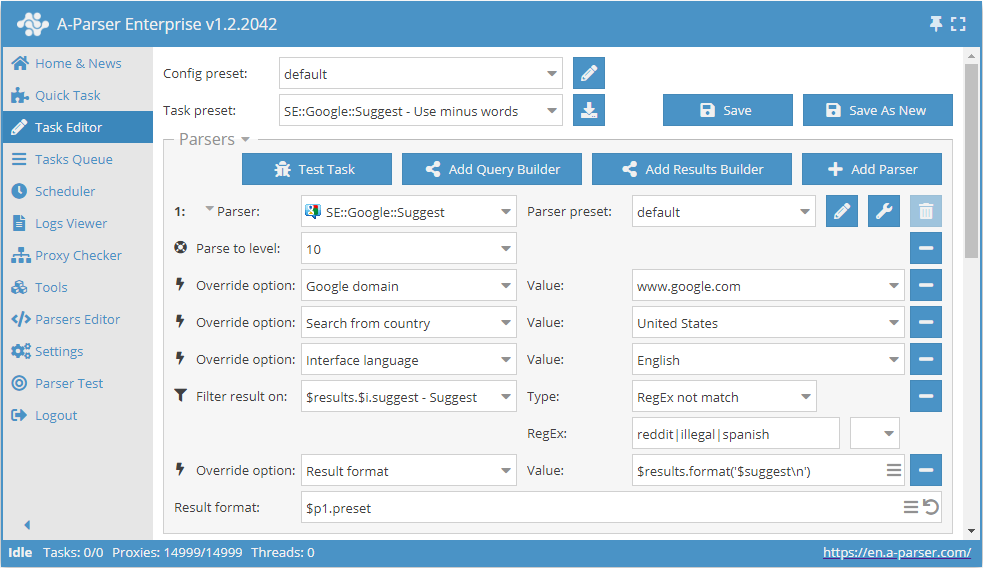
Download example
How to import an example into A-Parser
eJx9VE1vGjEQ/SvIQkojpSgcetkbQaFqRUMa4EQ4WOywceO1tx4vFBH+e2e83g9a
xG1n5r2ZNx/ro/AS3/HZAYJHkayOogjfIhHzxyT5am2mIUnmZZYB+t7n3hKhlytT
Ym9vXYriThTSITgmry5xCJHCVpaavo7CHwqg3Lbwyhpmq5TMkGIKO9Dk2UldEmZ4
f+rgd+CcSqEmpDaXyrRgsd/vB1koPNjYXFyhZp0aYjm/Bn3rQsF0oVulPTgK07S4
tWQVv7gnjJ2v7yJuUZEcGOtz6TdvnbwO0lT5D6U1ZFJ/YCGNQgZUMyLENYlb6yhh
FNEm7Ucxgyr+6aYfNb2+mptbcVqva+U4CQjmFMNBXH4TnMsdLGzVL7TuCVlPMg+V
UumBo3Wp24H/wxkkt0UNSF1V4ANpqy6N+h2UonfKZIQn0ynAiaP1JcJDSMLOQ61w
JfrB5rmWgf+z4ojEuxJo7qR2IklL2gS2UiNFFC1Beutm8e6So7BmpHW4uRYW0j+U
Sqd00KMtkb5F4mXI7L8cp6bDbila2t6RhlpoMB5mP1pSaqc2o76Npa61ypUnG8e2
NLyae3K+AxTN1J4YllsHTZUoLxanH7oAwwfSLm1UtK6zLs4Wc+7cWLNV2SweXY0s
zYJejZkZ27zQwG2ZUmtaCsJLeyAjjFtgoxX4L3kcSvA/Xb8Swlur8fu8klo4RQf4
hQXmNMhu1ZhyI7Vevky7EdEeFD8OPO4eIMqDYLiHzNIZUTOndfN+NW/g8eIrlhxP
tKZf+FyhuSfGko+Gg+FHHZ7+As4s2Yc=
See also: Result filters
Possible settings
| Parameter name | Default value | Description |
|---|---|---|
| Client | Chrome omnibox | Selection of the source to be used for collecting suggestions (Search page / Chrome omnibox) |
| Follow suggests | Human | Selection of the type of suggestions to be substituted into queries when using Parser to level (All / Synthetic / Human) |
| Google domain | www.google.com | Domain selection |
| Search from country | Global | Selection of the country from which the search is performed |
| Interface language | English | Interface language selection |
| Remove HTML tags | ☑ | Removing HTML tags |