SE::Yandex::Translate - Translates text via Yandex Translate
Overview
Fast, up to 2100 requests per minute, multi-threaded text translator via the Yandex service. This parser allows you to translate any volume of text in automatic mode, so you get unique content for filling websites, posting to social networks, or for filling any other resources. The parser automatically detects the source language of the content; you only need to specify the target language. Yandex translator is capable of processing colossal volumes of text while not consuming many resources.
Collected data
- Translated text
- Source text language
Capabilities
- Translation language selection
- Automatic language detection
Use cases
- Text translation
- Obtaining various content in the required language for further use
Queries
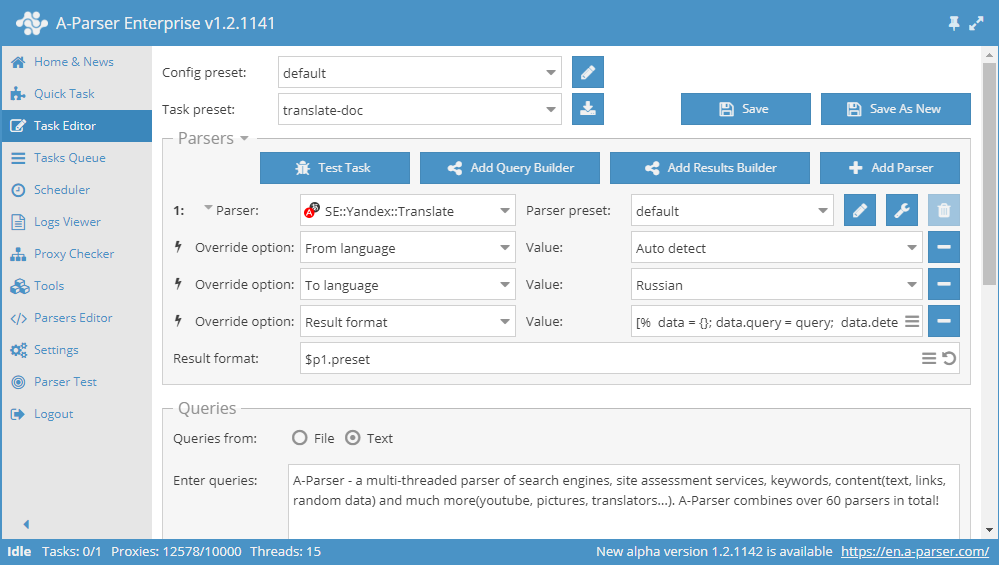
Any text for translation should be specified as queries, for example:
A-Parser - a multi-threaded parser of search engines, site assessment services, keywords, content(text, links, random data) and much more(youtube, pictures, translators...). A-Parser combines over 60 parsers in total!
Output results examples
A-Parser supports flexible result formatting thanks to the built-in Template Toolkit, which allows it to output results in any form, as well as in structured formats like CSV or JSON.
Default output
Result format:
$query - $translated\n
Result example:
A-Parser - a multi-threaded parser of search engines, site assessment services, keywords, content(text, links, random data) and much more(youtube, pictures, translators...). A-Parser combines over 60 parsers in total! - A-Parser - a multi-threaded parser of search engines, site assessment services, keywords, content(text, links, random data) and much more(youtube, pictures, translators...). A-Parser combines over 60 parsers in total!
Translated text only output
Result format:
$translated\n
Result example:
A-Parser - a multi-threaded parser of search engines, site assessment services, keywords, content(text, links, random data) and much more(youtube, pictures, translators...). A-Parser combines over 60 parsers in total!
Output in CSV table
Result format:
[% tools.CSVline(query, detected, translated) %]
Result example:
"A-Parser - a multi-threaded parser of search engines, site assessment services, keywords, content(text, links, random data) and much more(youtube, pictures, translators...). A-Parser combines over 60 parsers in total!",en,"A-Parser - a multi-threaded parser of search engines, site assessment services, keywords, content(text, links, random data) and much more(youtube, pictures, translators...). A-Parser combines over 60 parsers in total!"
Saving in SQL format
Result format:
[% "INSERT INTO text VALUES('" _ query _ "', '"; detected _ "', '"; translated _ "')\n"; %]
Result example:
INSERT INTO text VALUES('A-Parser - a multi-threaded parser of search engines, site assessment services, keywords, content(text, links, random data) and much more(youtube, pictures, translators...). A-Parser combines over 60 parsers in total!', 'en', 'A-Parser - a multi-threaded parser of search engines, site assessment services, keywords, content(text, links, random data) and much more(youtube, pictures, translators...). A-Parser combines over 60 parsers in total!')
Dump results to JSON
General output format:
[% IF notFirst;
  ",\n";
ELSE;
  notFirst = 1;
END;

obj = {};
obj.query = query;
obj.detected = p1.detected;
obj.translated = p1.translated;

obj.json %]
Initial text:
[
Final text:
]
Result example:
[{"query":"A-Parser - a multi-threaded parser of search engines, site assessment services, keywords, content(text, links, random data) and much more(youtube, pictures, translators...). A-Parser combines over 60 parsers in total!","translated":"A-Parser - a multi-threaded parser of search engines, site assessment services, keywords, content(text, links, random data) and much more(youtube, pictures, translators...). A-Parser combines over 60 parsers in total!","detected":"en"}]
To make the "Start text" and "End text" options available in the Task Editor, you need to activate "More options".
Possible settings
| Parameter | Default value | Description |
|---|---|---|
| AntiGate preset | default | Preset selection  Util::AntiGate, more details on the setting here Util::AntiGate, more details on the setting here |
| AntiGate preset for old captcha | default | Similar to AntiGate preset, but used only for regular (old, single image) captchas. If no preset is selected here, the preset selected in AntiGate preset will be used for such captchas. |
| Experimental img captcha max count | 5 | Maximum number of repeated captcha images per attempt |
| Preffered captcha type | Click | Choice of preferred captcha type: Click or Puzzle |
| From language | Auto-Detect | Choice of which language to translate the text from; auto-detection is set by default |
| To language | English | Choice of the language to which the translation should be performed |
| Use sessions | ☑ | Ability to disable the use of sessions |