Shop::Wildberries::Suggest - Wildberries search suggestions parser
Overview of the parser
Keyword search suggestions parser for Wildberries. Thanks to the Shop::Wildberries::Suggest parser, you can automatically collect keyword databases from the Wildberries marketplace search bar suggestions by query. Using the Shop::Wildberries::Suggest parser, you can easily and quickly scrape Wildberries suggestions by query.
The Wildberries suggestions parser solves one of the main SEO tasks, namely the fast automated acquisition of an expanded semantic core. Wildberries search suggestions allow you to cover the maximum number of phrases, especially when using the Parse to level function.
Thanks to the multi-threaded operation of A-Parser, the query processing speed can reach 10,000 queries per minute, which on average allows receiving about 20,000-50,000 results per minute.
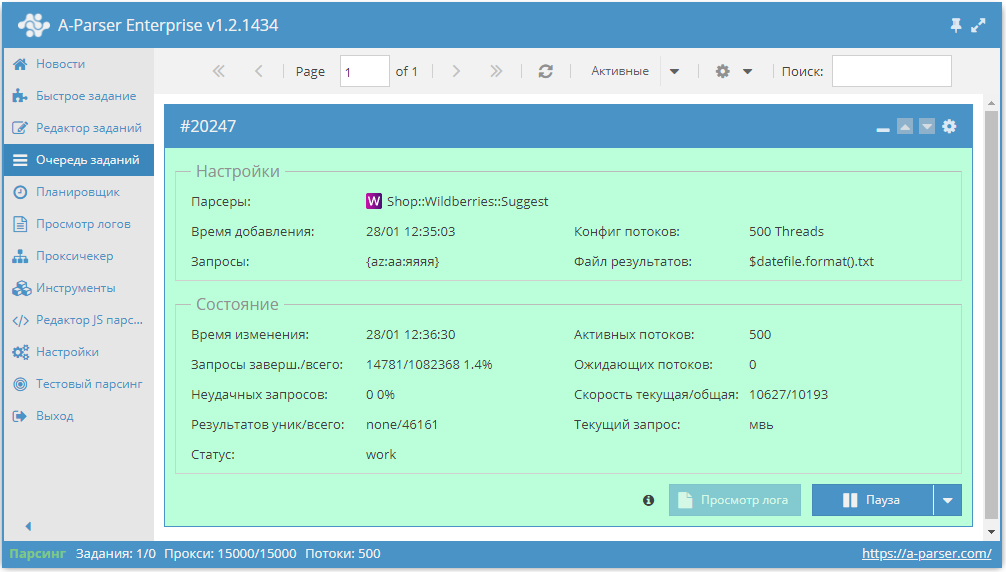
You can use automatic query multiplication, substitution of subqueries from files, iteration of alphanumeric combinations and lists to get the maximum possible number of results. Using results filtering you can immediately clean the result by removing all unnecessary trash (using negative words or filtering by suggestion type).
A-Parser functionality allows you to save parsing settings for the Shop::Wildberries::Suggest parser for future use (presets), set a parsing schedule, and much more.
Saving results is possible in the form and structure you need, thanks to the built-in powerful Template Toolkit templating engine which allows applying additional logic to results and outputting data in various formats, including JSON, SQL, and CSV.
Collected data
- Number of results per query
- Search suggestions
- Suggestion type (suggest/category/brand)
Capabilities
- Ability to filter keywords during deep parsing
- Ability to use the Parse to level function
Use cases
- Collecting keyword databases
Queries
Search phrases should be specified as queries, for example:
adidas
t-shirts and tops
Xiaomi smartphone
Query substitutions
You can use built-in macros for automatic substitution of subqueries from files, for example, if we want to add a list of other words to each query, let's specify several main queries:
discount
promo
sale
In the query format, we will specify a substitution macro for additional words from the Keywords.txt file; this method allows increasing the query variance manifold:
$query {subs:Keywords}
This macro will create as many additional queries as there are in the file for each original search query, which in total will give [number of original queries] x [number of queries in the Keywords file] = [total number of queries] as a result of the macro's work.
For example, if the Keywords.txt file contains the substitutions mentioned above, the result will be 9 queries:
adidas discount
t-shirts and tops discount
Xiaomi smartphone discount
adidas promo
t-shirts and tops promo
Xiaomi smartphone promo
adidas sale
t-shirts and tops sale
Xiaomi smartphone sale
Output results examples
A-Parser supports flexible result formatting thanks to the built-in Template Toolkit templating engine, which allows it to output results in arbitrary form, as well as in structured formats like CSV or JSON
Exporting a list of suggestions
Result format:
$results.format('$suggest\n')
Example result:
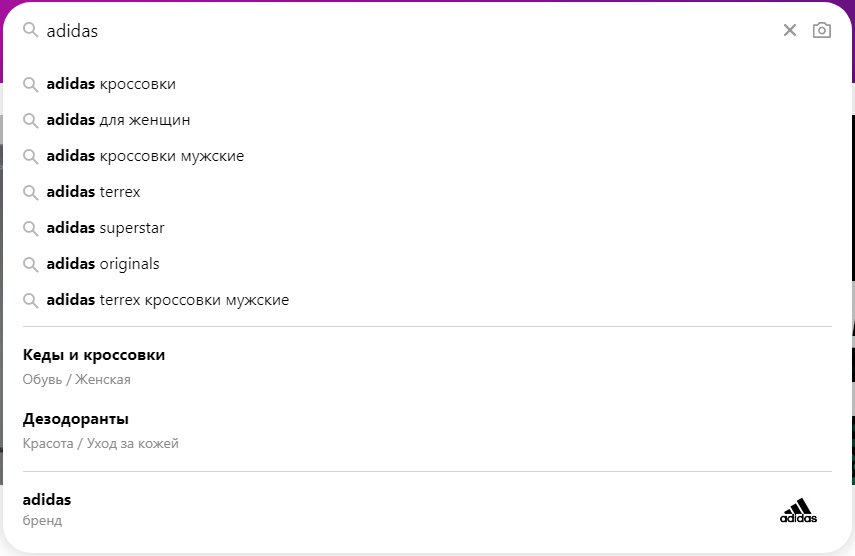
adidas sneakers
adidas for women
adidas men's sneakers
adidas terrex
adidas superstar
adidas originals
adidas terrex men's sneakers
Shoes and sneakers
Deodorants
adidas
Outputting query, suggestions per query + suggestion type
Result format:
$query:\n$results.format('$suggest - $type\n')
Example result:
adidas sneakers - suggest
adidas for women - suggest
adidas men's sneakers - suggest
adidas terrex - suggest
adidas superstar - suggest
adidas originals - suggest
adidas terrex men's sneakers - suggest
Shoes and sneakers - category
Deodorants - category
adidas - brand
Output to CSV table
The built-in $tools.CSVLine utility allows creating correct tabular documents ready for import into Excel or Google Sheets.
Result format:
[% FOREACH i IN results;
    tools.CSVline(i.suggest);
END %]
File name:
$datefile.format().csv
Initial text:
Suggestions
The Template Toolkit templating engine is used in the Result Format to output elements of the $results array in a FOREACH loop.
In the result file name, you just need to change the file extension to csv.
To make the "Initial text" option available in the Task Editor, you need to activate "More options". In "Initial text", write the column names separated by commas and make the second line empty.
Saving in SQL format
Result format:
[% FOREACH results;
    "INSERT INTO serp VALUES('" _ query _ "', '";   suggest _ "', '";   type _ "')\n";
END %]
Example result:
INSERT INTO serp VALUES('adidas', 'adidas sneakers', 'suggest')
INSERT INTO serp VALUES('adidas', 'adidas for women', 'suggest')
INSERT INTO serp VALUES('adidas', 'adidas men\'s sneakers', 'suggest')
INSERT INTO serp VALUES('adidas', 'adidas terrex', 'suggest')
INSERT INTO serp VALUES('adidas', 'adidas superstar', 'suggest')
INSERT INTO serp VALUES('adidas', 'adidas originals', 'suggest')
INSERT INTO serp VALUES('adidas', 'adidas terrex men\'s sneakers', 'suggest')
INSERT INTO serp VALUES('adidas', 'Gym shoes and sneakers', 'category')
INSERT INTO serp VALUES('adidas', 'Deodorants', 'category')
INSERT INTO serp VALUES('adidas', 'adidas', 'brand')
Dumping results to JSON
General result format:
[% result.${query} = {
    totalcount = p1.totalcount
    suggests = []
};

FOREACH i IN p1.results;
    result.${query}.suggests.push(i.suggest);
END %]
Initial text:
[% result = {} %]
Final text:
[% result.json %]
Example result:
{
    "adidas": {
        "suggests": [
            "adidas sneakers",
            "adidas for women",
            "adidas men's sneakers",
            "adidas terrex",
            "adidas superstar",
            "adidas originals",
            "adidas terrex men's sneakers",
            "Shoes and sneakers",
            "Deodorants",
            "adidas"
        ],
        "totalcount": 10
    },
    "t-shirts": {
        "suggests": [
            "women's summer t-shirts",
            "men's summer t-shirts",
            "children's t-shirts",
            "sports t-shirts",
            "t-shirts for boys",
            "women's t-shirts",
            "women's underwear t-shirts turkey",
            "T-shirts"
        ],
        "totalcount": 8
    }
}
To make the "Initial text" and "Final text" options available in the Task Editor, you need to activate "More options".
Results processing
A-Parser allows processing results directly during parsing; in this section, we have listed the most popular cases for the Shop::Wildberries::Suggest parser
Parse to level option
The option tells the parser to substitute the received results into the query queue in depth up to the specified level, for example:
- If level 1 is specified, the parser will add all results obtained from the original query to the queries
- If level 2 is specified, the parser will add all results obtained from the original query + all results obtained from queries from level 1 to the queries
- etc.
Since there will likely be duplicates in the results, to prevent the parser from doing redundant work (parsing the same thing), it is recommended to enable Query deduplication
Possible settings
| Parameter name | Default value | Description |
|---|---|---|
| Follow suggests | All | Choice of suggestion types to be substituted into queries when using Parse to level (All / Suggest / Tag / Brand), multiple choice supported |