SE::Google::Trends - Google Trends keyword parser
Overview of the parser
Search query parser from Google Trends. The Google Trends parser can automatically retrieve a list of all categories a query belongs to, as well as a list of interests by region and time.
You can use automatic query multiplication, substitution of subqueries from files, brute-forcing of alphanumeric combinations and lists to obtain the maximum possible number of results. Using results filtering you can immediately clean the result by removing all unnecessary garbage (using negative keywords).
A-Parser functionality allows you to save SE::Google::Trends parser settings for future use (presets), set parsing schedules, and much more.
Saving results is possible in the form and structure you need, thanks to the built-in powerful Template Toolkit which allows applying additional logic to results and outputting data in various formats, including JSON, SQL, and CSV.
Use cases for the parser
🔗 Date formatting
A way to convert it to a more human-readable format
Collected data
- List of all categories the query belongs to, in the format (query, category, popularity percentage)
- List of interests over time in the format: time of interest (in unix format), popularity percentage
- List of interests by region in the format: region, popularity percentage
- List of top related queries
- List of rising related queries
Capabilities
- Ability to compare data for several keywords, for this they must be listed separated by commas
- Ability to select a country for keyword evaluation
- Selection of the period for which to display results
- Selection of the property for parsing (Web Search, Image Search, News Search, etc.)
- Selection of the Google Trends category (you can find out the list of categories using the JS::GoogleTrendsCat parser)
- Ability to specify an arbitrary date range
- Search by category
Use cases
- Estimating traffic volume by keyword
- Searching for new keywords of similar topics
- To set arbitrary dates, select Custom time in Search time and specify the date range in YYYY-MM-DD YYYY-MM-DD format in Custom time range
- Search by category ignores the query submitted to the parser (option Use empty queries(ignore query value))
Spoiler: Example

Queries
Keywords should be specified as queries, just as if they were entered directly into the Google search form, for example:
write essay
Football
Waterfall
Speak in english
Cats and dogs
forex
cheap essay
Query substitutions
You can use built-in macros for automatic substitution of subqueries from files, for example, we want to add some list of other words to each query, let's specify several main queries:
essay
article
thesis
In the query format, we will specify a substitution macro for additional words from the Keywords.txt file; this method allows increasing query variability manifold:
{subs:Keywords} $query
This macro will create as many additional queries as there are in the file for each original search query, which in total will give [number of original queries(domains)] x [number of queries in the Keywords file] = [total number of queries] as a result of the macro's work.
For example, if the Keywords.txt file contains:
buy
cheap
As a result, the substitution macro will turn 3 main queries into 6:
buy essay
cheap essay
buy article
cheap article
buy thesis
cheap thesis
Output results examples
A-Parser supports flexible result formatting thanks to the built-in Template Toolkit, which allows it to output results in arbitrary form, as well as in structured form, such as CSV or JSON
Exporting a list of rising related queries
Exporting a list of rising related queries in the format: original query, related keyword, popularity.
Result format:
$query:\n$related_queries_rising.format('$key,$rquery,$interest\n')
Result example:
write essay:
write essay,write my essay 4 me,6550
write essay,write essay on globalization and 21st century,1450
write essay,grammarly,1100
write essay,how to write a hook for an argumentative essay,1000
write essay,write my essay for me cheap,1000
write essay,pay someone to write my essay,550
write essay,write that essay login,550
write essay,write my essay cheap,500
write essay,google docs,350
write essay,docs,300
write essay,how to write an argumentative essay step by step,250
write essay,someone write my essay,200
write essay,how long does it take to write a 1000 word essay,200
write essay,how long does it take to write a 2000 word essay,200
write essay,how to write a synthesis essay ap lang,200
write essay,pay to write essay,190
write essay,write essay on my school,180
write essay,how to write essay in hindi,170
write essay,write an essay on my school,170
write essay,help me write an essay,150
write essay,write my essay for me,130
write essay,help me write my essay,120
write essay,write my paper for me,120
write essay,how to write a hook for a persuasive essay,110
write essay,write essay for me,100
Outputting a list of related queries to a CSV table
The built-in utility $tools.CSVLine allows creating correct tabular documents ready for import into Excel or Google Sheets.
General result format:
[% FOREACH i IN p1.related_queries_rising;
    tools.CSVline(i.key, i.rquery, i.interest);
END %]
File name:
$datefile.format().csv
Initial text:
Original query,Related keyword,Popularness
In the General result format, the Template Toolkit templater is used to output the $related_queries_rising array in a FOREACH loop.
In the result file name, you just need to change the file extension to csv.
To make the "Initial text" option available in the Task Editor, you need to activate "More options". In "Initial text", write the column names separated by commas and make the second line empty.
Saving in SQL format
Result format:
[% FOREACH related_queries_rising; "INSERT INTO serp VALUES('" _ key _ "', '"; rquery _ "', '"; interest _ "')\n"; END %]
Result example:
INSERT INTO serp VALUES('write essay', 'write my essay 4 me', '6550')
INSERT INTO serp VALUES('write essay', 'write essay on globalization and 21st century', '1450')
INSERT INTO serp VALUES('write essay', 'grammarly', '1100')
INSERT INTO serp VALUES('write essay', 'how to write a hook for an argumentative essay', '1000')
INSERT INTO serp VALUES('write essay', 'write my essay for me cheap', '1000')
INSERT INTO serp VALUES('write essay', 'pay someone to write my essay', '550')
INSERT INTO serp VALUES('write essay', 'write that essay login', '550')
INSERT INTO serp VALUES('write essay', 'write my essay cheap', '500')
INSERT INTO serp VALUES('write essay', 'google docs', '350')
INSERT INTO serp VALUES('write essay', 'docs', '300')
INSERT INTO serp VALUES('write essay', 'how to write an argumentative essay step by step', '250')
INSERT INTO serp VALUES('write essay', 'someone write my essay', '200')
INSERT INTO serp VALUES('write essay', 'how long does it take to write a 1000 word essay', '200')
INSERT INTO serp VALUES('write essay', 'how long does it take to write a 2000 word essay', '200')
INSERT INTO serp VALUES('write essay', 'how to write a synthesis essay ap lang', '200')
INSERT INTO serp VALUES('write essay', 'pay to write essay', '190')
INSERT INTO serp VALUES('write essay', 'write essay on my school', '180')
INSERT INTO serp VALUES('write essay', 'how to write essay in hindi', '170')
INSERT INTO serp VALUES('write essay', 'write an essay on my school', '170')
INSERT INTO serp VALUES('write essay', 'help me write an essay', '150')
INSERT INTO serp VALUES('write essay', 'write my essay for me', '130')
INSERT INTO serp VALUES('write essay', 'help me write my essay', '120')
INSERT INTO serp VALUES('write essay', 'write my paper for me', '120')
INSERT INTO serp VALUES('write essay', 'how to write a hook for a persuasive essay', '110')
INSERT INTO serp VALUES('write essay', 'write essay for me', '100')
...
Dumping results to JSON
Result format:
[% IF notFirst;
  ",\n";
ELSE;
  notFirst = 1;
END;

obj = {};
obj.related_queries_rising.key = [];
obj.related_queries_rising.rquery = [];
obj.related_queries_rising.interest = [];

FOREACH item IN p1.related_queries_rising;
    obj.related_queries_rising.key.push(item.key);
    obj.related_queries_rising.rquery.push(item.key);
    obj.related_queries_rising.interest.push(item.key);
END;

obj.json %]
Initial text:
[
Final text:
]
Result example:
[{"related_queries_rising":{"rquery":["write my essay 4 me","write essay on globalization and 21st century","grammarly","how to write a hook for an argumentative essay","write my essay for me cheap","pay someone to write my essay","write that essay login","write my essay cheap","google docs","docs","how to write an argumentative essay step by step","someone write my essay","how long does it take to write a 1000 word essay","how long does it take to write a 2000 word essay","how to write a synthesis essay ap lang","pay to write essay","write essay on my school","how to write essay in hindi","write an essay on my school","help me write an essay","write my essay for me","help me write my essay","write my paper for me","how to write a hook for a persuasive essay","write essay for me"],"interest":[6550,1450,1100,1000,1000,550,550,500,350,300,250,200,200,200,200,190,180,170,170,150,130,120,120,110,100],"key":["write essay","write essay","write essay","write essay","write essay","write essay","write essay","write essay","write essay","write essay","write essay","write essay","write essay","write essay","write essay","write essay","write essay","write essay","write essay","write essay","write essay","write essay","write essay","write essay","write essay"]}}]
To make the "Initial text" and "Final text" options available in the Task Editor, you need to activate "More options".
Results processing
A-Parser allows processing results directly during parsing, in this section we have provided the most popular cases for the SE::Google::Trends parser
Using an arbitrary date
To set arbitrary dates, select Custom time in Search time and specify the date range in YYYY-MM-DD YYYY-MM-DD format in Custom time range.
Download example
How to import example into A-Parser
eJx1U1GP2jAM/iuVxcNN4hDctJe+cWhMm9j1dsATQqeIuCy7NMmSlA1V/e9z0tIC
46RKjZ3vsz/HdgWeuTf3bNGhd5BuKjDxDCksP6fpF633EtN0ZVFxl9wna4fJrnRe
FwlnHmEIhlmHNnA3NygE4JizUnoYVuCPBimyPqC1gge24GQ7ZHb389WLIrgOTJYB
1aSB+n1eg7jmPYwfxvfjCX0JHen/kY5Qb7dDoNJIiZtrW7BQ4sBMRm293eWSHXCl
6TIXEnv3nKwnVoQEg1B5uB3lMdDdh5H/GyIwzoUXWjHZZAiP0mddK/E7ClSasHS0
At3cUokpeIwBgvN4UreBQbSBQpSR+6PhQJoz6XAIjqTOGQnh1zfCo2Ve28wEPeSv
QKuplAs8oOxhMf5jKSSnDk5zIn1tibch2X8x6q6881TUpz+WNHRRovWYfe9ZXC/0
/vQYUhTCk+1mulShMWNyviGa7s2eAqzQFrs0beQ2O02woXkjZN+yqeldF2VctOXS
udMqF/usHbQTslQrWpNMzXRhJIa6VCkltcXhSz8eU9e2IRi9wGvyLKYgWd1igNda
um/LRqqxgsbvUxBY0EueZ21D7piU65fF+Q30I0VGfO4EnWNHCHCPe02DRMXU225j
u6Wvbu1tWtXUpV/uuQGHkqKT9oxMagGkk/ofqyh6IQ==
Filtering results
Example of exporting a list of rising related queries whose popularity is below a specified value.
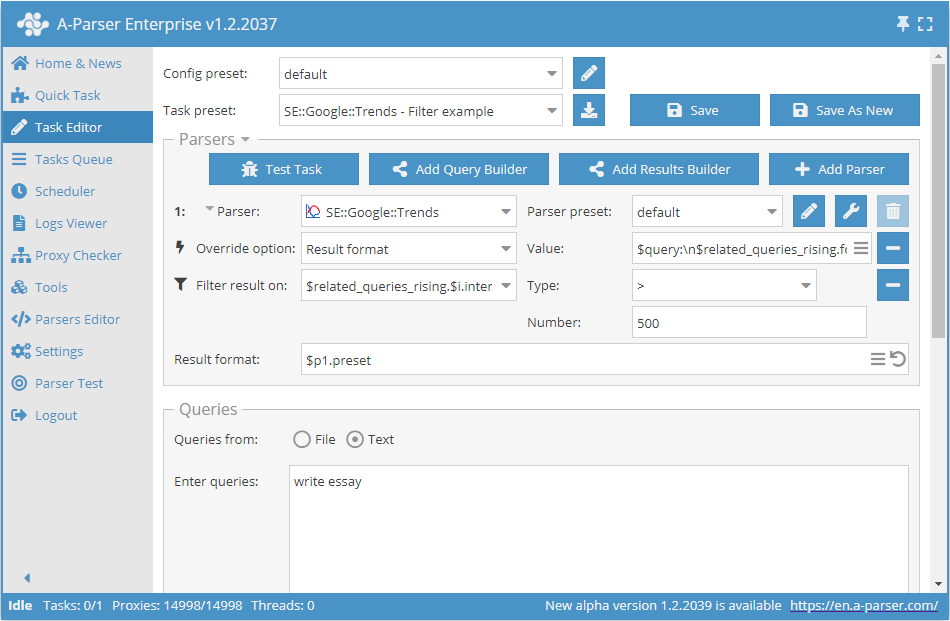
Download example
How to import example into A-Parser
eJxtVMFu2zAM/ZVACNAVcIP20IsPA9JgKTpkddekpzQohIoOtMiSK8pZA8P/PkqW
7aTLzaRIvsdH0jVzHHf4ZAHBIUvXNSvDN0vZ8kea3huzVZCmKwta4OhqNJfKgR3B
Jy9KBSxhJbcI1qeuz2RQgICcV8qxpGbuUAIVNnuwVgqfLQXZubEFdwQbwtieq8qH
jT8qsIf09VWPLSjuQLx5jwR8sxKl3k7axG8X4x0ckrEN8clYamII6Cjx4pI1A24e
uBNChErX7HxhTywWYZsk5q3aIt+PGN5eX5NlSieNJhNBI2s2mw4A54Gfb6W8mURd
+8cl38PKtLRgcJPA8MiLIIAgbv61a/Ry4j59BS6E9JhctQhe/QH1RcuPQE8bio2d
za0pyOUgFAhKdezWUWnfahVyf7c5LM25QkgYEtU5JyLi64skYbgzNgsakL9mRk+V
WsAe1BAW6t9VUglalWlOSQ8x8XxI9l+Npm/vGIoW6a8lDn2VYN1lv4YsYRZm24mh
ZCEd2TgzlfaD8fPbAZS9Zo8+rDAWephYOaLTpZS02BQ5jGxaDq6TNk7Gcup8NzqX
2yxeQhdZ6RWdY6Znxl+X70tXStFYEJ6H9ZhiHIM3BoJfk2cBgmj1F8icMQp/Lluq
pZW0freeYEFKHqPGku9cqZfnxfELG1aKjCD3CBD5gflwB1tDi0TNNJv+19D/XOpz
P4i0bmhKf/CpDfYtBSddGZnhsG6af/TaovA=
See also: Results filters
Possible settings
| Parameter name | Default value | Description |
|---|---|---|
| Search region | Worldwide | Region selection |
| Language | English | Language selection |
| Search time | Default(Past 5 years) | Selection of the period for which to display the result |
| Custom time range | Empty string | Entering an arbitrary date range when Search time = Custom time (format YYYY-MM-DD YYYY-MM-DD) |
| Search category id | 0 | Category selection |
| Search property | Default(Web Search) | Selection of the property for parsing (Web Search / Image Search / News Search / Google Shopping / YouTube Search) |
| Use empty queries(ignore query value) | ☐ | Ignores the query value submitted to the parser and performs a search by category |