SE::Yandex::Suggest - Yandex Search Suggestions Parser
Overview of the parser
Keyword search suggestion parser for Yandex. Thanks to the SE::Yandex::Suggest parser, you can automatically collect keyword databases from Yandex search engine suggestions by query. Using the SE::Yandex::Suggest parser, you can easily and quickly parse Yandex suggestions by query based on the region.
The Yandex Suggest parser solves one of the main SEO tasks, namely the fast automated acquisition of an expanded semantic core. Google search suggestions allow you to cover the maximum number of phrases, and in combination with the Yandex Keywords parser -  SE::Yandex::WordStat - you will get the most complete semantics possible, which will help attract more organic traffic.
Thanks to the multi-threaded operation of A-Parser, the query processing speed can reach 5700 queries per minute, which on average allows obtaining up to 17000-18000 results per minute.
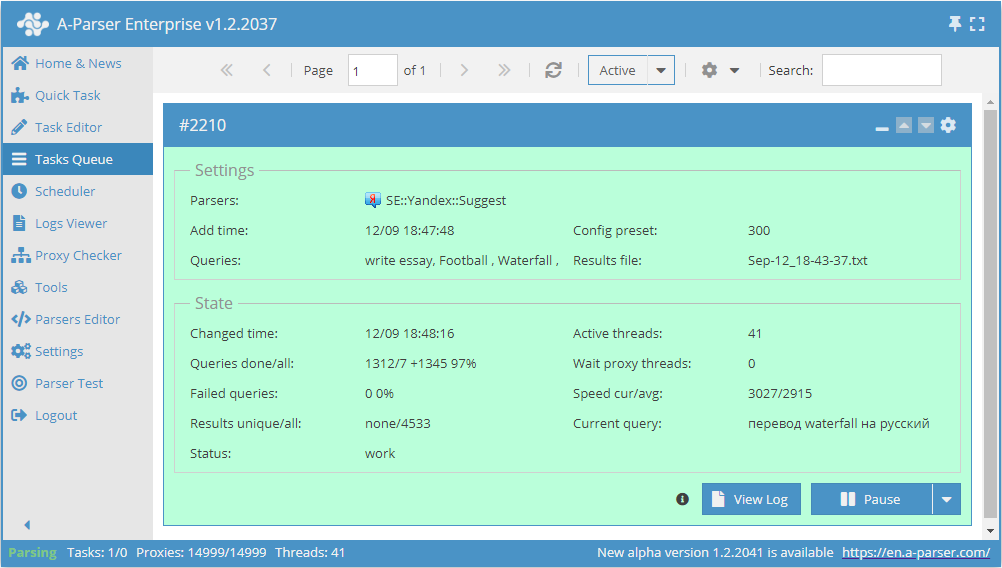
You can use automatic query multiplication, subquery substitution from files, permutation of alphanumeric combinations and lists to obtain the maximum possible number of results. Using results filtering you can immediately clean the result by removing all unnecessary trash (using negative keywords).
A-Parser functionality allows saving parsing settings for the SE::Yandex::Suggest parser for further use (presets), setting a parsing schedule, and much more.
Saving results is possible in the form and structure you need, thanks to the built-in powerful Template Toolkit which allows applying additional logic to results and outputting data in various formats, including JSON, SQL, and CSV.
Collected data
- Number of results per query
- Suggestions for the query
- When choosing the 2nd query method, additional data and suggestion types are also collected

Use cases
- Collecting keyword databases
Queries
Search phrases should be specified as queries, for example:
forex
write an essay
essays online
buy a car in Moscow
news
Query substitutions
You can use built-in macros for automatic substitution of subqueries from files; for example, if we want to add a certain list of other words to each query, we specify several main queries:
essay
article
thesis
In the query format, we specify the substitution macro for additional words from the file Keywords.txt; this method allows increasing query variability manifold:
{subs:Keywords} $query
This macro will create as many additional queries as there are in the file for each original search query, which in total will give [number of original queries (domains)] x [number of queries in the Keywords file] = [total number of queries] as a result of the macro's operation.
For example, if the file Keywords.txt contains:
buy
cheap
As a result, the substitution macro will turn 3 main queries into 6:
buy essay
cheap essay
buy article
cheap article
buy thesis
cheap thesis
Output results examples
A-Parser supports flexible result formatting thanks to the built-in Template Toolkit, which allows it to output results in arbitrary form, as well as in structured form, such as CSV or JSON
Exporting a list of suggestions
Result format:
$results.format('$suggest\n')
Example result:
essays online free
essays online order
essays online download free
essays online download
essays online make
essays online do
essays online find
essays online free make
essays online order
Outputting query, total count of suggestions found, and suggestions by query
Result format:
$query - $totalcount:\n$results.format('$suggest\n')
Example result:
essays online - 10:
essays online
essays online free
essays online order
essays online download free
essays online download
essays online make
essays online do
essays online find
essays online free make
essays online order
Output to a CSV table
The built-in utility $tools.CSVLine allows creating correct tabular documents ready for import into Excel or Google Sheets.
Result format:
[% FOREACH i IN results;
    tools.CSVline(i.suggest);
END %]
File name:
$datefile.format().csv
Head text:
Suggestions
In the General result format, the Template Toolkit templater is used to output suggest elements of the results array in a FOREACH loop.
In the result file name, you just need to change the file extension to csv.
To make the "Head text" option available in the Task Editor, you need to activate "More options". In "Head text", write the column names separated by commas and make the second line empty.
Keyword competition
Saving in SQL format
Result format:
[% FOREACH results;
    "INSERT INTO serp VALUES('" _ query _ "', '";   suggest _ "')\n";
END %]
Example result:
INSERT INTO serp VALUES('term papers online', 'term papers online')
INSERT INTO serp VALUES('term papers online', 'term papers online free')
INSERT INTO serp VALUES('term papers online', 'term papers online order')
INSERT INTO serp VALUES('term papers online', 'term papers online download free')
INSERT INTO serp VALUES('term papers online', 'term papers online download')
INSERT INTO serp VALUES('term papers online', 'term papers online create')
INSERT INTO serp VALUES('term papers online', 'term papers online making')
INSERT INTO serp VALUES('term papers online', 'term papers online find')
...
Dumping results to JSON
General output format:
[% IF notFirst;
  ",\n";
ELSE;
  notFirst = 1;
END;

obj = {};
obj.totalcount = p1.totalcount;
obj.suggests = [];

FOREACH item IN p1.serp;
    obj.suggests.push(item.suggest);
END;

obj.json %]
Initial text:
[
Final text:
]
Example result:
[{"suggests":["essays online","essays online free","essays online order","essays online download free","essays online download","essays online make","essays online do","essays online find","essays online free make","essays online order"],"totalcount":10}]
To make the "Head text" and "End text" options available in the Task Editor, you need to activate "More options".
Results processing
A-Parser allows processing results directly during parsing; in this section, we have provided the most popular cases for the SE::Yandex::Suggest parser
Parse to level option
The option tells the parser to substitute the obtained results into the query queue in depth up to the specified level, for example:
- If level 1 is specified, the parser will add all results obtained from the original query to the queries
- If level 2 is specified, the parser will add all results obtained from the original query + all results obtained from queries from level 1 to the queries
- and so on.
In simple terms, this is the substitution of received results into the query queue, which in turn allows parsing more results. Since there will likely be duplicates in the results, it is recommended to enable Query deduplication so that the parser does not perform unnecessary work (does not parse the same thing).
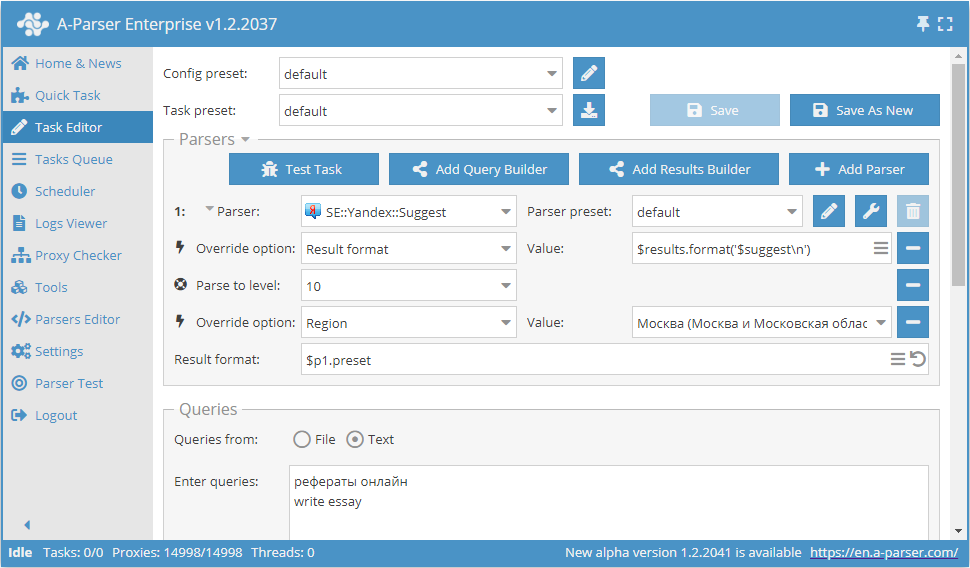
Download example
How to import an example into A-Parser
eJx1VFtv2jAU/iuVhdRVQggKfVjeKCrSJtZ0pX2YgAe3Pom8OrZnO6woyn/vsRPi
wLoXy+f2nct37Io4at/sgwELzpJkUxEd7iQhDDJaCkeGRFNjwXjzhqzvkuQXlQze
k2Rd5jlY79H5VsQdNGC02oMxnAEaOUM5U6agDrEbyD0VpXcbNBo7auxfLge2Ad1u
5eUVqXuA2nEl7REv1LSCPYiINhnX/y9AmOh4PZnWu92QtMmXIbevRk9Gbf+dcU33
8KR8B1xAVC9RuqdF6IFRB956bOJq5N49AmWM+6KpaDL4Ccasz5L/CTOQCn3xajjY
pVEFqhwEAK88HKvbkEGQCUKUIfZnE0OSjAoLQ2Kx1CXFQti5hTsw1CmTtkNMKqLk
XIgwwOgW8G9LLhjSPc8w6Fsb+LlL+g9G3bXXT4VU/DVYQ4cSpNv0R4xiaqXy4zAE
L7hD2S5UKT0xY1S+AehuZvferVAGujQtcpsdN1qD9LxHyuY6qk7aOKHlVPmqZMbz
tN2lo2cpn/DZpHKhCi3A9yVLIZAWC49xPea2pcELscDz4EVIcfLgnFLCfl83pWrD
cf1ufIEFTrKftYV8pUI8P676Fh9ondKpvDPmjL6wGGRbjmezsT+nN+E+690bfThn
1+F8uQgqCCcL50t0mn5t9TIwewHW0gPxlTnIFe4szq3edT9J999Un/4nSVXjRvy2
D423H5/3RR3yYJFufOr1Bxh5omw=
Results filtering (using negative keywords)
By using negative keywords, it is possible to immediately remove results that you do not need. Similarly, using a filter, you can also leave only those results that contain the necessary words.
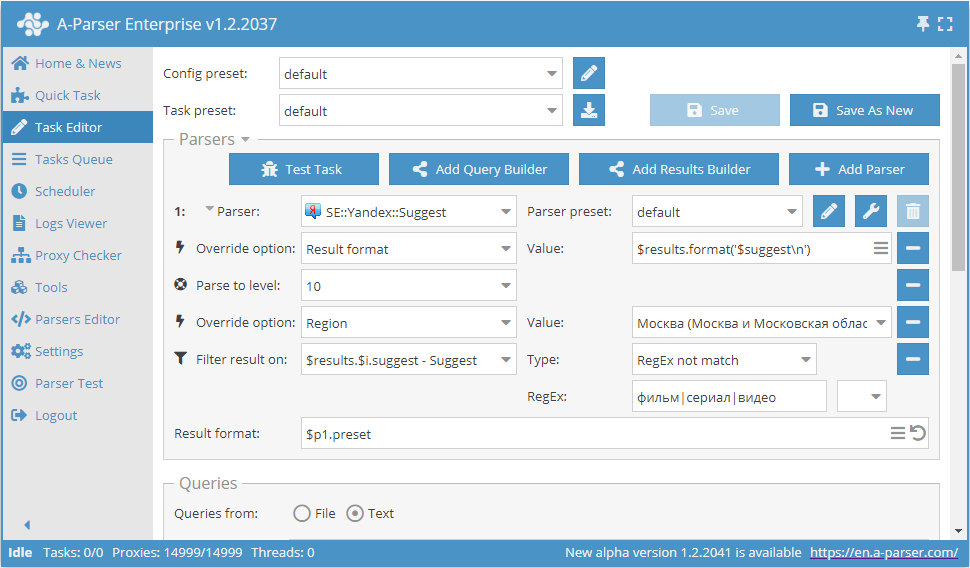
Download example
How to import an example into A-Parser
eJx1VN9vGjEM/leqCKmrVCEoIG33RlGRNrHSFfowAQ+BMyxrLrklOVbE7n+f44S7
g3UvUWx/tr/4R47McftqnwxYcJYliyPL6c4SlsKWF9KxW5ZzY8F484LNHpLkO1cp
vCXJrNjtwHpEhT0yd8gBvfUejBEpoFGkKG+1ybjD2CHknsvCw1pBY9vB/uG6ZUPQ
5VJd37CyETB3Qit7ikecJrAHWUfrdsr/E5CmBt51ew3kVkgH3hrZJYt488kiHba6
jbh5cDKgtEPGmx+N1yyLTr/f92fvI51r0mzovvlDQpeEAd07DWi4rwnUu2sY+rVD
z78mFAKzsXK1OpG2Y6qfr2jebcceVsYZ38Nch6dCrR6j9Mgz6kPKHXjrqRE3bffm
I/A0FT4flyGDn4I664sSv+jlSiMWr0aAHRudocoBBfDKw4ndgrVI9uUsyPdb8GHJ
lksLWG+kOuZIJL20CCw+d9pM4yAkR6bVUEoaghpG8e8LIVMc2eEWnT5Hx/ch039i
lNXzmqlwnH4b5FBFIel++rX2SvVE707FkCITDmU70oXyjemg8hUgr2r26GGZNlCl
iZFjdtzKHJSf3bplw7xWnT3jrC3nyo1WW7Gbxn04IQs1x9WfqpHOcgn+XaqQEtti
4bkej6GNbfBCTfDSeUQpzj4Np7W0X2aBam4Ejt/AE8ywks2sMeSGS/nyPGlavKN1
Op+qB2Mu2keDwRpLNGjsXnO56OzTPvXXV2GJ6EzrBY279ynqFXX2CqzlB+aZOdhp
nFmsW7mqfsPqzzy++ycmxxIn4qd9CmhfPo9FHfbB0gJ3y7/kMN7o
See also: Results filters
Possible settings
| Parameter name | Default value | Description |
|---|---|---|
| Region | Russia | Selection of the region from which the search is performed |
| Request method | Method 1 | Query method: Method 1 - the old method, same as it was before; Method 2 - the new method, allows collecting all extended suggestions (ads, facts, site links) |