SE::Google - Google Search Engine Results Parser
Parser Overview
The Google search results parser is one of the most popular, allowing you to obtain huge databases of links ready for further use. You can use queries in the same form as you enter them in Google, including search operators (inurl, intitle, etc.).
The Google parser supports automatic query multiplication, ensuring you get the maximum number of results from the search engine. Also, A-Parser can automatically follow related queries to a specified depth. Thanks to A-Parser multi-threaded operation, the processing speed can reach 3000-7000 queries per minute, which on average allows for receiving up to 500,000 links per minute.
A-Parser functionality allows you to save parsing settings for future use (presets), set parsing schedules, and much more. You can use automatic query multiplication, substitution of subqueries from files, iteration of alphanumeric combinations and lists to get the maximum possible number of results.
Saving results is possible in the form and structure you need, thanks to the built-in powerful Template Toolkit templating engine, which allows applying additional logic to results and outputting data in various formats, including JSON, SQL, and CSV.
Use cases for the parser
🔗 Domain Parsing
Parsing thematic domains by keyword from Google and obtaining various domain parameters
🔗 Google News Parsing
This preset parses Google News by search query and collects the dates of these news items
🔗 Indexing Check
The preset checks the indexing of website pages in Google by going through a list of specified links
🔗 Competition Assessment
The preset determines competition in the Google search engine by keywords
🔗 Top 3 SERP Parsing
The preset saves the top three snippets from Google search results
🔗 Questions and Answers
A parser that collects questions and answers from the People Also Ask section
Collected data
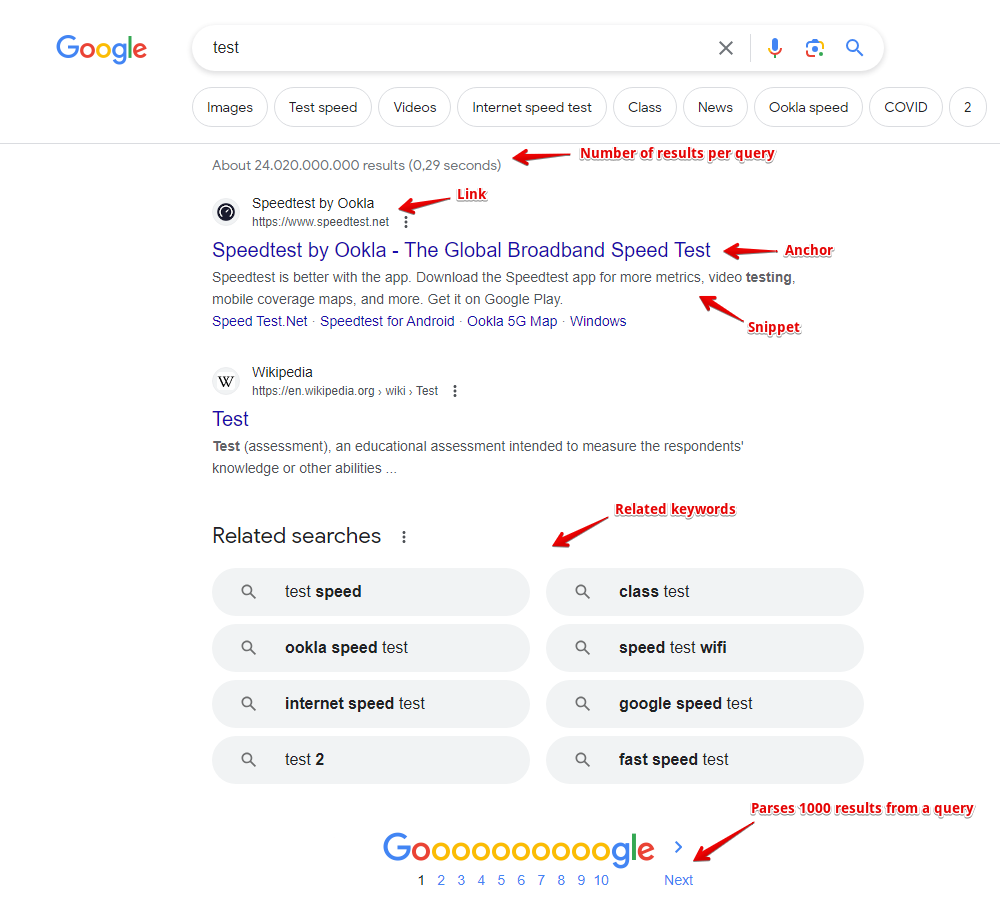
- Links, anchors, and snippets from search results, as well as the date from the snippet (if available)
- Information about flags for each result is also collected; currently supported flags include: Date, AMP, Image Preview, Video, Rich snippet, Featured snippet
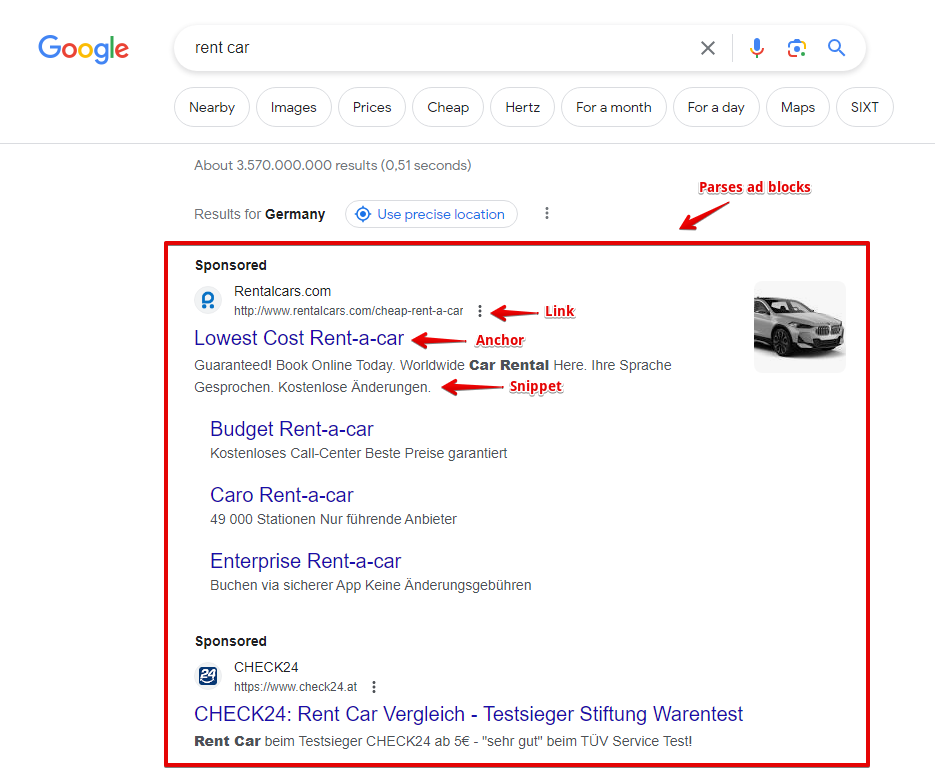
- Presence and content of advertising blocks, as well as their position on the page
- Number of results for the query (competition)
- List of related keywords
- Presence of additional blocks on the page: product carousel, videos, etc.
- The parser also collects such additional data:
- Presence of a typo in the query and the corrected query
- Geo-location determined by Google
- Presence of AMP pages
- People also ask list: questions, answers, source links, their anchors, and media links (enabled by a separate Parse People also ask option)
- AI answer (AI overview), its type, and list of sources
Capabilities
The Google search engine parser has many features and settings:
- support for all Google search operators (site:, inurl:, etc.)
- specifying result size (10, 20, 30, 50, or 100 results) and specifying the number of pages (from 1 to 10); at maximum settings, Google provides from 300 to 500 results per query, and thanks to query multiplication, A-Parser easily bypasses this limitation
- ability to automatically follow related keywords
- specifying the language and country of search results, the ability to choose a local Google domain, as well as the interface language of the search results
- ability to specify geo-location, which allows for accurate local search results for any place on the globe
- choice between desktop or mobile display
- ability to choose the type of search results; besides the main organic results, the Google parser can collect news, books, or video results
- if necessary, automatic ReCaptcha2 recognition can be connected via recognition services or through XEvil/CapMonster
- supports specifying the time of search results (for all time or for a specific interval from 24 hours to a year)
- ability to disable the Google filter for hiding similar results (filter=)
- ability to specify whether to parse search results if Google reports that nothing was found for the specified query and offers results for a similar query
- ability to set the number of People also ask items that the parser should collect by clicking through each question in depth
- ability to collect tags
The following parsers work based on the Google parser:
 SE::Google::Position - determining the positions of any sites in search results for a list of queries
 SE::Google::Compromised - checks domains for cleanliness from Google's perspective; can identify hacked and phishing sites
 SE::Google::TrustCheck - checks Google's Trust in a website
Use cases
- Collecting link databases - for XRumer, AllSubmitter, GSA Ranker, etc.
- Full SERP dump, including links, anchors, snippets, ad blocks, and other information, allows for deep analysis for SEO specialists and marketers
- Assessing competition for keywords
- Assessing competition in PPC (advertising) search results
- Searching for backlinks and site mentions
- Checking site indexing
- Searching for vulnerable sites
- Any other cases involving obtaining search results for an unlimited number of queries
Queries
Search phrases should be specified as queries, exactly as if they were entered directly into the Google search form, for example:
car purchase
windows in london
site:https://lenta.ru
inurl:guestbook
Query substitutions
You can use built-in macros for query multiplication; for example, if we want to get a very large database of forums, we specify several main queries in different languages:
forum
forum
foro
论坛
In the query format, we specify character iteration from a to zzzz; this method allows for maximum rotation of search results and obtaining many new unique results:
$query {az:a:zzzz}
This macro will create 475254 additional queries for each original search query, which in total will give 4 x 475254 = 1901016 search queries—an impressive figure, but not a problem for A-Parser. At a speed of 2000 queries per minute, such a task will be processed in just 16 hours.
Using operators
You can use search operators in the query format, so they will be automatically added to each query from your list:
inurl:$query
Output results examples
A-Parser supports flexible result formatting thanks to the built-in Template Toolkit templating engine, which allows it to output results in arbitrary forms, as well as in structured formats like CSV or JSON.
Exporting a list of links
Result format:
$serp.format('$link\n')
Example result:
https://www.weforum.org/open-forum/
https://www.weforum.org/about/world-economic-forum/
https://www.merriam-webster.com/dictionary/forum
https://en.wikipedia.org/wiki/Forum
https://dictionary.cambridge.org/dictionary/english/forum
https://www.collinsdictionary.com/dictionary/english/forum
https://www.linkedin.com/company/world-economic-forum
https://docs.moodle.org/en/Forum_activity
https://wordpress.org/support/forums/
https://www.facebook.com/worldeconomicforum/
...
Links + anchors + snippets with position output
Result format:
[% FOREACH item IN serp; loop.count _ ' - ' _ item.link _ ' - ' _ item.anchor _ ' - ' _ item.snippet _ "\n"; END %]
Example result:
1 - https://ru.wikipedia.org/wiki/%D0%A4%D0%BE%D1%80%D1%83%D0%BC - Forum — Wikipedia - <em>Fórum</em> (lat. forum — arch. threshold of a tomb; a platform in a press for grapes to be processed; market square, city market; ...
2 - https://ru.wikipedia.org/wiki/%D0%A4%D0%BE%D1%80%D1%83%D0%BC_(%D0%BC%D0%B5%D1%80%D0%BE%D0%BF%D1%80%D0%B8%D1%8F%D1%82%D0%B8%D0%B5) - Forum (event) — Wikipedia - <em>Forum</em> — an event held to identify or solve some<wbr>sufficiently global problems. This concept is found in ...
3 - https://support.google.com/googleplay/community?hl=ru - Welcome to the community help forum ... - Welcome to the help <em>forum</em> of the Google Play community. Featured posts. View all interesting posts · Need help with a game?
4 - https://support.google.com/mail/community?hl=en - Gmail Community - Google Support - Welcome to the Gmail Help Community · Featured posts · Categories.
5 - https://www.weforum.org/ - The World Economic Forum - The World Economic Forum is an independent international organization committed to improving the state of the world by engaging business, political, academic ...
6 - https://www.kunena.org/ - Home - Kunena - To Speak! Next Generation Forum ... - Kunena! - To Speak! Next Generation Forum Component for Joomla.
7 - https://forum.adguard.com/index.php - AdGuard Forum - <em>Forum</em> for beta testers. Post bug reports for beta versions here. Threads: 355. Messages: 11.6K. Sub-forums: Comments on beta version releases ...
8 - https://www.sofiaforum.bg/ - Sofia Security Forum: Platform for discussion ... - Sofia <em>Forum</em> for Security / Sofia Security Forum.
9 - https://forum.keenetic.net/ - Forums - Keenetic Community - Keenetic fan club. A place to meet software developers, get the latest updates, and share experience.
10 - https://forum.euroaion.com/ - Perfect quality European private server of Aion - EuroAion.com - Perfect quality European private server of Aion!
...
Outputting links, anchors, and snippets to a CSV table
The built-in utility $tools.CSVLine allows you to create correct tabular documents ready for import into Excel or Google Sheets.
General result format:
[% FOREACH i IN p1.serp; tools.CSVline(i.link, i.anchor, i.snippet); END %]
File name:
$datefile.format().csv
Initial text:
Link,Anchor,Snippet
Example result:
Link,Anchor,Snippet
https://ru.wikipedia.org/wiki/%D0%A4%D0%BE%D1%80%D1%83%D0%BC,"Forum — Wikipedia",
https://en.wikipedia.org/wiki/Forum,"Forum - Wikipedia","<em>Forum</em> (plural forums or fora) may refer to: Contents. 1 Common uses; 2 Places. 2.1 Natural features; 2.2 Populated places. 3 Arts and entertainment; 4 Media."
https://www.weforum.org/,"The World Economic Forum","The World Economic <em>Forum</em> is an independent international organization committed to improving the state of the world by engaging business, political, academic ..."
https://support.google.com/webmasters/community?hl=ru,"Welcome to the community help forum ...","Welcome to the help <em>forum</em> of the Google Search Central community. Featured posts. View all interesting posts · Answers to ..."
https://support.google.com/chrome/community?hl=ru,"Welcome to the community help forum ...","Welcome to the help <em>forum</em> of the Google Chrome community. Featured ..."
...
In the General result format, the Template Toolkit templating engine is used to output the $serp array in a FOREACH loop.
In the result file name, you just need to change the file extension to csv.
To make the "Initial text" option available in the Task Editor, you need to activate "More options". In "Initial text", write the column names separated by commas and make the second line empty.
Outputting advertising blocks
Result format:
$ads.format('$link - $anchor - $snippet\n')
Example result:
https://www.rentalcars.com/ - Rent a Car Worldwide - Best Prices Online Guaranteed - Secure Your <em>Car Hire</em> Today. The Best Price Guaranteed. Book at Over 53,000 Locations. Search, Compare and Save Using the World's Biggest Online <em>Car Rental</em> Service.
https://www.kayak.com/United-States-Car-Rentals.253.crc.html - United States from $9/day - Search for Rental Cars on Kayak - Find and Compare Great <em>Car</em> Deals in USA. Book with Confidence on KAYAK®!
https://www.discovercars.com/ - -70% Worldwide Car Rental - Rent Your Car in 5 Minutes - <em>Car rental</em> prices are rising, but if you act fast, you can get a good deal. Don’t stress! We...
https://www.economybookings.com/ - Rent a Car for Summer Holidays - Car Rentals for the Best Price - Theft protection and Third Party liability part of a great deal. Free Mileage included.
...
Saving related keywords
Result format:
$related.format('$key\n')
Example result:
test <b>speed</b>
<b>net speed</b> test
<b>google speed</b> test
<b>fast speed</b> test
<b>ping</b> test
<b>xfinity speed</b> test
<b>speed</b> test <b>mobile</b>
test <b>my</b>
...
To automatically remove HTML tags in the result, you need to use the Results Builder, select the $related array, and apply Remove HTML tags.
Keyword competition
Result format:
$query - $totalcount\n
Example result:
speed test mobile - 1080000000
test score - 4020000000
net speed test - 1210000000
fast speed test - 2150000000
speed test - 2500000000
test match - 4160000000
ping test - 425000000
google speed test - 1870000000
Identifying misspelled keywords
Result format:
$query - $misspell\n
Example result:
spead test - 1
test match - 0
speed test - 0
temst match - 1
Checking link indexing
Query format:
site:$query
Result format:
$query.orig - $totalcount\n
Example result:
https://a-parser.com/pages/buy - 2
https://a-parser.com/wiki/parsers - 4
https://a-parser.com/resources - 883
https://trjkjfkdf.bg.ky - none
https://a-parser.com/forum - 371
To check link indexing, substitute the corresponding operator into the Query Format: site:.
The result format is output as "original url - number of pages in index".
As a result, we get the address of the pages and their count in the search engine index.
If the page is missing, the result will be: none.
Saving in SQL format
Result format:
[% FOREACH serp; "INSERT INTO serp VALUES('" _ query _ "', '"; link _ "', '"; anchor _ "')\n"; END %]
Example result:
INSERT INTO serp VALUES('test', 'https://www.speedtest.net/', 'Speedtest by Ookla - The Global Broadband Speed Test')
INSERT INTO serp VALUES('test', 'https://fast.com/', 'Fast.com: Internet Speed Test')
INSERT INTO serp VALUES('test', 'https://www.business-standard.com/article/sports/ind-vs-aus-live-score-4th-day-5-india-vs-australia-live-cricket-score-online-brisbane-weather-121011900103_1.html', 'IND vs AUS 4th Test highlights: India creates history, wins ...')
INSERT INTO serp VALUES('test', 'https://www.test.com/', 'Find online tests, practice test, and test creation software | Test ...')
INSERT INTO serp VALUES('test', 'https://www.espncricinfo.com/series/india-in-australia-2020-21-1223867/australia-vs-india-4th-test-1223872/match-report-4', 'Recent Match Report - Australia vs India 4th Test 2020 ...')
INSERT INTO serp VALUES('test', 'https://www.icc-cricket.com/world-test-championship/standings', 'World Test Championship (2019-2021) Points Table - Live ...')
INSERT INTO serp VALUES('test', 'https://www.icc-cricket.com/rankings/mens/team-rankings/test', 'ICC Test Match Team Rankings International Cricket Council')
INSERT INTO serp VALUES('test', 'https://projectstream.google.com/speedtest', 'Speedtest - Google')
INSERT INTO serp VALUES('test', 'https://www.google.com/search?hl=en&q=Software+Testing&stick=H4sIAAAAAAAAAONgecQ4g5Fb4OWPe8JSfYyT1py8xtjOyMUVnJFf7ppXkllSKaTCxQZlSXHxSHHo5-obmJul5GkwSHFxwXlKwUbuuy5NO8fmKMgABGJm_g5SmlpCXOyexT75yYk5ggpvuB68mfLeXkuYiyMksSI_Lz-3UtCBgcHhx__39kqcnEBND7aoddhrMTTtW3GIjYWDUYCBZxGrQHB-Wkl5YlGqQkhqcUlmXjoAS5B1P7EAAAA&sa=X&ved=2ahUKEwiW-rnmlajuAhWpAGMBHR-JAv4Q6RMwHXoECDQQBQ', '')
...
Dumping results to JSON
General output format:
[% IF notFirst;
  ",\n";
ELSE;
  notFirst = 1;
END;

obj = {};
obj.totalcount = p1.totalcount;
obj.links = [];

FOREACH item IN p1.serp;
    obj.links.push(item.link);
END;

obj.json %]
Initial text:
[
Final text:
]
Example result:
[{"totalcount":"6450000000","links":["https://www.speedtest.net/","https://fast.com/","https://projectstream.google.com/speedtest","https://www.test.com/","https://www.speakeasy.net/speedtest/","https://www.att.com/support/speedtest/","https://speedtest.xfinity.com/","https://developers.google.com/speed/pagespeed/insights/","https://www.espncricinfo.com/series/india-in-australia-2020-21-1223867/australia-vs-india-4th-test-1223872/match-report-4","https://nasional.tempo.co/read/1424570/listyo-sigit-temui-ahy-menjelang-fit-and-profer-test-calon-kapolri","https://www.google.com/search?hl=en&q=Test+Assessment&stick=H4sIAAAAAAAAAONgecRYyC3w8sc9YamMSWtOXmNM4uIKzsgvd80rySypFNLiYoOyFLj4pbj10_UNjQyzKsvyzDQYpHi5kAWUNIxkdl2ado5NTJABCMTKAhyUODmBLIVA-wX2WgxN-1YcYmPhYBRg4FnEyh-SWlyi4FhcnFpcnJuaVwIAwEAP9ogAAAA&sa=X&ved=2ahUKEwj17MzXmajuAhW8CWMBHRlzBP4Q6RMwDHoECBEQBQ"]}]
To make the "Initial text" and "End text" options available in the Task Editor, you need to activate "More options".
Results processing
A-Parser allows you to process results directly during parsing; in this section, we have listed the most popular cases for the Google parser.
Link deduplication
Add deduplication and select $serp.$i.link - Link from the dropdown list.
Download example
How to import example into A-Parser
eJx9VE1v2zAM/SsFkcMGBEFy2MW3NFiKDVnTNekpyEGNaUOLLGmSnDUw/N9H+ktO
N/Rmko+PfCTlCoLwZ//k0GPwkBwqsM03JLD7miQPxuQK7zZSn/3di5a/S4QpWOE8
OoYfRigKpJiJUgWYVhCuFonEXNA5mXJQpmRbZ96uDoOT6Ml3Eapk2GI+n0P9QZrI
8WRKHWLO4gO44n4tOk4bZcxHKWUvhuRyy8kBSJMlByfDcdoh9i3cU8c6h977oMyr
UJAEV2J9PPYsfm1cIXh4E7uYdZMcgjtxwb2hYCZVrOzXZD2KgqtMUhGQo7OsIfr0
eRbemEGkqQzSaKHaCjz7WLVbTALaEJY+ebprZwpyBWwI2HntuzvApLGjyp9tDiSZ
UB6n4KnVtaBG0vcRGdCJYNzWcj/kr8DopVIbvKCKsIb/vpQqpUNZZpT0rUv8P2T7
D0c9yBuXokX/cdTDwNJY99sfMSs1G5OT8vS1WWYhA9l+1VxPAnNynhHtMLNHnllh
HA5lOuauOr0Ni5qvKq5saaPrRsbNWm6dJ6MzmW+7S+2Rpd7TA9zqlSmsQtalS6Vo
LR6f43ksfbcGNmKD75NXTQmW3r9DCMYo/33XtmqdpPP7wg0WNMlx1Y7yJJR6ed6M
IxBPqjknz7QnutPc0AWRivo4/BGG/0g1/i8kVU1r+eWfWhBrYAj5aBieZs6P+S/t
6pW4
See also: Results deduplication
Link deduplication by domain
Add deduplication and select $serp.$i.link - Link from the dropdown list. Select deduplication type: Domain.
Download example
How to import example into A-Parser
eJx9VE2P2jAQ/SvI4tBKaAWHXnJj6bJqRZftwp4QB0MmyMXxuLZDF0X89844IQ7b
am+ZmffefDq1CNIf/bMDD8GLbFMLG79FJlYPWfaIeNAwWChz9INXo35XMNidB1+x
lMqIkbDSeXBM3PTwFMihkJUOYlSLcLZAcngC51TOQZWTbR2+nR0Ep8CT7yR1xbDJ
eDwWlw9o8gB7rExInMkHcM2VW3BM6zHGPUoV26IgNc4lZxtBPVlyMFlsRy1i3cDz
a++N91HjTmqRBVfBZbu9qvg5ulLyGId2ctfOtAuu5AnWSMFC6ZTZz8l6kiVnGeYy
AEfviij06fNdeGMFmecqKDRSNxl49ilrsyLiGyQsffJ05w5LcgWIAuw8X6vbiGG0
U5c/G47ICqk9jISnUueSCsnfR1QAJwO6peV6yF8LNFOtF3ACnWBR/75SOqdDmRZE
+tYS/w9Z/qNx6drrp6JF/3FUQ6cSrfvlj8TKcYEHXtkuLrNUgWw/i9eTiTE5jwC2
m9kTz6xEB12aVrnNTq/EguGrSiub2uS6aeNmLbfOPZpCHZbtpV6RlVnTU1yaGZZW
A/dlKq1pLR5e0nlMfbsGNlKB78mzmIJbv75DERC1/75qSrVO0fl94QJLmmQ/ayu5
l1q/viz6EZFOKp6TZ9k93ekB6YKoi8u2+yN0f5S6/1/I6gut5Zd/bkDcA0PIR8Pw
NHN+zH8BRVyZDA==
See also: Results deduplication
Extracting domains
Add Results Builder and select source: $p1.serp.$i.link - Link from the dropdown list. Select type: Extract Domain.
Download example
How to import example into A-Parser
eJx9VE1v2zAM/SuFkMMGBIFz2MW3NGuGDVnTNe0p6EGzaUOLLGqSnCUw8t9HKort
dkNv5scj+cgndyJIv/cPDjwEL/JdJ2z8FrnY3uX5F8Raw83dMThZhJvP2EhlxFRY
6Tw4BuxGeRQooZKtDmLaiXCyQGXwAM6pkoOqJNs6PJ4cBKfAk+8gdctp8yzLxPkd
mKyhwNaEATN/J10rs/cWHMNGiOz88jIVxJBm9Ct0jWSmEzufJdp9cCsP8IQUrFQk
dsWQdS8bbjkpZQCOzqpY6MPHWThyBVmWKig0Ul868JqGrs9G/Y6MDVIuffIiVg4b
cgWIBdh5uk63E5NoCyrRRuyPC0bkldQepsLTqCtJg5RvIyqAkwHdxvI85O8EmoXW
aziAHtJi/dtW6ZJuuqgI9DUB/5+y+afGuac3bkU3+eNohr5KtG433wdUiWusiXn5
k3hr1ahAtl/GQ+ciI+cewPY7u+edNeigb5Mqp+4kZAuGBTCcbGEH1ysar84ycnbC
Y+sK6rfLpjtBQrdxOLMXrJ6kOLi8if5JSOfkifwpPWBSoTgTpkBTqXqTRHrt3Jon
en0bs8TGauA9mVZrOrOHx0FuC5/OysZA+C14GVvwKq9PkGZA7b9tL9StUzTSJybc
0GXGXVPJQmr9/LgeR8Qg0ShPz2UL0n2NpEhiweTSz6D/iXTjX0LenenMv/zDJYk5
cAr5aBmebsjv+C86oZM/
See also: Results Builder
Removing tags from anchors and snippets
Add Results Builder and select source: $p1.serp.$i.anchor - Anchor from the dropdown list. Select type: Remove HTML tags.
Add Results Builder again and select source: $p1.serp.$i.snippet - Snippet from the dropdown list. Select type: Remove HTML tags.
Download example
How to import example into A-Parser
eJyVVD1v2zAQ/SsC4aEFBEMeumhzjLpp4cSp7UxGBlY6qawpkiUpN4bg/947mpaU
NAjQjby79+7rkR3z3B3cgwUH3rF83zETzixn2895/kXrWkKygUYfIbnd3a0Sz2uX
VFY3yVwVP7V1CVdlslXCGKJImeHWgSWy/YgDHSVUvJWepR3zJwOYAkmtFSU5RYl3
Y/XzyYK3AojpyGVLYbMsy9j5HRivodCt8gNm9k64FOrgDFiCjRDZ+ekpZdg91uiW
2jacpjAxs2kcSe/c8iPsNDorERq7YvB2zxtKOSm5B/JOq0D04ePUPxMDL0vhhVZc
XjLQmIasj0r8Dh0rjbF4pEEscdZo8hAIyHi6Vrdnk3BnSNEG7PcLhuUVlw5S5rDU
JcdCytce4cFyr+3aUD1o75hWcylXcAQ5hAX+m1bIEnc6rxD0NQLfDln/w3Hu2xun
wp38sVhDzxJuN+u7AVXqla6x8/IH9i1FIzze3SIsOmcZGg8App/ZPc2s0Rb6NJE5
ZkeRG1AkgGFlczOYXrTxYi0jY8ecbm2B+fZZumcodENbDS+BkX6i5mx4Mbe+keS2
lp/QGKM9SSdCSKZvMbrLe/ovyivmjJhCq0rU66j8azut2uFzX6uFbowEGr5qpUTt
ONgMGp67qBW6DFN8DV6EFLSf67vGMrR037aXeRorsKpPaSx8nDVSFlzKx81q7GGD
7oPmHdEW+JhqjTLHLqi5+MP0v1Y3/mfy7oza+eUeLkHUA4WgDYfhUBj0OfwFH/O5
UQ==
You can add the Results Builder as many times as you need.
See also: Results Builder
Filtering links by inclusion
Add a filter and select $serp.$i.link - Link from the dropdown list. Select type: Contains string. Next, you need to enter the filtering criteria in the String field.
Download example
How to import example into A-Parser
eJx9VE1v2kAQ/StoxSGVEIJDL74RVKpWNKSBnBCHDR5bG9Y72901DbL83zuzNrZJ
qtw8H+/Nm491JYL0J//owEPwItlXwsZvkYjttyT5jphrGK2UDuCUyUcvl5EP8UuZ
kVbmJCbCSufBMXo/AFEghUyWOohJJcLFAnHiGZxTKQdVSrZ1+HZxQIzgyXeWuuS0
+Ww2E/UnMJnDEUsTesz8k3TW6S04hg0QswEkix1SkLpnycleUE+WHLHJw6TN2DXp
RzRBKjOQPD1iQSbaoNCQ7cF4UR8OV0a/QldInuvYzqftkLvgVp5hh40O6N00d3iQ
BfOPUxmAo9MsEt19mYY3ZpBpqrim1E0F3kNf9dmoP1GfQcqlT570ypHWRASIBOy8
XNXtxTja3HEZsb8bjEgyqT1MhCepK0lC0vcRRfORAd0mzoD8lUCz0HoNZ9B9WuS/
L5VO6WgWGYF+tMD/p2w+cNRde8NStPS/jjR0LNG63/zqUSmuMafO05e42EIFsv0y
XlIiZuQ8AdhuZg88swIddGVa5rY6PRsLhi+sX9nC9q6bNm7Wcuuka8pUvmmv9ppZ
mh29zY1ZYmE1cF+m1JrW4uGpP4+Fb9fARi/wPXgZS3Dr1zcpAqL2P7eNVOsUnd9X
FljQJIdVW8qj1Pr5aT2MiP6k4jl5pj3SneZIF0Rd1Ifu79D9YqrhPyKpalrLq39s
krgHTiEfDcPHlzSv/wHtZp3U
See also: Results filters
Possible settings
Regional settings
Google domain - the Google domain used, default is google.com
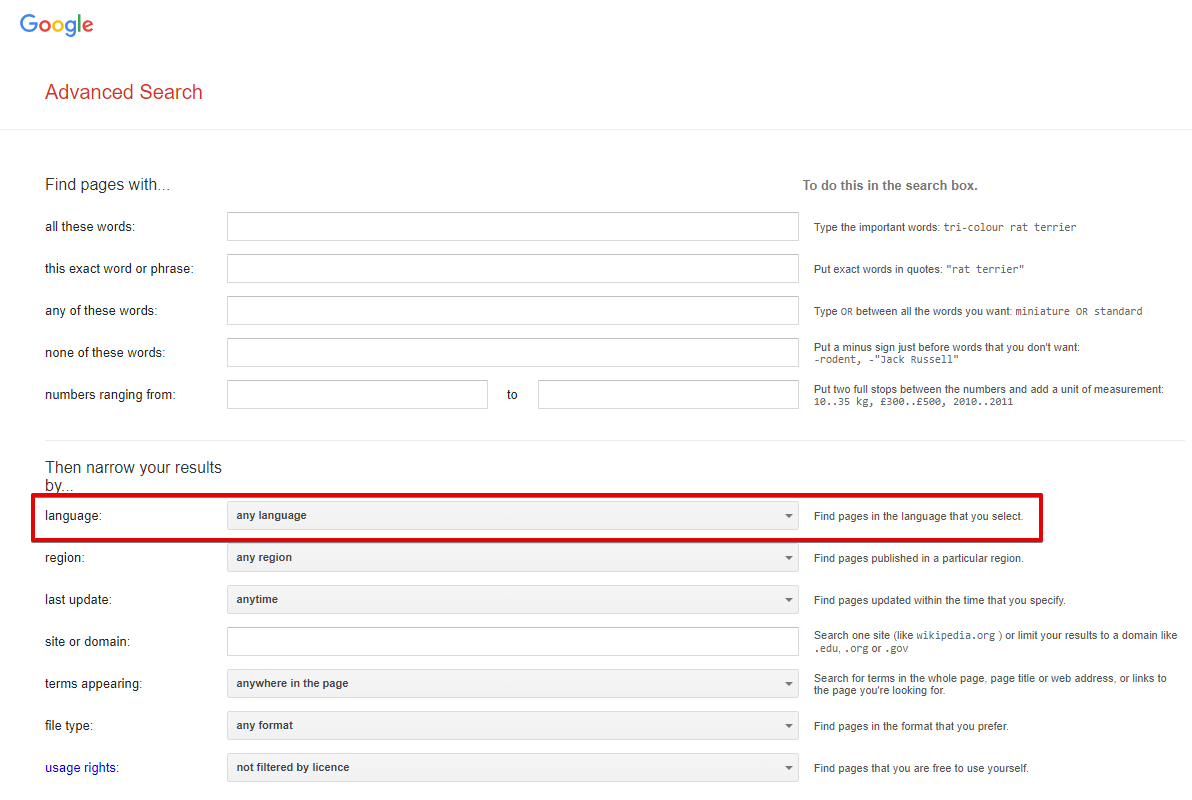
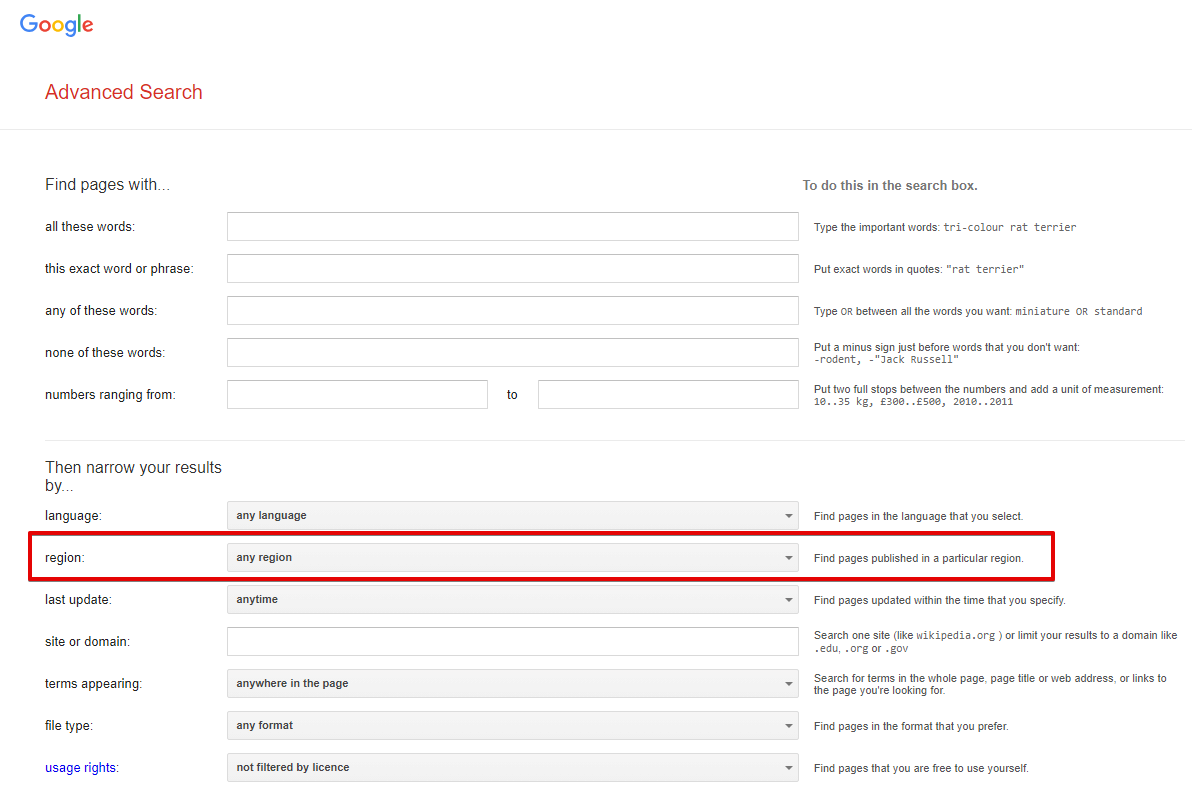
Results language - search for pages in the selected language; in the browser, this corresponds to the option Advanced Search -> Additional settings -> Search in (url parameter lr). By default not set, which means automatic detection based on IP
Spoiler: Screenshot
Interface language - the language of Google products; in the browser, this is Languages -> Interface language (url parameter hl). English is selected by default
Spoiler: Screenshot
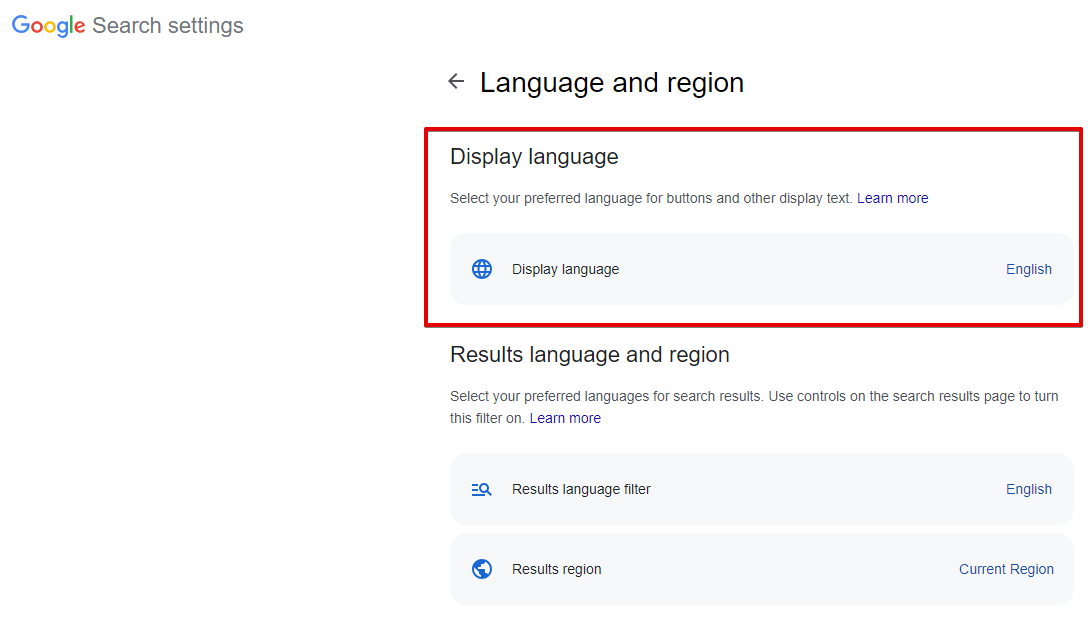
Search from country - selection of the search region; in the browser, this is Languages -> Search region (url parameter gl). By default not set, which means automatic detection based on IP
Spoiler: Screenshot
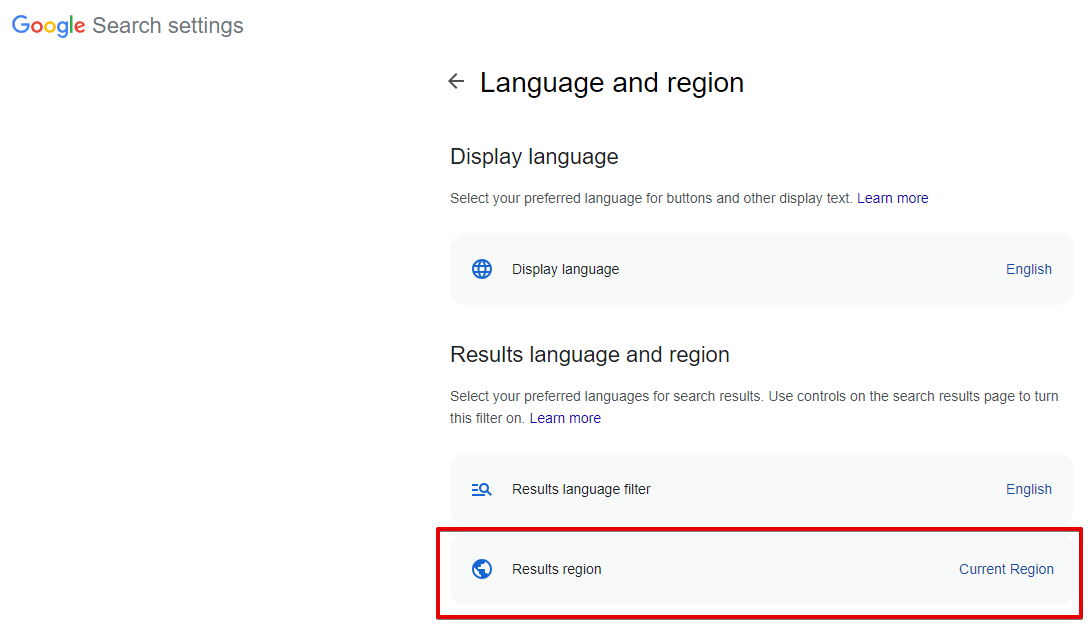
Narrow results by region - search for pages created in a specific country; in the browser, this is Advanced Search -> Additional settings -> Country (url parameter cr). By default not set, which means this option is disabled
Spoiler: Screenshot
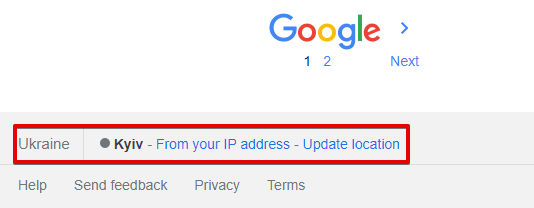
Location (city) - exact search location; in the browser, it is determined automatically based on the user's location. By default not set, which means automatic detection based on the request IP
Spoiler: Screenshot
All regional parameters affect the search results to some extent.
| Parameter name | Default value | Description |
|---|---|---|
| Device | Desktop | Choice of desktop or mobile search results: Desktop / Mobile |
| Pages count | 5 | Number of pages to parse (from 1 to 100) |
| Parse pages links from first page | ☑ | Collects links to all available pagination pages from the first search results page. Only applicable when Device is set to Desktop; does not work for mobile search results |
| Serp type | Default (All) | Determines whether to parse from the main page, by news, or blogs (Books, News, Videos) |
| Hide omitted results | ☑ | Determines whether to hide omitted results (parameter filter=) |
| Serp time | Anytime | SERP time (time-dependent search, parameter tbs=, possible values: Past 1 hour, Past 24 hours, Past week, Past month, Past year) |
| Parse not found | ☑ | Determines whether to parse search results if Google reported that nothing was found for the specified query and offered results for another query |
| Disable autocorrect | ☐ | Allows disabling Google's auto-correction and parsing results exactly for the specified query |
| Exact match | ☐ | Corresponds to the "Verbatim" option in the search engine. Warning, this option overwrites the Serp time parameter value (similar to how these options work in a browser). |
| Safe search | Blur | Ability to enable "SafeSearch" |
| Google domain | www.google.com | Google domain for parsing; all domains are supported (www.google.ac, www.google.com.af, www.google.co.ck, etc.) |
| Narrow results by region | Any region | Ability to narrow search to a specific country |
| Results language | Auto (Based on IP) | Choice of results language (parameter lr=) |
| Search from country | Auto (Based on IP) | Choice of country from which the search is performed (geo-dependent search, parameter gl=) |
| Interface language | English | Ability to choose the Google interface language for maximum identity of results in the parser and in the browser |
| Location (city) | Search by city, region. You can specify cities in the form novosibirsk, russia; a full list of locations can be found in Geotargets (copy - use the value from the Canonical Name column). It is also necessary to set the correct Google domain | |
| Util::ReCaptcha2 preset | default | Determines whether to use  Util::ReCaptcha2 to bypass recaptchas Util::ReCaptcha2 to bypass recaptchas |
| Util::AntiGate preset | default | Determines whether to use  Util::AntiGate to bypass graphic captchas Util::AntiGate to bypass graphic captchas |
| ReCaptcha2 retries | 3 | Number of attempts to send a recaptcha response the specified number of times without changing the proxy |
| ReCaptcha2 pass proxy | ☐ | Allows passing proxies (used in the request to Google) and cookies (received in the response from Google) to the ReCaptcha recognition service |
| Use sessions | ☑ | Saves good sessions, which allows for even faster parsing with fewer errors. |
| Don't take session | ☐ | Ability not to use saved good sessions |
| Additional headers | Allows specifying any custom headers | |
| PAA questions count | 0 | Maximum number of questions and answers (People also ask) for each query that the parser should collect |
| Empty totalcount is error | ☐ | When this parameter is enabled, the query will be considered unsuccessful if there is no value for $totalcount, and accordingly, repeated attempts will be made |
| Count of retries when result is empty | 10 | Number of retries for a query if the results page is completely empty |
| Redirect browser max pages | 10 | Number of browser pages used to bypass protection in the form of checking for enabled JavaScript |
| Single redirect browser for task | ☑ | If multiple Google parsers are specified in a task — use only one browser for all subtasks; the maximum number of pages and other settings are taken from the first Google parser in the task |